Android GridLayout使用案例詳解
GridLayout是Android4.0引入的網格布局,使用它可以減少布局嵌套。也算是常用,但一直沒仔細看過,今天研究一下
二、常用屬性介紹GridLayout 使用屬性
屬性 作用 android:columnCount 最大列數 android:rowCount 最大行數 android:orientation GridLayout中子元素的布局方向 android:alignmentMode alignBounds:對齊子視圖邊界 alignMargins :對齊子視距內容,默認值 android:columnOrderPreserved 使列邊界顯示的順序和列索引的順序相同,默認是true android:rowOrderPreserved 使行邊界顯示的順序和行索引的順序相同,默認是true android:useDefaultMargins 沒有指定視圖的布局參數時使用默認的邊距,默認值是falseitem屬性
屬性 作用 android:layout_column 指定該單元格在第幾列顯示 android:layout_row 指定該單元格在第幾行顯示 android:layout_columnSpan 指定該單元格占據的列數 android:layout_rowSpan 指定該單元格占據的行數 android:layout_gravity 指定該單元格在容器中的位置 android:layout_columnWeight (API21加入)列權重 android:layout_rowWeight (API21加入) 行權重 android:layout_gravity 作用 center 不改變元素的大小,僅居中 center_horizontal 不改變大小,水平居中 center_vertical 不改變大小,垂直居中 top 不改變大小,置于頂部 left 不改變大小,置于左邊 bottom 不改變大小,置于底部 right 不改變大小,置于右邊 start 不改變大小,根據系統語言,置于開始位置 end 不改變大小,置于結尾 fill 拉伸元素控件,填滿其應該所占的格子 fill_vertical 僅垂直方向上拉伸填充 fill_horizontal 僅水平方向上拉伸填充 clip_vertical 垂直方向上裁剪元素,僅當元素大小超過格子的空間時 clip_horizontal 水平方向上裁剪元素,僅當元素大小超過格子的空間時注意
使用layout_columnSpan 、layout_rowSpan時要加上layout_gravity屬性,否則沒有效果;另外item在邊緣時寬高計算會出現錯誤,需要我們手動設置寬高,否則達不到想要的效果
三、平分問題GridLayout在API21時引入了android:layout_columnWeight和android:layout_rowWeight來解決平分問題
那么在API21以前的,想要平分的話:引用兼容包
compile ’com.android.support:gridlayout-v7:25.+’
注意:
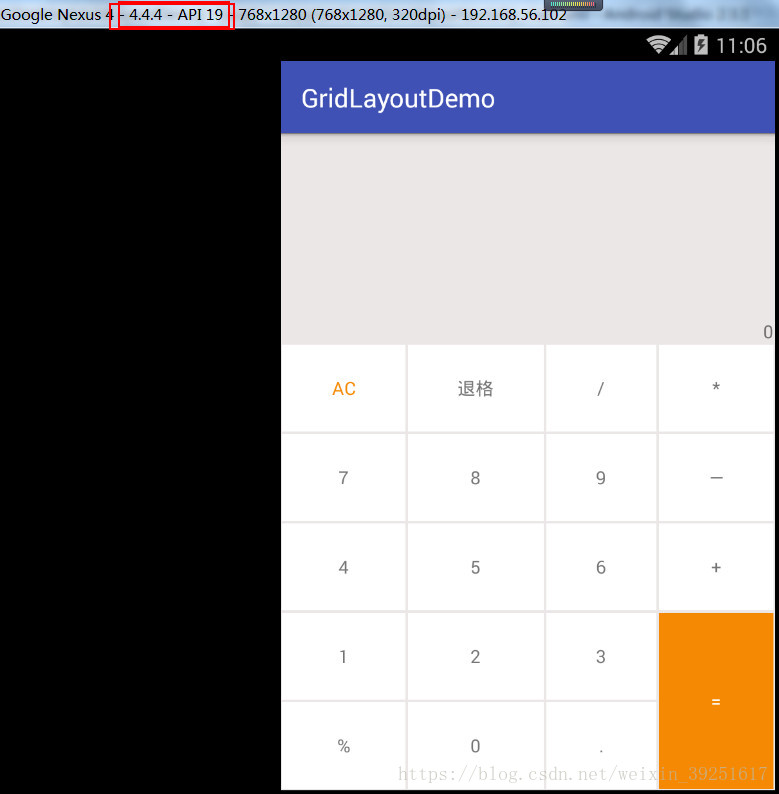
使用該控件,命名空間使用app 單獨設置app:layout_columnWeight時,這一列的所有item都設置為這個屬性,才能達到預期效果,否則這一列中設置了該屬性的item,都會被隱藏,顯示不出來 單獨設置app:layout_rowWeight時,沒有問題四、小米計算器效果<?xml version='1.0' encoding='utf-8'?><android.support.v7.widget.GridLayout xmlns:android='http://schemas.android.com/apk/res/android' xmlns:app='http://schemas.android.com/apk/res-auto' xmlns:tools='http://schemas.android.com/tools' android: android:layout_width='match_parent' android:layout_height='match_parent' android:background='#ece7e7' app:alignmentMode='alignBounds' app:columnCount='4' app:orientation='horizontal' app:rowCount='5' app:useDefaultMargins='false' tools:context='com.strivestay.gridlayoutdemo.MainActivity'> <!-- 如果不使用 app:layout_gravity='fill',則實際下面這個textview的寬度只是wrap_content,實現不了想要的right|bottom效果;或者,用app:layout_columnWeight='1',效果等同,填充滿 --> <TextViewandroid:gravity='right|bottom'android:text='0'app:layout_columnSpan='4'app:layout_rowWeight='3'app:layout_columnWeight='1'/> <TextViewandroid:layout_margin='1dp'android:background='#ffffff'android:gravity='center'android:text='AC'android:textColor='#f68904'app:layout_columnWeight='1'app:layout_rowWeight='1'/> <TextViewandroid:layout_margin='1dp'android:background='#ffffff'android:gravity='center'android:text='退格'app:layout_columnWeight='1'app:layout_rowWeight='1'/> <TextViewandroid:layout_margin='1dp'android:background='#ffffff'android:gravity='center'android:text='/'app:layout_columnWeight='1'app:layout_rowWeight='1'/> <TextViewandroid:layout_margin='1dp'android:background='#ffffff'android:gravity='center'android:text='*'app:layout_columnWeight='1'app:layout_rowWeight='1'/> <TextViewandroid:layout_margin='1dp'android:background='#ffffff'android:gravity='center'android:text='7'app:layout_columnWeight='1'app:layout_rowWeight='1'/> <TextViewandroid:layout_margin='1dp'android:background='#ffffff'android:gravity='center'android:text='8'app:layout_columnWeight='1'app:layout_rowWeight='1'/> <TextViewandroid:layout_margin='1dp'android:background='#ffffff'android:gravity='center'android:text='9'app:layout_columnWeight='1'app:layout_rowWeight='1'/> <TextViewandroid:layout_margin='1dp'android:background='#ffffff'android:gravity='center'android:text='—'app:layout_columnWeight='1'app:layout_rowWeight='1'/> <TextViewandroid:layout_margin='1dp'android:background='#ffffff'android:gravity='center'android:text='4'app:layout_columnWeight='1'app:layout_rowWeight='1'/> <TextViewandroid:layout_margin='1dp'android:background='#ffffff'android:gravity='center'android:text='5'app:layout_columnWeight='1'app:layout_rowWeight='1'/> <TextViewandroid:layout_margin='1dp'android:background='#ffffff'android:gravity='center'android:text='6'app:layout_columnWeight='1'app:layout_rowWeight='1'/> <TextViewandroid:layout_margin='1dp'android:background='#ffffff'android:gravity='center'android:text='+'app:layout_columnWeight='1'app:layout_rowWeight='1'/> <TextViewandroid:layout_margin='1dp'android:background='#ffffff'android:gravity='center'android:text='1'app:layout_columnWeight='1'app:layout_rowWeight='1'/> <TextViewandroid:layout_margin='1dp'android:background='#ffffff'android:gravity='center'android:text='2'app:layout_columnWeight='1'app:layout_rowWeight='1'/> <TextViewandroid:layout_margin='1dp'android:background='#ffffff'android:gravity='center'android:text='3'app:layout_columnWeight='1'app:layout_rowWeight='1'/> <TextViewandroid:layout_margin='1dp'android:background='#f68904'android:gravity='center'android:text='='android:textColor='#ffffff'app:layout_columnWeight='1'app:layout_rowSpan='2'app:layout_rowWeight='1'/> <TextViewandroid:layout_margin='1dp'android:background='#ffffff'android:gravity='center'android:text='%'app:layout_columnWeight='1'app:layout_rowWeight='1'/> <TextViewandroid:layout_margin='1dp'android:background='#ffffff'android:gravity='center'android:text='0'app:layout_columnWeight='1'app:layout_rowWeight='1'/> <TextViewandroid:layout_margin='1dp'android:background='#ffffff'android:gravity='center'android:text='.'app:layout_columnWeight='1'app:layout_rowWeight='1'/></android.support.v7.widget.GridLayout>
效果: 4.4.4模擬器
1.xml引用GridLayout
<?xml version='1.0' encoding='utf-8'?><android.support.v7.widget.GridLayout xmlns:android='http://schemas.android.com/apk/res/android' xmlns:app='http://schemas.android.com/apk/res-auto' xmlns:tools='http://schemas.android.com/tools' android: android:layout_width='match_parent' android:layout_height='match_parent' android:background='#ece7e7' app:orientation='horizontal' app:useDefaultMargins='false' app:alignmentMode='alignBounds' tools:context='com.strivestay.gridlayoutdemo.MainActivity'></android.support.v7.widget.GridLayout>
2.動態添加
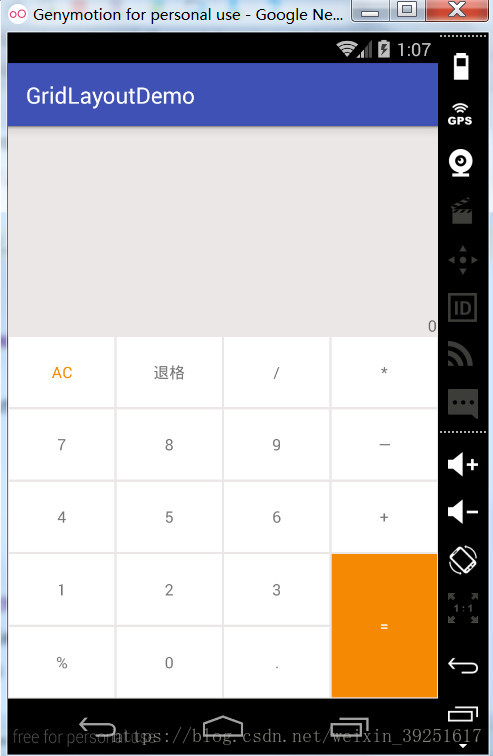
package com.strivestay.gridlayoutdemo;import android.graphics.Color;import android.os.Bundle;import android.support.v7.app.AppCompatActivity;import android.support.v7.widget.GridLayout;import android.view.Gravity;import android.widget.TextView;/** * GridLayout示例 * @author StriveStay * @date 2018/3/27 */public class MainActivity extends AppCompatActivity { private String[] mStrings = {'0','AC','退格','/','*','7','8','9','—','4','5','6','+','1','2','3','=','%','0','.'}; @Override protected void onCreate(Bundle savedInstanceState) {super.onCreate(savedInstanceState);// xml布局//setContentView(R.layout.activity_main);// 動態添加setContentView(R.layout.activity_main2);GridLayout gridLayout = (GridLayout) findViewById(R.id.grid_layout);// 6行 4列gridLayout.setColumnCount(4);gridLayout.setRowCount(6);for (int i = 0; i < mStrings.length; i++) { TextView textView = new TextView(this); GridLayout.LayoutParams params = new GridLayout.LayoutParams(); params.width =0; params.height =0; if(i == 0){// 設置行列下標, 所占行列 ,比重// 對應: layout_row , layout_rowSpan , layout_rowWeight// 如下代表: item坐標(0,0), 占 1 行,比重為 3 ; 占 4 列,比重為 1params.rowSpec = GridLayout.spec(0,1,3f);params.columnSpec = GridLayout.spec(0,4,1f);textView.setGravity(Gravity.BOTTOM|Gravity.RIGHT); }else{// 設置行列下標,和比重params.rowSpec = GridLayout.spec((i+3)/4,1f);params.columnSpec = GridLayout.spec((i+3)%4,1f);// 背景textView.setBackgroundColor(Color.WHITE);// 字體顏色if('AC'.equals(mStrings[i])){ textView.setTextColor(Color.parseColor('#f68904'));}if('='.equals(mStrings[i])){ textView.setBackgroundColor(Color.parseColor('#f68904')); textView.setTextColor(Color.WHITE); params.rowSpec = GridLayout.spec((i+3)/4,2,1f);}// 居中顯示textView.setGravity(Gravity.CENTER);// 設置邊距params.setMargins(2,2,2,2); } // 設置文字 textView.setText(mStrings[i]); // 添加item gridLayout.addView(textView,params);} }}
效果和用xml中直接布局一樣:
注意:GridLayout.spec(); 這個方法是一個重點,需要好好看一下,而且由于它有幾個重載方法,使用時也要注意。比如說下面兩個方法:
public static Spec spec(int start, int size) public static Spec spec(int start, float weight)
我剛開始就忽略了這點,本想用的是第二個帶有weight的方法,但是傳入參數時,沒有加上f,就調用了第一個方法,搞了半天才發現
所以,如果調用的是第二個方法,一定要注意float參數的表示方法,加個f,如:GridLayout.spec(0,1f);
到此這篇關于Android GridLayout使用案例詳解的文章就介紹到這了,更多相關Android GridLayout使用內容請搜索好吧啦網以前的文章或繼續瀏覽下面的相關文章希望大家以后多多支持好吧啦網!
相關文章:

 網公網安備
網公網安備