Springboot hibernate envers使用過(guò)程詳解
添加maven配置
<?xml version='1.0' encoding='UTF-8'?><project xmlns='http://maven.apache.org/POM/4.0.0' xmlns:xsi='http://www.w3.org/2001/XMLSchema-instance' xsi:schemaLocation='http://maven.apache.org/POM/4.0.0 https://maven.apache.org/xsd/maven-4.0.0.xsd'> <modelVersion>4.0.0</modelVersion> <parent> <groupId>org.springframework.boot</groupId> <artifactId>spring-boot-starter-parent</artifactId> <version>2.2.5.RELEASE</version> </parent> <artifactId>springboot-envers</artifactId> <name>springboot-envers</name> <dependencies> <dependency> <groupId>org.springframework.boot</groupId> <artifactId>spring-boot-starter-web</artifactId> </dependency> <dependency> <groupId>org.springframework.boot</groupId> <artifactId>spring-boot-starter-data-jpa</artifactId> </dependency> <dependency> <groupId>org.hibernate</groupId> <artifactId>hibernate-envers</artifactId> </dependency> <dependency> <groupId>com.h2database</groupId> <artifactId>h2</artifactId> </dependency> </dependencies></project>
使用User類(lèi)作為被審計(jì)的對(duì)象
@Entity@Table(name = 'user')@Audited@JsonIgnoreProperties(value = 'hibernateLazyInitializer')public class User { @Id @GeneratedValue private Long id; private String name; public Long getId() { return id; } public void setId(Long id) { this.id = id; } public String getName() { return name; } public void setName(String name) { this.name = name; }}
添加配置
spring.jpa.hibernate.ddl-auto=createspring.jpa.properties.org.hibernate.envers.audit_strategy=org.hibernate.envers.strategy.internal.ValidityAuditStrategyspring.jpa.properties.org.hibernate.envers.audit_strategy_validity_store_revend_timestamp=truespring.h2.console.enabled=truespring.h2.console.path=/h2spring.datasource.url=jdbc:h2:mem:enversspring.datasource.username=saspring.datasource.password=saspring.datasource.driverClassName=org.h2.Driver
創(chuàng)建相應(yīng)的UserRepository
@Repositorypublic interface UserRepository extends JpaRepository<User, Long> {}
添加用于增刪改的Controller
@Controllerpublic class UserController { @Autowired private UserRepository userRepository; private int counter; @ResponseBody @RequestMapping('/user/add') public Object add() { User user = new User(); user.setName('name' + ++counter); userRepository.save(user); return user; } @ResponseBody @RequestMapping('/user/update/{id}') public Object update(@PathVariable Long id) { User user = userRepository.getOne(id); user.setName('name' + ++counter); userRepository.save(user); return user; } @ResponseBody @RequestMapping('/user/delete/{id}') public Object delete(@PathVariable Long id) { User user = userRepository.getOne(id); userRepository.delete(user); return user; }}
添加啟動(dòng)類(lèi)
@SpringBootApplicationpublic class SpringbootEnversApplication { public static void main(String[] args) { SpringApplication.run(SpringbootEnversApplication.class, args); }}
運(yùn)行程序后,訪問(wèn)http://localhost:8080/h2,輸入密碼sa,即可登陸數(shù)據(jù)庫(kù)并查詢(xún)數(shù)據(jù)
由于配置了spring.jpa.hibernate.ddl-auto=create,可以看到系統(tǒng)已經(jīng)為我們生成了相關(guān)的數(shù)據(jù)表
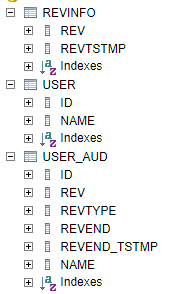
其中USER是實(shí)體類(lèi)的表,USER_AUD是對(duì)應(yīng)的審計(jì)表
依次訪問(wèn)以下鏈接,增加兩條數(shù)據(jù),分別對(duì)兩條數(shù)據(jù)進(jìn)行更新,再刪除第一條數(shù)據(jù)
http://localhost:8080/user/add
http://localhost:8080/user/add
http://localhost:8080/user/update/1
http://localhost:8080/user/update/2
http://localhost:8080/user/delete/1
在h2頁(yè)面查詢(xún)USER表
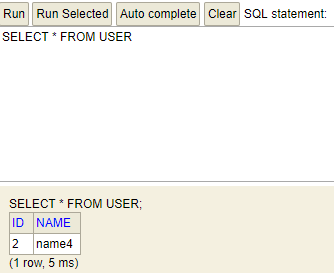
可以看到,USER表只有第二條數(shù)據(jù)更新后的記錄了
而查詢(xún)USER_AUD表
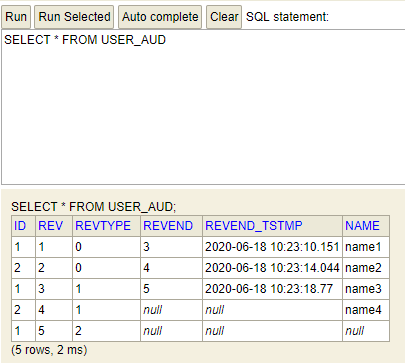
可以看到表中存在5條記錄,分別對(duì)應(yīng)著上面的五次操作
其中ID是USER表的主鍵,REV是USER_AUD的主鍵,REVTYPE是操作類(lèi)型,0新增,1更新,2刪除,name則是對(duì)應(yīng)USER的name屬性
hibernate提供了兩種審計(jì)策略,分別是
org.hibernate.envers.strategy.internal.DefaultAuditStrategy org.hibernate.envers.strategy.internal.ValidityAuditStrategy如果使用DefaultAuditStrategy,USER_AUD表中不會(huì)有REVEND,REVEND_TSTMP兩個(gè)字段,只會(huì)單純的記錄變更與版本
而使用ValidityAuditStrategy,在新增一條變更記錄時(shí),會(huì)更新上一條變更記錄的REVEND,REVEND_TSTMP為當(dāng)前的版本號(hào)以及變更時(shí)間
因?yàn)閂alidityAuditStrategy除了插入新紀(jì)錄還要更新舊的記錄,所以插入速度會(huì)慢一點(diǎn),但是因?yàn)樘峁┝祟~外的信息,對(duì)于數(shù)據(jù)查詢(xún),速度則較DefaultAuditStrategy更快一些
以上就是本文的全部?jī)?nèi)容,希望對(duì)大家的學(xué)習(xí)有所幫助,也希望大家多多支持好吧啦網(wǎng)。
相關(guān)文章:
1. IntelliJ IDEA配置Tomcat服務(wù)器的方法2. IntelliJ IDEA導(dǎo)入jar包的方法3. idea刪除項(xiàng)目的操作方法4. 使用Maven 搭建 Spring MVC 本地部署Tomcat的詳細(xì)教程5. IntelliJ IDEA設(shè)置默認(rèn)瀏覽器的方法6. IntelliJ IDEA恢復(fù)刪除文件的方法7. Docker 部署 Prometheus的安裝詳細(xì)教程8. idea重置默認(rèn)配置的方法步驟9. idea導(dǎo)入maven項(xiàng)目的方法10. IntelliJ IDEA調(diào)整字體大小的方法

 網(wǎng)公網(wǎng)安備