springboot~nexus項目打包要注意的地方示例代碼詳解
一個使用maven制作框架包時,會有一個主項目,然后它有多個子項目框架組成,很少一個工具包一個工程,像springboot,springcloud都是這種結(jié)構(gòu),主項目用來管理一些依賴包的版本,這對于框架型項目來說是很必要的,而對于業(yè)務(wù)項目來說,因為目前都是推薦使用微服務(wù)的輕量方式,所以不建議用多項目綁定一個大項目的方式,而都是一個服務(wù)一個項目。
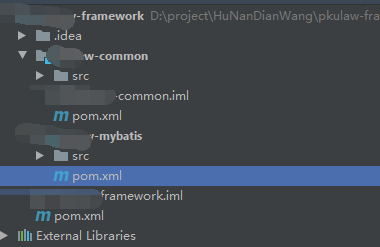
主pom文件
主項目的pom文件用來管理依賴包版本,一般在dependencyManagement節(jié)點去聲明它們的版本號,這樣在子項目里可以不聲明相同包的版本信息了
<dependencyManagement> <dependencies> <!--spring boot 版本--> <dependency><groupId>org.springframework.boot</groupId><artifactId>spring-boot-dependencies</artifactId><version>${spring-boot-dependencies.version}</version><type>pom</type><scope>import</scope> </dependency> <!--阿里巴巴組件--> <dependency><groupId>com.alibaba.cloud</groupId><artifactId>spring-cloud-alibaba-dependencies</artifactId><version>${spring-cloud-alibaba-dependencies.version}</version><type>pom</type><scope>import</scope> </dependency> <!--spring cloud 版本--> <dependency><groupId>org.springframework.cloud</groupId><artifactId>spring-cloud-dependencies</artifactId><version>${spring-cloud.version}</version><type>pom</type><scope>import</scope> </dependency> <!-- Spring Boot Web 依賴 --> <dependency><groupId>org.springframework.boot</groupId><artifactId>spring-boot-starter-web</artifactId><version>${spring-boot-dependencies.version}</version><exclusions> <!-- 排除Tomcat 以使用 Undertow --> <exclusion> <groupId>org.springframework.boot</groupId> <artifactId>spring-boot-starter-tomcat</artifactId> </exclusion></exclusions> </dependency> <!-- Google 編碼助手 --> <dependency><groupId>com.google.guava</groupId><artifactId>guava</artifactId><version>${guava.version}</version> </dependency> <!-- Mysql 驅(qū)動 --> <dependency><groupId>mysql</groupId><artifactId>mysql-connector-java</artifactId><version>${mysql.drive.version}</version> </dependency> <!-- HikariCP 連接池 --> <dependency><groupId>com.zaxxer</groupId><artifactId>HikariCP</artifactId><version>${HikariCP.version}</version> </dependency> <!-- MyBatis 增強工具 --> <dependency><groupId>com.baomidou</groupId><artifactId>mybatis-plus-boot-starter</artifactId><version>${mybatis-plus-boot-starter.version}</version> </dependency> <!-- Alibaba json解析器 --> <dependency><groupId>com.alibaba</groupId><artifactId>fastjson</artifactId><version>${fastjson.version}</version> </dependency> <!-- 接口文檔 --> <dependency><groupId>io.springfox</groupId><artifactId>springfox-swagger2</artifactId><version>${springfox-swagger2.version}</version> </dependency> <!-- 接口文檔 UI --> <dependency><groupId>io.springfox</groupId><artifactId>springfox-swagger-ui</artifactId><version>${springfox-swagger2.version}</version> </dependency> <!-- HTTP 客戶端請求 --> <dependency><groupId>org.apache.httpcomponents</groupId><artifactId>httpclient</artifactId><version>${httpclient.version}</version> </dependency> <!-- Feign 客戶端請求 --> <dependency><groupId>io.github.openfeign</groupId><artifactId>feign-httpclient</artifactId><version>${feign-httpclient.version}</version> </dependency> </dependencies> </dependencyManagement>
如果項目希望進(jìn)行發(fā)布到nexus私服上,需要配置distributionManagement節(jié)點的信息,它對應(yīng)你的.m2/settings.xml里的profile節(jié)點信息
<distributionManagement> <repository> <id>releases</id> <name>Nexus Release Repository</name> <url>http://192.168.0.203:8081/repository/maven-releases/</url> </repository> <snapshotRepository> <id>snapshots</id> <name>Nexus Snapshot Repository</name> <url>http://192.168.0.203:8081/repository/maven-snapshots/</url> </snapshotRepository>
使用deploy發(fā)布項目
第一次把工具包發(fā)到nexus時,需要在點擊主項目的 deploy它會把主項目和其子項目同時發(fā)到nexus上面,后續(xù)可以只deploy修改的項目

在具體項目里使用它
直接在項目的pom里,添加對應(yīng)的工具包即可,工具包的項目依賴你不需要關(guān)心
<dependency> <groupId>com.lind</groupId> <artifactId>lind-common</artifactId> <version>${lind-common.version}</version> </dependency>
注意:對于框架型項目,需要保存你的工具包依賴的項目也在nexus上面,否則會導(dǎo)致加載失敗。
到此這篇關(guān)于springboot~nexus項目打包要注意的地方的文章就介紹到這了,更多相關(guān)springboot nexus項目打包內(nèi)容請搜索好吧啦網(wǎng)以前的文章或繼續(xù)瀏覽下面的相關(guān)文章希望大家以后多多支持好吧啦網(wǎng)!
相關(guān)文章:
1. IntelliJ IDEA恢復(fù)刪除文件的方法2. IntelliJ IDEA配置Tomcat服務(wù)器的方法3. idea刪除項目的操作方法4. 使用Maven 搭建 Spring MVC 本地部署Tomcat的詳細(xì)教程5. IntelliJ IDEA設(shè)置默認(rèn)瀏覽器的方法6. IntelliJ IDEA導(dǎo)入jar包的方法7. idea重置默認(rèn)配置的方法步驟8. idea導(dǎo)入maven項目的方法9. Docker 部署 Prometheus的安裝詳細(xì)教程10. IntelliJ IDEA調(diào)整字體大小的方法

 網(wǎng)公網(wǎng)安備