解決Vue項(xiàng)目中tff報(bào)錯(cuò)的問題
在webpack.config.js中的模塊配置中加如下的配置規(guī)則:
{test: /.(woff2?|eot|ttf|otf)(?.*)?$/, use: 'url-loader'}
const path = require(’path’);const htmlWebpackplugin = require(’html-webpack-plugin’);const VueLoaderPlugin = require(’vue-loader/lib/plugin’); module.exports = { entry: path.join(__dirname,’./src/main.js’), output: { path: path.join(__dirname, ’./dist’), filename: ’bundle.js’ }, plugins: [ new htmlWebpackplugin({ //創(chuàng)建一個(gè)在內(nèi)存中生成的html頁面的插件 template: path.join(__dirname, ’./src/index.html’), filename: ’index.html’ }), new VueLoaderPlugin() ], module: { //這個(gè)節(jié)點(diǎn)用于配置所有的第三方模塊加載器 rules: [ {test: /.css$/, use:[’style-loader’,’css-loader’]},//配置處理.css文件的第三方處理規(guī)則 {test: /.less$/, use: ['style-loader',’css-loader’,’less-loader’]}, {test: /.scss$/, use: ['style-loader',’css-loader’,’sass-loader’]}, {test: /.(jpg|png|gif|bmp|jpeg)$/, use: 'url-loader?limit=8000'}, {test: /.(woff2?|eot|ttf|otf)(?.*)?$/, use: 'url-loader'}, {test:/.js$/, use:’babel-loader’,exclude:/node_modules/}, {test: /.vue$/, use: ’vue-loader’} ] }};
補(bǔ)充知識:vue項(xiàng)目引入字體.ttf的操作步驟
1、下載所需要的字體,.ttf格式本文以(FZCYJ.ttf 為例)
2、在src下新建common文件,文件夾中包含以下文件
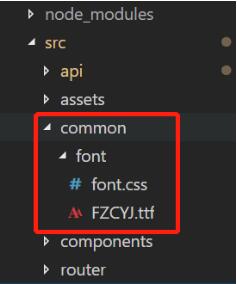
3、打開font.css
@font-face { font-family: ’FZCYJ’; //重命名字體名 src: url(’FZCYJ.ttf’); //引入字體 font-weight: normal; font-style: normal; }
4、配置webpack.base.conf.js 文件
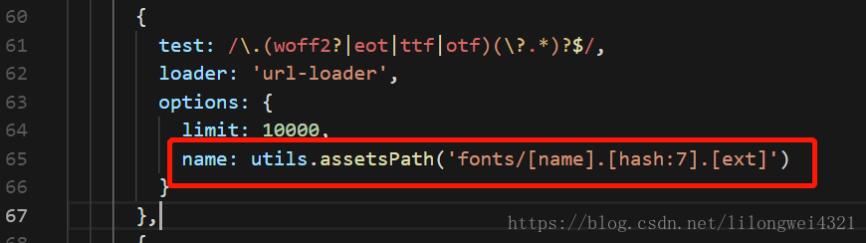
5、App.vue引入字體
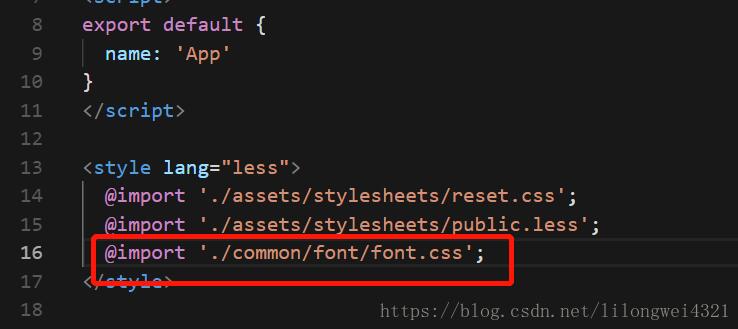
6、可在body中設(shè)置字體
body{ font-family: FZCYJ;}
以上這篇解決Vue項(xiàng)目中tff報(bào)錯(cuò)的問題就是小編分享給大家的全部內(nèi)容了,希望能給大家一個(gè)參考,也希望大家多多支持好吧啦網(wǎng)。
相關(guān)文章:
1. 使用Maven 搭建 Spring MVC 本地部署Tomcat的詳細(xì)教程2. IntelliJ IDEA配置Tomcat服務(wù)器的方法3. idea刪除項(xiàng)目的操作方法4. IntelliJ IDEA導(dǎo)入jar包的方法5. IntelliJ IDEA設(shè)置默認(rèn)瀏覽器的方法6. IntelliJ IDEA恢復(fù)刪除文件的方法7. idea重置默認(rèn)配置的方法步驟8. idea導(dǎo)入maven項(xiàng)目的方法9. Docker 部署 Prometheus的安裝詳細(xì)教程10. IntelliJ IDEA調(diào)整字體大小的方法

 網(wǎng)公網(wǎng)安備