android使用TextView實(shí)現(xiàn)跑馬燈效果
本文實(shí)例為大家分享了android使用TextView實(shí)現(xiàn)跑馬燈效果的具體代碼,供大家參考,具體內(nèi)容如下
先上效果圖:此為靜態(tài)圖,實(shí)際動(dòng)態(tài)中文字勻速向左滑動(dòng)。
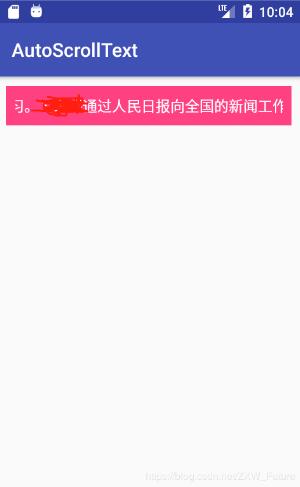
實(shí)現(xiàn)步驟:
第一步:創(chuàng)建好布局頁面
<?xml version='1.0' encoding='utf-8'?><android.support.constraint.ConstraintLayout xmlns:android='http://schemas.android.com/apk/res/android' xmlns:app='http://schemas.android.com/apk/res-auto' xmlns:tools='http://schemas.android.com/tools' android:layout_width='match_parent' android:layout_height='match_parent' tools:context='.MainActivity'> <TextView android: android:layout_width='match_parent' android:layout_height='wrap_content' android:background='@color/colorAccent' android:textColor='#fff' android:textSize='15sp' android:padding='10dp' android:layout_margin='10dp'/> </android.support.constraint.ConstraintLayout>
第二步:在activity中編寫java代碼
package com.example.smallbag.autoscrolltext; import android.support.v7.app.AppCompatActivity;import android.os.Bundle;import android.text.Html;import android.text.TextUtils;import android.text.method.LinkMovementMethod;import android.widget.TextView; public class MainActivity extends AppCompatActivity { @Override protected void onCreate(Bundle savedInstanceState) { super.onCreate(savedInstanceState); setContentView(R.layout.activity_main); TextView textView = (TextView) findViewById(R.id.textview); String html = '1月25日上午,中共中央政治局在人民日?qǐng)?bào)社就全媒體時(shí)代和媒體融合發(fā)展舉行第十二次集體學(xué)習(xí)。通過人民日?qǐng)?bào)向全國的新聞工作者致以新春慰問和祝福。'; // CharSequence charSequence = Html.fromHtml(html); // 使文本具有html的功能,如超鏈接 textView.setText(html); textView.setMovementMethod(LinkMovementMethod.getInstance()); // 添加手動(dòng)滑動(dòng)功能 textView.setEllipsize(TextUtils.TruncateAt.valueOf('MARQUEE')); // 添加跑馬燈功能 textView.setMarqueeRepeatLimit(Integer.MAX_VALUE); // 跑馬燈滾動(dòng)次數(shù),此處已設(shè)置最大值 textView.setSingleLine(true); // 設(shè)置為單行顯示 textView.setFocusable(true); // 獲得焦點(diǎn) textView.setFocusableInTouchMode(true); // 通過觸碰獲取焦點(diǎn)的能力 }}
設(shè)置textview的屬性也可以直接在布局文件中設(shè)定,博主在布局文件中設(shè)置時(shí)出現(xiàn)了不能滾動(dòng)的問題,原因未知,注意即可
第三步:運(yùn)行程序,得到效果
以上就是本文的全部內(nèi)容,希望對(duì)大家的學(xué)習(xí)有所幫助,也希望大家多多支持好吧啦網(wǎng)。
相關(guān)文章:
1. IntelliJ IDEA安裝插件的方法步驟2. idea導(dǎo)入maven項(xiàng)目的方法3. Docker 部署 Prometheus的安裝詳細(xì)教程4. IntelliJ IDEA設(shè)置自動(dòng)提示功能快捷鍵的方法5. 通過Django Admin+HttpRunner1.5.6實(shí)現(xiàn)簡易接口測試平臺(tái)6. idea重置默認(rèn)配置的方法步驟7. IntelliJ IDEA調(diào)整字體大小的方法8. idea設(shè)置代碼格式化的方法步驟9. idea給項(xiàng)目打war包的方法步驟10. IntelliJ IDEA設(shè)置背景圖片的方法步驟
 網(wǎng)公網(wǎng)安備