原生JS實(shí)現(xiàn)拖拽效果
本文實(shí)例為大家分享了JS實(shí)現(xiàn)拖拽效果的具體代碼,供大家參考,具體內(nèi)容如下
想要讓整個(gè)元素移動(dòng)需要三個(gè)事件:
鼠標(biāo)按下 onmousedown鼠標(biāo)移動(dòng) onmousemove鼠標(biāo)抬起 onmouseup
html
<div class='login'> <!-- 點(diǎn)擊title拖拽 --> <div class='login-title'>登錄會(huì)員 <!-- title end --> <span><a href='javascript:void(0);' class='close-login'>關(guān)閉</a></span> </div> <div class='login-input-content'> <div class='login-input'> <label>用戶名:</label> <input type='text' placeholder='請(qǐng)輸入用戶名' name='info[username]' class='list-input'> </div> <div class='login-input'> <label>登錄密碼:</label> <input type='password' placeholder='請(qǐng)輸入登錄密碼' name='info[password]' class='list-input'> </div> </div> <div class='login-button'><a href='javascript:void(0);' id='login-button-submit'>登錄會(huì)員</a></div></div>
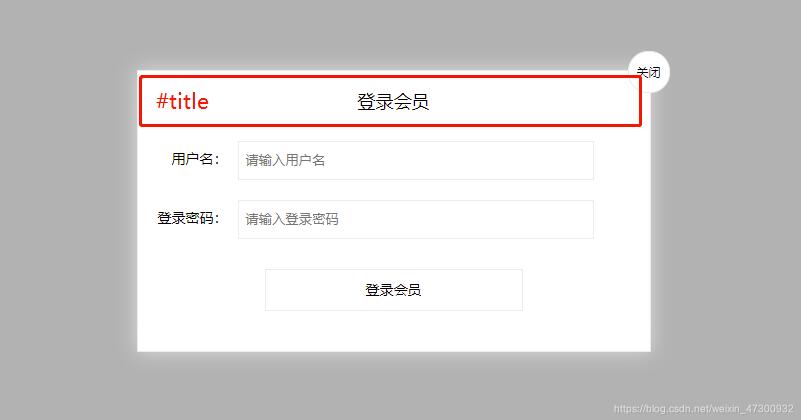
JS
var login = document.querySelector(’.login’);//獲取整個(gè)彈框的內(nèi)容var title = document.querySelector(’#title’); title.addEventListener(’mousedown’,function(e){ //當(dāng)按下鼠標(biāo)的時(shí)候,獲取到鼠標(biāo)在拖拽盒子內(nèi)的坐標(biāo) //鼠標(biāo)在頁面的坐標(biāo) - 大盒子距離瀏覽器左側(cè)的距離 var x = e.pageX - login.offsetLeft; var y = e.pageY - login.offsetTop; //鼠標(biāo)移動(dòng) document.addEventListener(’mousemove’,move); function move(e){ //拖拽的盒子定位=鼠標(biāo)在頁面的坐標(biāo) - 鼠標(biāo)在拖拽盒子的坐標(biāo) login.style.left = e.pageX - x + ’px’; login.style.top = e.pageY - y + ’px’; } //當(dāng)鼠標(biāo)抬起的時(shí)候,將移動(dòng)事件刪除 document.addEventListener(’mouseup’,function(){ document.removeEventListener(’mousemove’,move); }) })
CSS部分
<style> *{ padding: 0px; margin: 0px; } .login { display: block; width: 512px; height: 280px; position: fixed; border: #ebebeb solid 1px; left: 50%; top: 50%; background: #ffffff; box-shadow: 0px 0px 20px #ddd; z-index: 9999; transform: translate(-50%, -50%); } .login-title { width: 100%; margin: 10px 0px 0px 0px; text-align: center; line-height: 40px; height: 40px; font-size: 18px; position: relative; cursor: move; } .login-input-content { margin-top: 20px; } .login-button { width: 50%; margin: 30px auto 0px auto; line-height: 40px; font-size: 14px; border: #ebebeb 1px solid; text-align: center; } .login-bg { display: none; width: 100%; height: 100%; position: fixed; top: 0px; left: 0px; background: rgba(0, 0, 0, .3); } a { text-decoration: none; color: #000000; } .login-button a { display: block; } .login-input input.list-input { float: left; line-height: 35px; height: 35px; width: 350px; border: #ebebeb 1px solid; text-indent: 5px; } .login-input { overflow: hidden; margin: 0px 0px 20px 0px; } .login-input label { float: left; width: 90px; padding-right: 10px; text-align: right; line-height: 35px; height: 35px; font-size: 14px; } .login-title span { position: absolute; font-size: 12px; right: -20px; top: -30px; background: #ffffff; border: #ebebeb solid 1px; width: 40px; height: 40px; border-radius: 20px; }</style>
以上就是本文的全部內(nèi)容,希望對(duì)大家的學(xué)習(xí)有所幫助,也希望大家多多支持好吧啦網(wǎng)。
相關(guān)文章:

 網(wǎng)公網(wǎng)安備