js制作簡(jiǎn)易計(jì)算器
本文實(shí)例為大家分享了js制作簡(jiǎn)易計(jì)算器的具體代碼,供大家參考,具體內(nèi)容如下
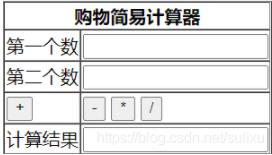
要制作一個(gè)如圖所示的簡(jiǎn)易計(jì)算器,首先要建立一個(gè)表單,制作出如圖所示的樣子。
<table border='1' cellspacing='0' > <tr><th colspan='2'>購(gòu)物簡(jiǎn)易計(jì)算器</th></tr> <tr> <td>第一個(gè)數(shù)</td> <td><input type='text' /></td> </tr> <tr> <td>第二個(gè)數(shù)</td> <td><input type='text' /></td> </tr> <tr> <td><button type='button' onclick='cal(’+’)' >+</button></td> <td><button type='button' onclick='cal(’-’)' >-</button> <button type='button' onclick='cal(’*’)' >*</button> <button type='button' onclick='cal(’/’)' >/</button></td> </tr> <tr> <td>計(jì)算結(jié)果</td> <td><input type='text' /></td> </tr></table>
onclick使用cal()方法,其實(shí)一開(kāi)始我是使用add,sub,mul,div四種方法的,后來(lái)發(fā)現(xiàn)這四個(gè)方法除了算術(shù)運(yùn)算符不一樣,其他的地方都一樣,所以選擇使用一個(gè)方法,點(diǎn)擊button,傳給方法里的算術(shù)運(yùn)算符不一樣,代碼如下:
<script type='text/javascript'> function cal(type){ var num1 = document.getElementById(’inputId1’); var num2 = document.getElementById(’inputId2’); var result; switch(type){ case ’+’: result = parseInt(num1.value) + parseInt(num2.value); break; case ’-’: result = parseInt(num1.value) - parseInt(num2.value); break; case ’*’: result = parseInt(num1.value) * parseInt(num2.value); break; case ’/’: result = parseInt(num1.value) / parseInt(num2.value); break; } var resultObj = document.getElementById(’resultId’); resultObj.value = result; }</script>
以上就是本文的全部?jī)?nèi)容,希望對(duì)大家的學(xué)習(xí)有所幫助,也希望大家多多支持好吧啦網(wǎng)。
相關(guān)文章:
 網(wǎng)公網(wǎng)安備