Spring Security 實現短信驗證碼登錄功能
之前文章都是基于用戶名密碼登錄,第六章圖形驗證碼登錄其實還是用戶名密碼登錄,只不過多了一層圖形驗證碼校驗而已;Spring Security默認提供的認證流程就是用戶名密碼登錄,整個流程都已經固定了,雖然提供了一些接口擴展,但是有些時候我們就需要有自己特殊的身份認證邏輯,比如用短信驗證碼登錄,它和用戶名密碼登錄的邏輯是不一樣的,這時候就需要重新寫一套身份認證邏輯。
開發短信驗證碼接口
獲取驗證碼
短信驗證碼的發送獲取邏輯和圖片驗證碼類似,這里直接貼出代碼。
@GetMapping('/code/sms')public void createSmsCode(HttpServletRequest request, HttpServletResponse response) throws Exception {// 創建驗證碼ValidateCode smsCode = createCodeSmsCode(request);// 將驗證碼放到session中sessionStrategy.setAttribute(new ServletWebRequest(request), SMS_CODE_SESSION_KEY, smsCode);String mobile = ServletRequestUtils.getRequiredStringParameter(request, 'mobile');// 發送驗證碼smsCodeSender.send(mobile, smsCode.getCode());}
前端代碼
<tr><td>手機號:</td><td><input type='text' name='mobile' value='13012345678'></td></tr><tr><td>短信驗證碼:</td><td><input type='text' name='smsCode'><a href='http://www.b3g6.com/code/sms?mobile=13012345678' rel='external nofollow' >發送驗證碼</a></td></tr>
短信驗證碼流程原理
短信驗證碼登錄和用戶名密碼登錄對比
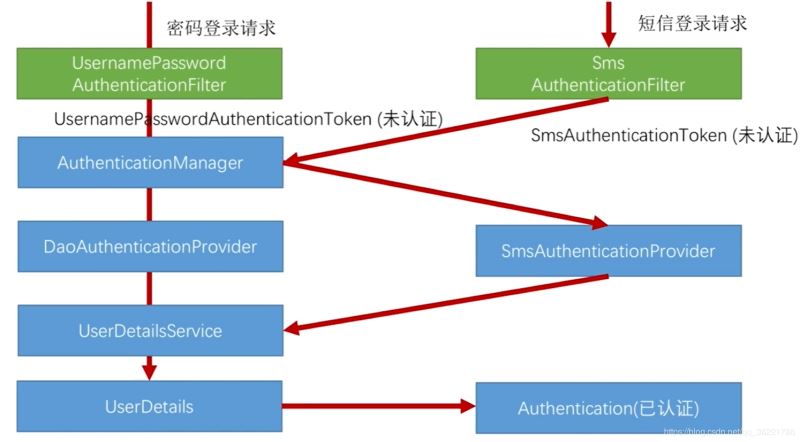
步驟流程
首先點擊登錄應該會被SmsAuthenticationFilter過濾器處理,這個過濾器拿到請求以后會在登錄請求中拿到手機號,然后封裝成自定義的一個SmsAuthenticationToken(未認證)。 這個Token也會傳給AuthenticationManager,因為AuthenticationManager整個系統只有一個,它會檢索系統中所有的AuthenticationProvider,這時候我們要提供自己的SmsAuthenticationProvider,用它來校驗自己寫的SmsAuthenticationToken的手機號信息。 在校驗的過程中同樣會調用UserDetailsService,把手機號傳給它讓它去讀用戶信息,去判斷是否能登錄,登錄成功的話再把SmsAuthenticationToken標記為已認證。 到這里為止就是短信驗證碼的認證流程,上面的流程并沒有提到校驗驗證碼信息,其實它的驗證流程和圖形驗證碼驗證流程也是類似,同樣是在SmsAuthenticationFilter過濾器之前加一個過濾器來驗證短信驗證碼。代碼實現
SmsCodeAuthenticationToken
作用:封裝認證Token 實現:可以繼承AbstractAuthenticationToken抽象類,該類實現了Authentication接口public class SmsCodeAuthenticationToken extends AbstractAuthenticationToken {private static final long serialVersionUID = SpringSecurityCoreVersion.SERIAL_VERSION_UID;private final Object principal;/** * 進入SmsAuthenticationFilter時,構建一個未認證的Token * * @param mobile */public SmsCodeAuthenticationToken(String mobile) {super(null);this.principal = mobile;setAuthenticated(false);}/** * 認證成功以后構建為已認證的Token * * @param principal * @param authorities */public SmsCodeAuthenticationToken(Object principal,Collection<? extends GrantedAuthority> authorities) {super(authorities);this.principal = principal;super.setAuthenticated(true);}@Overridepublic Object getCredentials() {return null;}@Overridepublic Object getPrincipal() {return this.principal;}@Overridepublic void setAuthenticated(boolean isAuthenticated) throws IllegalArgumentException {if (isAuthenticated) {throw new IllegalArgumentException('Cannot set this token to trusted - use constructor which takes a GrantedAuthority list instead');}super.setAuthenticated(false);}@Overridepublic void eraseCredentials() {super.eraseCredentials();}}
SmsCodeAuthenticationFilter
作用:處理短信登錄的請求,構建Token,把請求信息設置到Token中。 實現:該類可以模仿UsernamePasswordAuthenticationFilter類,繼承AbstractAuthenticationProcessingFilter抽象類public class SmsCodeAuthenticationFilter extends AbstractAuthenticationProcessingFilter {private String mobileParameter = 'mobile';private boolean postOnly = true; /** * 表示要處理的請求路徑 */public SmsCodeAuthenticationFilter() { super(new AntPathRequestMatcher('/authentication/mobile', 'POST'));} @Overridepublic Authentication attemptAuthentication(HttpServletRequest request, HttpServletResponse response)throws AuthenticationException {if (postOnly && !request.getMethod().equals('POST')) {throw new AuthenticationServiceException('Authentication method not supported: ' + request.getMethod());}String mobile = obtainMobile(request);if (mobile == null) {mobile = '';}mobile = mobile.trim();SmsCodeAuthenticationToken authRequest = new SmsCodeAuthenticationToken(mobile);// 把請求信息設到Token中setDetails(request, authRequest);return this.getAuthenticationManager().authenticate(authRequest);}/** * 獲取手機號 */protected String obtainMobile(HttpServletRequest request) {return request.getParameter(mobileParameter);}protected void setDetails(HttpServletRequest request, SmsCodeAuthenticationToken authRequest) {authRequest.setDetails(authenticationDetailsSource.buildDetails(request));}public void setMobileParameter(String usernameParameter) {Assert.hasText(usernameParameter, 'Username parameter must not be empty or null');this.mobileParameter = usernameParameter;}public void setPostOnly(boolean postOnly) {this.postOnly = postOnly;}public final String getMobileParameter() {return mobileParameter;}}
SmsAuthenticationProvider
作用:提供認證Token的校驗邏輯,配置為能夠支持SmsCodeAuthenticationToken的校驗 實現:實現AuthenticationProvider接口,實現其兩個方法。public class SmsCodeAuthenticationProvider implements AuthenticationProvider {private UserDetailsService userDetailsService; /** * 進行身份認證的邏輯 * * @param authentication * @return * @throws AuthenticationException */@Overridepublic Authentication authenticate(Authentication authentication) throws AuthenticationException {SmsCodeAuthenticationToken authenticationToken = (SmsCodeAuthenticationToken) authentication;UserDetails user = userDetailsService.loadUserByUsername((String) authenticationToken.getPrincipal());if (user == null) {throw new InternalAuthenticationServiceException('無法獲取用戶信息');}SmsCodeAuthenticationToken authenticationResult = new SmsCodeAuthenticationToken(user, user.getAuthorities());authenticationResult.setDetails(authenticationToken.getDetails());return authenticationResult;} /** * 表示支持校驗的Token,這里是SmsCodeAuthenticationToken * * @param authentication * @return */@Overridepublic boolean supports(Class<?> authentication) {return SmsCodeAuthenticationToken.class.isAssignableFrom(authentication);}public UserDetailsService getUserDetailsService() {return userDetailsService;}public void setUserDetailsService(UserDetailsService userDetailsService) {this.userDetailsService = userDetailsService;}}
ValidateCodeFilter
作用:校驗短信驗證碼 實現:和圖形驗證碼類似,繼承OncePerRequestFilter接口防止多次調用,主要就是驗證碼驗證邏輯,驗證通過則繼續下一個過濾器。@Component('validateCodeFilter')public class ValidateCodeFilter extends OncePerRequestFilter implements InitializingBean {/** * 驗證碼校驗失敗處理器 */@Autowiredprivate AuthenticationFailureHandler authenticationFailureHandler;/** * 系統配置信息 */@Autowiredprivate SecurityProperties securityProperties;/** * 系統中的校驗碼處理器 */@Autowiredprivate ValidateCodeProcessorHolder validateCodeProcessorHolder;/** * 存放所有需要校驗驗證碼的url */private Map<String, ValidateCodeType> urlMap = new HashMap<>();/** * 驗證請求url與配置的url是否匹配的工具類 */private AntPathMatcher pathMatcher = new AntPathMatcher();/** * 初始化要攔截的url配置信息 */@Overridepublic void afterPropertiesSet() throws ServletException {super.afterPropertiesSet();urlMap.put('/authentication/mobile', ValidateCodeType.SMS);addUrlToMap(securityProperties.getCode().getSms().getUrl(), ValidateCodeType.SMS);}/** * 講系統中配置的需要校驗驗證碼的URL根據校驗的類型放入map * * @param urlString * @param type */protected void addUrlToMap(String urlString, ValidateCodeType type) {if (StringUtils.isNotBlank(urlString)) {String[] urls = StringUtils.splitByWholeSeparatorPreserveAllTokens(urlString, ',');for (String url : urls) {urlMap.put(url, type);}}}/** * 驗證短信驗證碼 * * @param request * @param response * @param chain * @throws ServletException * @throws IOException */@Overrideprotected void doFilterInternal(HttpServletRequest request, HttpServletResponse response, FilterChain chain)throws ServletException, IOException {ValidateCodeType type = getValidateCodeType(request);if (type != null) {logger.info('校驗請求(' + request.getRequestURI() + ')中的驗證碼,驗證碼類型' + type);try {// 進行驗證碼的校驗validateCodeProcessorHolder.findValidateCodeProcessor(type).validate(new ServletWebRequest(request, response));logger.info('驗證碼校驗通過');} catch (ValidateCodeException exception) {// 如果校驗拋出異常,則交給我們之前文章定義的異常處理器進行處理authenticationFailureHandler.onAuthenticationFailure(request, response, exception);return;}}// 繼續調用后邊的過濾器chain.doFilter(request, response);}/** * 獲取校驗碼的類型,如果當前請求不需要校驗,則返回null * * @param request * @return */private ValidateCodeType getValidateCodeType(HttpServletRequest request) {ValidateCodeType result = null;if (!StringUtils.equalsIgnoreCase(request.getMethod(), 'GET')) {Set<String> urls = urlMap.keySet();for (String url : urls) {if (pathMatcher.match(url, request.getRequestURI())) {result = urlMap.get(url);}}}return result;}}
添加配置
SmsCodeAuthenticationSecurityConfig
作用:配置SmsCodeAuthenticationFilter,后面需要把這些配置加到主配置類BrowserSecurityConfig
@Componentpublic class SmsCodeAuthenticationSecurityConfig extends SecurityConfigurerAdapter<DefaultSecurityFilterChain, HttpSecurity> {@Autowiredprivate AuthenticationSuccessHandler meicloudAuthenticationSuccessHandler;@Autowiredprivate AuthenticationFailureHandler meicloudAuthenticationFailureHandler;@Autowiredprivate UserDetailsService userDetailsService;@Autowiredprivate PersistentTokenRepository persistentTokenRepository;@Overridepublic void configure(HttpSecurity http) throws Exception {SmsCodeAuthenticationFilter smsCodeAuthenticationFilter = new SmsCodeAuthenticationFilter();// 設置AuthenticationManagersmsCodeAuthenticationFilter.setAuthenticationManager(http.getSharedObject(AuthenticationManager.class));// 設置登錄成功處理器smsCodeAuthenticationFilter.setAuthenticationSuccessHandler(meicloudAuthenticationSuccessHandler);// 設置登錄失敗處理器smsCodeAuthenticationFilter.setAuthenticationFailureHandler(meicloudAuthenticationFailureHandler);String key = UUID.randomUUID().toString();smsCodeAuthenticationFilter.setRememberMeServices(new PersistentTokenBasedRememberMeServices(key, userDetailsService, persistentTokenRepository));SmsCodeAuthenticationProvider smsCodeAuthenticationProvider = new SmsCodeAuthenticationProvider();smsCodeAuthenticationProvider.setUserDetailsService(userDetailsService);// 將自己寫的Provider加到Provider集合里去http.authenticationProvider(smsCodeAuthenticationProvider).addFilterAfter(smsCodeAuthenticationFilter, UsernamePasswordAuthenticationFilter.class);}}
BrowserSecurityConfig
作用:主配置類;添加短信驗證碼配置類、添加SmsCodeAuthenticationSecurityConfig配置
@Configurationpublic class BrowserSecurityConfig extends WebSecurityConfigurerAdapter {@Beanpublic PasswordEncoder passwordEncoder() {return new BCryptPasswordEncoder();}@Autowiredprivate SecurityProperties securityProperties;@Autowiredprivate DataSource dataSource;@Autowiredprivate UserDetailsService userDetailsService;@Autowiredprivate AuthenticationSuccessHandler meicloudAuthenticationSuccessHandler;@Autowiredprivate AuthenticationFailureHandler meicloudAuthenticationFailureHandler;@Autowiredprivate SmsCodeAuthenticationSecurityConfig smsCodeAuthenticationSecurityConfig;@Overrideprotected void configure(HttpSecurity http) throws Exception {// 驗證碼校驗過濾器ValidateCodeFilter validateCodeFilter = new ValidateCodeFilter();// 將驗證碼校驗過濾器加到 UsernamePasswordAuthenticationFilter 過濾器之前http.addFilterBefore(validateCodeFilter, UsernamePasswordAuthenticationFilter.class).formLogin()// 當用戶登錄認證時默認跳轉的頁面.loginPage('/authentication/require')// 以下這行 UsernamePasswordAuthenticationFilter 會知道要處理表單的 /authentication/form 請求,而不是默認的 /login.loginProcessingUrl('/authentication/form').successHandler(meicloudAuthenticationSuccessHandler).failureHandler(meicloudAuthenticationFailureHandler)// 配置記住我功能.and().rememberMe()// 配置TokenRepository.tokenRepository(persistentTokenRepository())// 配置Token過期時間.tokenValiditySeconds(3600)// 最終拿到用戶名之后,使用UserDetailsService去做登錄.userDetailsService(userDetailsService).and().authorizeRequests()// 排除對 '/authentication/require' 和 '/meicloud-signIn.html' 的身份驗證.antMatchers('/authentication/require', securityProperties.getBrowser().getSignInPage(), '/code/*').permitAll()// 表示所有請求都需要身份驗證.anyRequest().authenticated().and().csrf().disable()// 暫時把跨站請求偽造的功能關閉掉// 相當于把smsCodeAuthenticationSecurityConfig里的配置加到上面這些配置的后面.apply(smsCodeAuthenticationSecurityConfig);}/** * 記住我功能的Token存取器配置 * * @return */@Beanpublic PersistentTokenRepository persistentTokenRepository() {JdbcTokenRepositoryImpl tokenRepository = new JdbcTokenRepositoryImpl();tokenRepository.setDataSource(dataSource);// 啟動的時候自動創建表,建表語句 JdbcTokenRepositoryImpl 已經都寫好了tokenRepository.setCreateTableOnStartup(true);return tokenRepository;}}
總結
到此這篇關于Spring Security 實現短信驗證碼登錄功能的文章就介紹到這了,更多相關spring security 驗證碼登錄內容請搜索好吧啦網以前的文章或繼續瀏覽下面的相關文章希望大家以后多多支持好吧啦網!
相關文章:

 網公網安備
網公網安備