深入學習Spring Cloud-Ribbon
Ribbon 是 Netflix 發布的開源項目,主要功能是提供客戶端的 軟件負載均衡算法 ,將 Netflix 的中間層服務連接在一起。Ribbon 客戶端組件提供一系列完善的配置項如連接超時,重試等。簡單的說,就是在配置文件中列出Load Balancer(簡稱LB)后面所有的機器,Ribbon 會自動的幫助你基于某種規則(如簡單輪詢,隨機連接等)去連接這些機器。我們也很容易使用 Ribbon 實現自定義的負載均衡算法。
ribion=負載均衡+重試
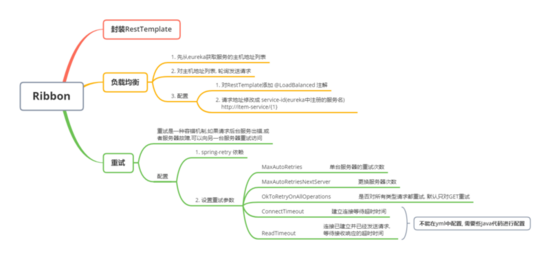
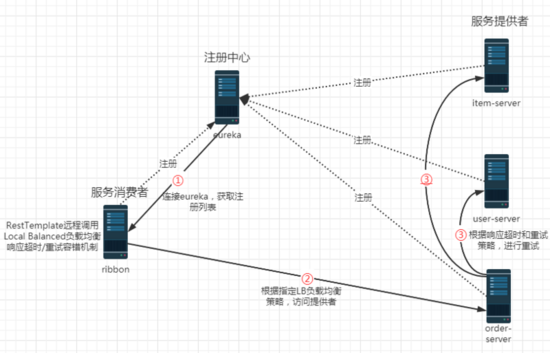
ribbon的工作步驟:
第一步先選擇 EurekaServer ,它優先選擇在同一個區域內負載較少的server。 第二步再根據用戶指定的策略,在從server取到的服務注冊列表中選擇一個地址。 其中Ribbon提供了多種策略:比如輪詢、隨機和根據響應時間加權。
第一步:新建spring項目

第二步:添加Eureka Discovery Client,Spring Web依賴

第三步:添加sp01-commons工具API依賴;eureka-client 中已經包含 ribbon 依賴
<?xml version='1.0' encoding='UTF-8'?><project xmlns='http://maven.apache.org/POM/4.0.0' xmlns:xsi='http://www.w3.org/2001/XMLSchema-instance' xsi:schemaLocation='http://maven.apache.org/POM/4.0.0 https://maven.apache.org/xsd/maven-4.0.0.xsd'> <modelVersion>4.0.0</modelVersion> <parent> <groupId>org.springframework.boot</groupId> <artifactId>spring-boot-starter-parent</artifactId> <version>2.2.1.RELEASE</version> <relativePath/> <!-- lookup parent from repository --> </parent> <groupId>cn.tedu</groupId> <artifactId>sp06-ribbon</artifactId> <version>0.0.1-SNAPSHOT</version> <name>sp06-ribbon</name> <description>Demo project for Spring Boot</description> <properties> <java.version>1.8</java.version> <spring-cloud.version>Hoxton.RELEASE</spring-cloud.version> </properties> <dependencies> <dependency> <groupId>org.springframework.boot</groupId> <artifactId>spring-boot-starter-web</artifactId> </dependency> <dependency> <groupId>org.springframework.cloud</groupId> <artifactId>spring-cloud-starter-netflix-eureka-client</artifactId> </dependency> <dependency> <groupId>org.springframework.boot</groupId> <artifactId>spring-boot-starter-test</artifactId> <scope>test</scope> <exclusions><exclusion> <groupId>org.junit.vintage</groupId> <artifactId>junit-vintage-engine</artifactId></exclusion> </exclusions> </dependency> <dependency> <groupId>cn.tedu</groupId> <artifactId>sp01-commons</artifactId> <version>0.0.1-SNAPSHOT</version> </dependency> </dependencies> <dependencyManagement> <dependencies> <dependency><groupId>org.springframework.cloud</groupId><artifactId>spring-cloud-dependencies</artifactId><version>${spring-cloud.version}</version><type>pom</type><scope>import</scope> </dependency> </dependencies> </dependencyManagement> <build> <plugins> <plugin><groupId>org.springframework.boot</groupId><artifactId>spring-boot-maven-plugin</artifactId> </plugin> </plugins> </build></project>
第四步:添加yml配置
spring: application: name: ribbon #服務器命名 server: port: 3001 # 設置服務器端口號 # 配置添加注冊中心集群 eureka: client: service-url: defaultZone: http://eureka1:2001/eureka, http://eureka2:2002/eureka遠程調用RestTemplate
RestTemplate 是SpringBoot提供的一個Rest遠程調用工具。
類似于 HttpClient,可以發送 http 請求,并處理響應。RestTemplate簡化了Rest API調用,只需要使用它的一個方法,就可以完成請求、響應、Json轉換
方法:
getForObject(url, 轉換的類型.class, 提交的參數) postForObject(url, 協議體數據, 轉換的類型.class)RestTemplate 和 Dubbo 遠程調用的區別:
RestTemplate:
http調用
效率低
Dubbo:
RPC調用,Java的序列化
效率高
第一步:創建RestTemplate實例
RestTemplate 是用來調用其他微服務的工具類,封裝了遠程調用代碼,提供了一組用于遠程調用的模板方法,例如: getForObject() 、 postForObject() 等
package cn.tedu.sp06;import org.springframework.boot.SpringApplication;import org.springframework.boot.autoconfigure.SpringBootApplication;import org.springframework.cloud.client.discovery.EnableDiscoveryClient;import org.springframework.context.annotation.Bean;import org.springframework.web.client.RestTemplate;@EnableDiscoveryClient@SpringBootApplicationpublic class Sp06RibbonApplication { //創建 RestTemplate 實例,并存入 spring 容器 @Bean public RestTemplate getRestTemplate() { return new RestTemplate(); } public static void main(String[] args) { SpringApplication.run(Sp06RibbonApplication.class, args); }}
第二步:創建RibbonController
package cn.tedu.sp06.controller;import java.util.List;import org.springframework.beans.factory.annotation.Autowired;import org.springframework.web.bind.annotation.GetMapping;import org.springframework.web.bind.annotation.PathVariable;import org.springframework.web.bind.annotation.PostMapping;import org.springframework.web.bind.annotation.RequestBody;import org.springframework.web.bind.annotation.RestController;import org.springframework.web.client.RestTemplate;import cn.tedu.sp01.pojo.Item;import cn.tedu.sp01.pojo.Order;import cn.tedu.sp01.pojo.User;import cn.tedu.web.util.JsonResult;@RestControllerpublic class RibbonController { @Autowired private RestTemplate rt; @GetMapping('/item-service/{orderId}') public JsonResult<List<Item>> getItems(@PathVariable String orderId) { //向指定微服務地址發送 get 請求,并獲得該服務的返回結果 //{1} 占位符,用 orderId 填充 return rt.getForObject('http://localhost:8001/{1}', JsonResult.class, orderId); } @PostMapping('/item-service/decreaseNumber') public JsonResult decreaseNumber(@RequestBody List<Item> items) { //發送 post 請求 return rt.postForObject('http://localhost:8001/decreaseNumber', items, JsonResult.class); } / @GetMapping('/user-service/{userId}') public JsonResult<User> getUser(@PathVariable Integer userId) { return rt.getForObject('http://localhost:8101/{1}', JsonResult.class, userId); } @GetMapping('/user-service/{userId}/score') public JsonResult addScore( @PathVariable Integer userId, Integer score) { return rt.getForObject('http://localhost:8101/{1}/score?score={2}', JsonResult.class, userId, score); } / @GetMapping('/order-service/{orderId}') public JsonResult<Order> getOrder(@PathVariable String orderId) { return rt.getForObject('http://localhost:8201/{1}', JsonResult.class, orderId); } @GetMapping('/order-service') public JsonResult addOrder() { return rt.getForObject('http://localhost:8201/', JsonResult.class); }}
第三步:啟動服務,進行測試
http://localhost:3001/item-service/35
等。。
ribbon負載均衡
第一步:RestTemplate設置@LoadBalanced
@LoadBalanced 負載均衡注解,會對 RestTemplate 實例進行封裝,創建動態代理對象,并切入(AOP)負載均衡代碼,把請求分發到集群中的服務器
package cn.tedu.sp06;import org.springframework.boot.SpringApplication;import org.springframework.boot.autoconfigure.SpringBootApplication;import org.springframework.cloud.client.discovery.EnableDiscoveryClient;import org.springframework.cloud.client.loadbalancer.LoadBalanced;import org.springframework.context.annotation.Bean;import org.springframework.web.client.RestTemplate;@EnableDiscoveryClient@SpringBootApplicationpublic class Sp06RibbonApplication { @LoadBalanced //負載均衡注解 @Bean public RestTemplate getRestTemplate() { return new RestTemplate(); } public static void main(String[] args) { SpringApplication.run(Sp06RibbonApplication.class, args); }}
第二步:訪問路徑設置為id
package cn.tedu.sp06.controller;import java.util.List;import org.springframework.beans.factory.annotation.Autowired;import org.springframework.web.bind.annotation.GetMapping;import org.springframework.web.bind.annotation.PathVariable;import org.springframework.web.bind.annotation.PostMapping;import org.springframework.web.bind.annotation.RequestBody;import org.springframework.web.bind.annotation.RestController;import org.springframework.web.client.RestTemplate;import cn.tedu.sp01.pojo.Item;import cn.tedu.sp01.pojo.Order;import cn.tedu.sp01.pojo.User;import cn.tedu.web.util.JsonResult;@RestControllerpublic class RibbonController { @Autowired private RestTemplate rt; @GetMapping('/item-service/{orderId}') public JsonResult<List<Item>> getItems(@PathVariable String orderId) { //這里服務器路徑用 service-id 代替,ribbon 會向服務的多臺集群服務器分發請求 return rt.getForObject('http://item-service/{1}', JsonResult.class, orderId); } @PostMapping('/item-service/decreaseNumber') public JsonResult decreaseNumber(@RequestBody List<Item> items) { return rt.postForObject('http://item-service/decreaseNumber', items, JsonResult.class); } / @GetMapping('/user-service/{userId}') public JsonResult<User> getUser(@PathVariable Integer userId) { return rt.getForObject('http://user-service/{1}', JsonResult.class, userId); } @GetMapping('/user-service/{userId}/score') public JsonResult addScore( @PathVariable Integer userId, Integer score) { return rt.getForObject('http://user-service/{1}/score?score={2}', JsonResult.class, userId, score); } / @GetMapping('/order-service/{orderId}') public JsonResult<Order> getOrder(@PathVariable String orderId) { return rt.getForObject('http://order-service/{1}', JsonResult.class, orderId); } @GetMapping('/order-service') public JsonResult addOrder() { return rt.getForObject('http://order-service/', JsonResult.class); }}
第三步:訪問測試,ribbon 會把請求分發到 8001 和 8002 兩個服務端口上
http://localhost:3001/item-service/34 ribbon重試
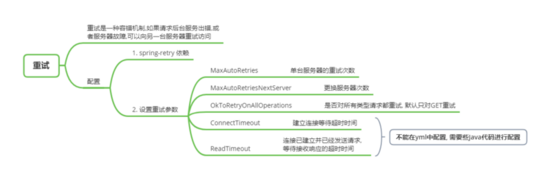
第一步:添加spring-retry依賴
<dependency> <groupId>org.springframework.retry</groupId> <artifactId>spring-retry</artifactId></dependency>
第二步:application.yml 配置 ribbon 重試
# 06項目用來測試遠程調用和ribbon工具# 等功能測試完成后,直接刪除spring: application: name: ribbonserver: port: 3001# 連接eureka,從eureka發現其他服務的地址eureka: client: service-url: defaultZone: http://eureka1:2001/eureka,http://eureka2:2002/eureka#配置ribbon 重試次數ribbon: # 次數參數沒有提示,并且會有黃色警告 # 重試次數越少越好,一般建議用0,1 MaxAutoRetries: 1 MaxAutoRetriesNextServer: 2
第三步:設置 RestTemplate 的請求工廠的超時屬性
package cn.tedu.sp06;import org.springframework.boot.SpringApplication;import org.springframework.boot.autoconfigure.SpringBootApplication;import org.springframework.cloud.client.loadbalancer.LoadBalanced;import org.springframework.context.annotation.Bean;import org.springframework.http.client.SimpleClientHttpRequestFactory;import org.springframework.web.client.RestTemplate;@SpringBootApplicationpublic class Sp06RibbonApplication { public static void main(String[] args) { SpringApplication.run(Sp06RibbonApplication.class, args); } /** * 創建RestTemplate實例 * 放入spring容器 * @LoadBalanced-對RestTemplate進行增強,封裝RestTemplate,添加負載均衡功能 */ @LoadBalanced @Bean public RestTemplate restTemplate(){ //設置調用超時時間,超時后認為調用失敗 SimpleClientHttpRequestFactory f = new SimpleClientHttpRequestFactory(); f.setConnectTimeout(1000);//建立連接等待時間 f.setReadTimeout(1000);//連接建立后,發送請求后,等待接收響應的時間 return new RestTemplate(f); }}
第四步:ItemController 添加延遲代碼
package cn.tedu.sp02.item.controller;import java.util.List;import java.util.Random;import org.springframework.beans.factory.annotation.Autowired;import org.springframework.beans.factory.annotation.Value;import org.springframework.web.bind.annotation.GetMapping;import org.springframework.web.bind.annotation.PathVariable;import org.springframework.web.bind.annotation.PostMapping;import org.springframework.web.bind.annotation.RequestBody;import org.springframework.web.bind.annotation.RestController;import cn.tedu.sp01.pojo.Item;import cn.tedu.sp01.service.ItemService;import cn.tedu.web.util.JsonResult;import lombok.extern.slf4j.Slf4j;@Slf4j@RestControllerpublic class ItemController { @Autowired private ItemService itemService; //配置文件 application.yml中的server.port=8001注入到這個變量 //是為了后面做負載均衡測試,可以直接看到調用的是那個服務器 @Value('${server.port}') private int port; //獲取訂單的商品列表 @GetMapping('/{orderId}') public JsonResult<List<Item>> getItems(@PathVariable String orderId) throws InterruptedException { log.info('server.port='+port+', orderId='+orderId); //模擬延遲代碼 if (Math.random()<0.9){ long t = new Random().nextInt(5000); log.info('延遲:'+t); Thread.sleep(t); } List<Item> items = itemService.getItems(orderId);//根據訂單id獲取商品列表 return JsonResult.ok(items).msg('port='+port); } //減少商品庫存 /** * @RequestBody 完整接收請求協議體中的數據 * @param items * @return */ @PostMapping('/decreaseNumber') public JsonResult decreaseNumber(@RequestBody List<Item> items) { for (Item item : items){ log.info('減少商品庫存:'+item ); } itemService.decreaseNumbers(items); return JsonResult.ok(); }}
第五步:測試 ribbon 重試機制
通過 ribbon 訪問 item-service,當超時,ribbon 會重試請求集群中其他服務器
http://localhost:3001/item-service/35
到此這篇關于深入學習Spring Cloud-Ribbon的文章就介紹到這了,更多相關Spring Cloud-Ribbon內容請搜索好吧啦網以前的文章或繼續瀏覽下面的相關文章希望大家以后多多支持好吧啦網!
相關文章:
 網公網安備
網公網安備