vue-路由精講 二級(jí)路由和三級(jí)路由的作用
1、我們繼續(xù)上一個(gè)案例 vue -- 路由精講制作導(dǎo)航 -- 從無到有 ,在 about文件夾下 創(chuàng)建一些文件夾。如下:
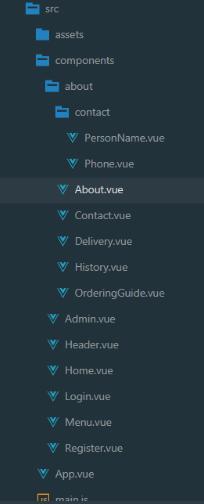
2、編寫about.vue代碼。當(dāng)我們點(diǎn)擊導(dǎo)航中 “關(guān)于我們” ,就會(huì)顯示該部分內(nèi)容。代碼中寫了四個(gè)可供點(diǎn)擊后可以跳轉(zhuǎn)的模塊。和 <router-view></router-view> 表示你點(diǎn)擊了哪個(gè)組件,哪個(gè)組件就會(huì)渲染到這里來。
其中注意:css樣式,我們直接引入bootstrap中的導(dǎo)航的樣式,在標(biāo)簽中直接添加class屬性的值就可以了。
about.vue代碼
<template> <div> <div class='row mb-5'> //row 代表行, mb-5 表示margin-bottom距離下面5 <!-- 導(dǎo)航 --> <div class='col-4'> //四列<div class='list-group mb-5'> <router-link tag='li' :to='{name:’historyLink’}'> <a class='list-group-item list-group-item-action'>歷史訂單</a> </router-link> <router-link tag='li' :to='{name:’contactLink’}'> <a class='list-group-item list-group-item-action'>聯(lián)系我們</a> </router-link> <router-link tag='li' :to='{name:’orderingGuideLink’}'> <a class='list-group-item list-group-item-action'>點(diǎn)餐文檔</a> </router-link> <router-link tag='li' :to='{name:’deliveryLink’}'> <a class='list-group-item list-group-item-action'>快遞信息</a> </router-link></div> </div> <!-- 導(dǎo)航所對(duì)應(yīng)的內(nèi)容 --> <div class='col-8'> //8列<router-view></router-view> </div> </div> </div></template>
3、配置二級(jí)路由和三級(jí)路由
注意:我們要在about頁面下添加四個(gè)路由,用到 children 屬性, 而且還用到 redirect 屬性,默認(rèn)跳轉(zhuǎn)到指定路由,具體操作看代碼和注釋。
main.js代碼
import Vue from ’vue’import VueRouter from ’vue-router’import App from ’./App.vue’import Home from ’./components/Home.vue’import Menu from ’./components/Menu.vue’import Admin from ’./components/Admin.vue’import About from ’./components/about/About.vue’import Login from ’./components/Login.vue’import Register from ’./components/Register.vue’//二級(jí)路由import Contact from ’./components/about/Contact.vue’import Delivery from ’./components/about/Delivery.vue’import History from ’./components/about/History.vue’import OrderingGuide from ’./components/about/OrderingGuide.vue’//三級(jí)路由import Phone from ’./components/about/contact/Phone.vue’import PersonName from ’./components/about/contact/PersonName.vue’
Vue.use(VueRouter)
核心代碼 二級(jí)路由和三級(jí)路由的跳轉(zhuǎn)
const routes = [ {path:’/’, name:’homeLink’, component:Home}, {path:’/menu’, name:’menuLink’, component:Menu}, {path:’/admin’, name:’adminLink’, component:Admin}, {path:’/about’, name:’aboutLink’, redirect:’/about/contact’, component:About, children:[ //表示about頁面中默認(rèn)跳轉(zhuǎn)到/about/contact 這個(gè)路由頁面下。 {path:’/about/contact’, name:’contactLink’, redirect:’/personName’, component:Contact, children:[ //在/about/contact頁面中默認(rèn)展現(xiàn)三級(jí)路由personName 的內(nèi)容。 {path:’/phone’, name:'phoneNumber', component:Phone}, {path:’/personName’, name:'personName', component:PersonName}, ]}, {path:’/history’,name:’historyLink’,component:History}, {path:’/delivery’,name:’deliveryLink’,component:Delivery}, {path:’/orderingGuide’,name:’orderingGuideLink’,component:OrderingGuide}, ]}, {path:’/login’, name:’loginLink’, component:Login}, {path:’/register’, name:’registerLink’, component:Register}, // {path:’*’,redirect:’/’},]const router = new VueRouter({ routes, mode:’history’})new Vue({ el: ’#app’, router, render: h => h(App)})
Contact.vue代碼
<template> <div class='card text-dark bg-light mb-3'> <div class='card-header'>聯(lián)系我們</div> <div class='card-body'> <h4 class='card-title'>聯(lián)系我們</h4> <p class='card-text'>1623487989@qq.com</p> <router-link :to='{name:’phoneNumber’}'>電話</router-link> <router-link :to='{name:’personName’}'>聯(lián)系人</router-link> <router-view></router-view> </div> </div></template>
Delivery.vue代碼
<template> <div class='card text-dark bg-light mb-3'> <div class='card-header'>快遞信息</div> <div class='card-body'> <h4 class='card-title'>快遞信息</h4> <p class='card-text'>1623487989@qq.com</p> </div> </div></template>
History.vue代碼
<template> <div class='card text-dark bg-light mb-3'> <div class='card-header'>歷史訂單</div> <div class='card-body'> <h4 class='card-title'>歷史訂單</h4> <p class='card-text'>1623487989@qq.com</p> </div> </div></template>
OrderingGuide.vue代碼
<template> <div class='card text-dark bg-light mb-3'> <div class='card-header'>點(diǎn)餐文檔</div> <div class='card-body'> <h4 class='card-title'>點(diǎn)餐文檔</h4> <p class='card-text'>1623487989@qq.com</p> </div> </div></template>
Phone.vue代碼
<template> <h1>400040040404404</h1> </template>
PersonName.vue代碼
<template> <h1>小劭</h1> </template>
補(bǔ)充知識(shí):vue:菜單收縮功能
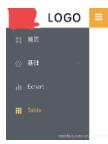
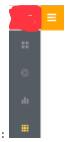
想要實(shí)現(xiàn):點(diǎn)擊菜單能收縮。(效果如下:)
點(diǎn)擊前:
點(diǎn)擊后:
思路:
首先我們要知道紳縮的按鈕和菜單是否在一個(gè)頁面。在一個(gè)頁面就簡單了。
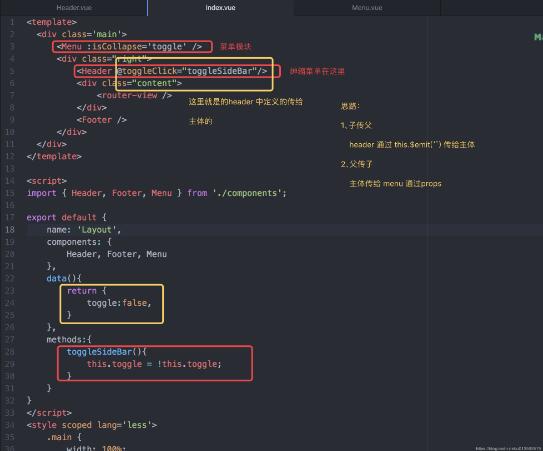
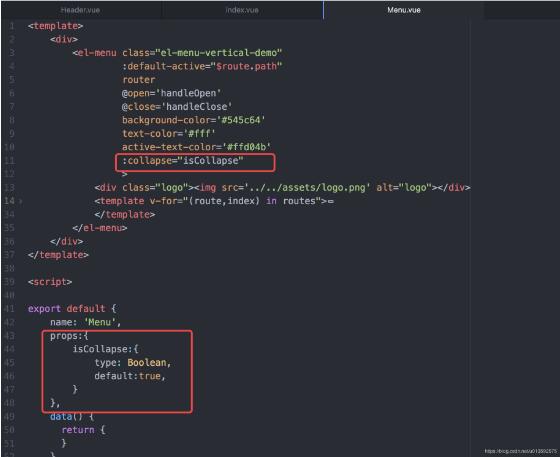
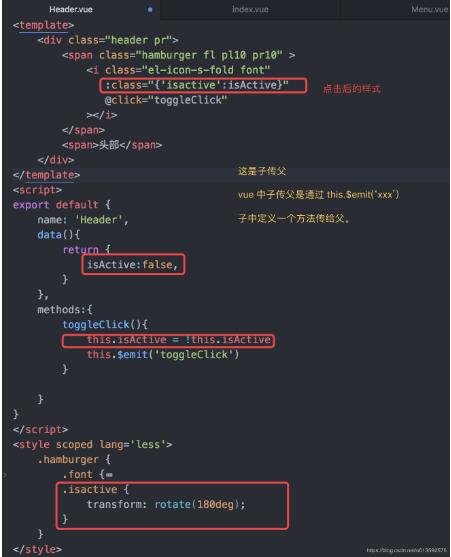
如果不在一個(gè)頁面,就會(huì)涉級(jí)到父子級(jí)傳參,紳縮按鈕模塊中要把狀態(tài)傳給header,這是兄弟間的傳遞參數(shù),需要用到 vuex。如果不用vuex的話,就通過主體去操作。紳縮按鈕把狀態(tài)傳給主體是子傳父,通過 this.$emit()。主體把狀態(tài)傳給菜單,是父傳子,通過props ,菜單中需要接收主體中傳過來的東西,要在 data 中定義props 在里面定義type、required、default。如果不清楚props 是啥,請(qǐng)百度。
操作:
1、先看整體布局
2、menu 模塊
3、header 模塊
以上這篇vue-路由精講 二級(jí)路由和三級(jí)路由的作用就是小編分享給大家的全部內(nèi)容了,希望能給大家一個(gè)參考,也希望大家多多支持好吧啦網(wǎng)。
相關(guān)文章:
1. IntelliJ IDEA導(dǎo)入項(xiàng)目的方法2. Vue+express+Socket實(shí)現(xiàn)聊天功能3. Spring Boot設(shè)置支持跨域請(qǐng)求過程詳解4. 基于Java實(shí)現(xiàn)記事本功能5. 詳解Python IO口多路復(fù)用6. python利用opencv如何實(shí)現(xiàn)答題卡自動(dòng)判卷7. Java 實(shí)現(xiàn)定時(shí)任務(wù)的三種方法8. Java 獲取properties的幾種方式9. 使用HttpClient消費(fèi)ASP.NET Web API服務(wù)案例10. Python ini文件常用操作方法解析

 網(wǎng)公網(wǎng)安備