vue實現div可拖動位置也可改變盒子大小的原理
以下是效果圖:實現了div盒子在固定區域的拖動,也可改變盒子的高度和寬度,當超出邊距后無法繼續改變大小
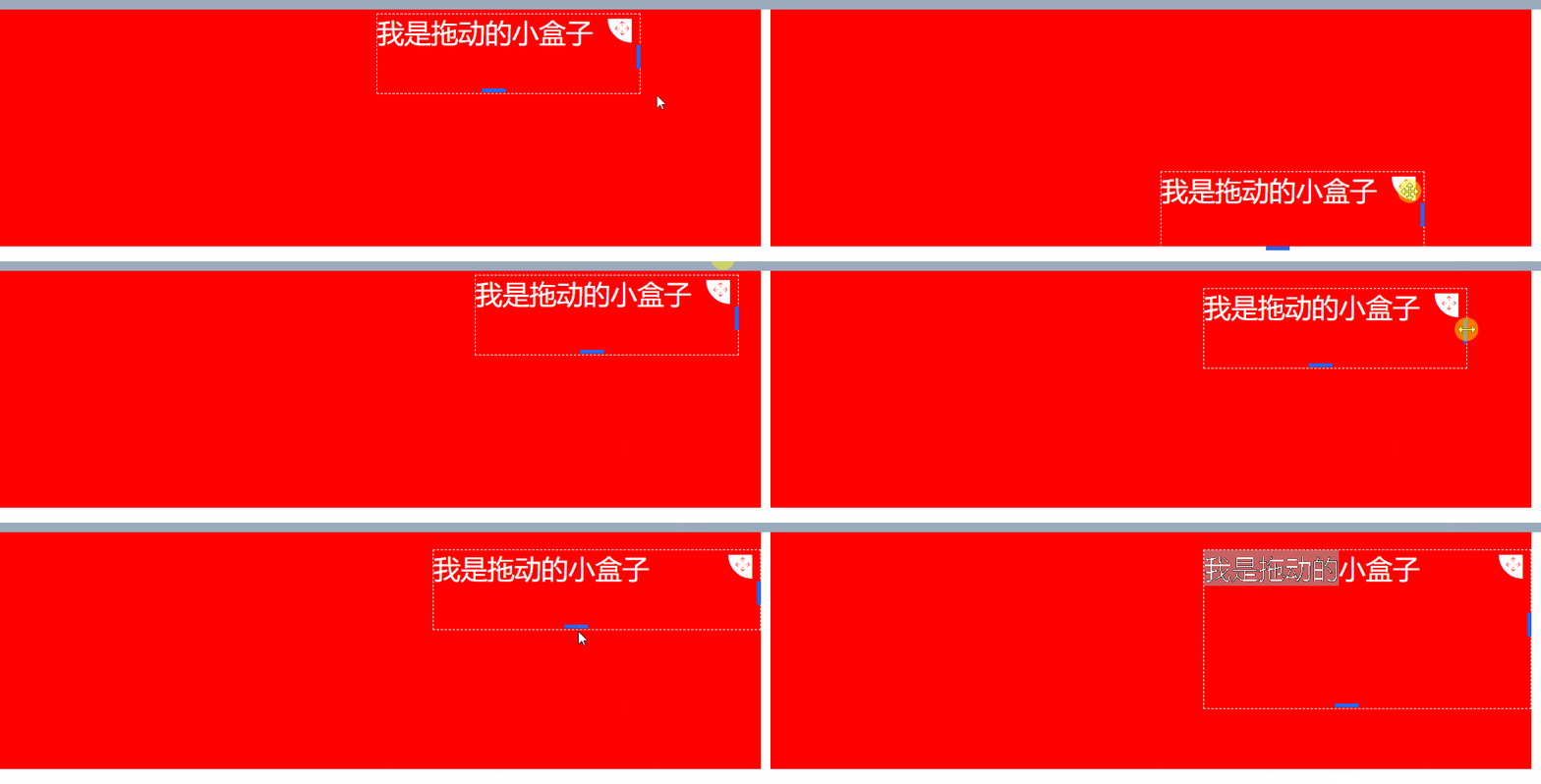
這里說一下大致原理:拖動和改變大小是分開來操作的,接下來分別說一下
盒子拖動
這里用到了js的三個鼠標事件,分別是onmousedown(鼠標按下)、onmousemove(鼠標移動)以及onmouseup(鼠標松開),大致流程就是鼠標按下拖動圖標進行拖動時,動態獲取當前div的left和top再重新賦值給當前div的top、left值,當鼠標松開再清除事件,至于固定在某個區域內拖動,在賦值的時候判斷當前top及left值是否超過限制區域的值,如果超過給最大值最小值
盒子改變大小
這里用到的也是盒子拖動的三個事件,當鼠標移入盒子左邊框觸發mousemove事件,動態計算盒子寬度重新賦值,鼠標松開注銷mousrmove事件,我將寬度和高度改變分別封裝了組件,用的時候直接調用就好
博主用的vue寫的,這里展示的也是銅鼓vue書寫的,其他都是大同小異,知道原理就好
// index.vue<template> <!-- demo --> <div id='maxBoxId'> <div : : > <div class='drag-content'> <div class='content-text'> <!-- 拖拽圖標 --> <div class='drag-icon'> <i @mousedown.stop='dragDiv($event)' @mouseup.stop='dragUp($event)' ></i> </div> {{ moveInfo.text }} </div> <!-- 寬度改變組件 --> <ChangeWidth :moveId='moveInfo.moveId' index='0' @widthChange='changeWidth' @clearEvent='clearEvent' /> <!-- 高度改變組件 --> <ChangeHeight :moveId='moveInfo.moveId' index='1' @heightChange='heightChange' @clearEvent='clearEvent' /> </div> </div> </div></template> <script>import ChangeWidth from ’../component/ChangeWidth’import ChangeHeight from ’../component/ChangeHeight’export default { components: { ChangeWidth, ChangeHeight }, name: ’demo’, data() { return { moveInfo: { dragId: ’smallDragBoxId’, moveId: ’smallMoveBoxId’, text: ’我是拖動的小盒子’, width: 400, height: 100, // 上邊距和左邊距 coordinate: { x: 180, y: 10 } } } }, methods: { // 區塊拖動 dragDiv(el, index) { // dragId: 可拖動區域唯一標識 // moveId: 改變寬度組件唯一標識 const { dragId, coordinate } = this.moveInfo let obig = document.getElementById(’maxBoxId’) let osmall = document.getElementById(dragId) // 用于保存小的div拖拽前的坐標 osmall.startX = el.clientX - osmall.offsetLeft osmall.startY = el.clientY - osmall.offsetTop document.onmousemove = e => { let left, top left = e.clientX - osmall.startX top = e.clientY - osmall.startY osmall.style.left = left + ’px’ osmall.style.top = top + ’px’ coordinate.x = left coordinate.y = top if (left <= 0) { osmall.style.left = 0 + ’px’ coordinate.x = 0 } if (top <= 0) { osmall.style.top = 0 + ’px’ coordinate.y = 0 } if (left >= obig.offsetWidth - osmall.offsetWidth) { osmall.style.left = obig.offsetWidth - osmall.offsetWidth + ’px’ coordinate.x = obig.offsetWidth - osmall.offsetWidth } if (top >= obig.offsetHeight - osmall.offsetHeight) { osmall.style.top = obig.offsetHeight - osmall.offsetHeight + ’px’ coordinate.y = obig.offsetHeight - osmall.offsetHeight } } }, dragUp(el) { document.onmousemove = null document.onmouseup = null // 調用接口保存數據 }, // 改變drag寬度尺寸 changeWidth(params) { const { index, width } = params let left const { dragId } = this.moveInfo // let obig = document.getElementById(’maxBoxId’) let osmall = document.getElementById(dragId) let boxWidth = document.getElementById(’maxBoxId’).offsetWidth left = osmall.style.left const newWidth = this.moveInfo.width + width // outWidth拖動寬度時超出box的寬度 const outWidth = Number(left.slice(0, left.length - 2)) + Number(newWidth) - Number(boxWidth) // 如果超出box將截取留下的 if (outWidth >= 0) { this.moveInfo.width = Number(boxWidth) - Number(left.slice(0, left.length - 2)) } else { this.moveInfo.width = newWidth } // 設置div的最小寬度和最大寬度 if (this.moveInfo.width < 200) { this.moveInfo.width = 200 } if (this.moveInfo.width > 900) { this.moveInfo.width = 900 } }, // 改變drag高度 heightChange(params) { const { index, height } = params let top let osmall = document.getElementById(this.moveInfo.dragId) let boxHeight = document.getElementById(’maxBoxId’).offsetHeight top = osmall.style.top const newHeight = this.moveInfo.height + height // outHeight拖動寬度時超出box的高度 const outHeight = Number(top.slice(0, top.length - 2)) + Number(newHeight) - Number(boxHeight) // 如果超出box將截取留下的 if (outHeight >= 0) { this.moveInfo.height = Number(boxHeight) - Number(top.slice(0, top.length - 2)) } else { this.moveInfo.height = newHeight } // 設置div的最小寬度和最大寬度 if (this.moveInfo.height < 100) { this.moveInfo.height = 100 } if (this.moveInfo.height > 200) { this.moveInfo.height = 200 } }, // 清除鼠標事件 clearEvent() { document.onmousemove = null document.onmouseup = null } }}</script><style lang='scss' scoped>.demo { position: relative; width: 100%; z-index: 10; width: 1200px; background: red; height: 300px; margin-bottom: 1000px; margin-left: 100px; .drag-class { background: rgba(255, 255, 255, 0); position: absolute; .drag-content { position: relative; height: 100%; .content-text { border: 1px dashed #ffffff; font-size: 34px; color: #ffffff; margin-top: 5px; position: relative; height: 100%; .drag-icon { position: absolute; right: 10px; top: 5px; float: left; // margin-right: 10px; .down-dragger { cursor: move; font-size: 30px; color: #dbdce0; color: #ffffff; } } } } }}</style>
以下是改變大小的組件
<template> <!-- 拖動右邊距改變div寬度 --> <div : @mousedown='mouseDown'></div></template> <script>export default { name: ’ChangeWidth’, props: [’index’, ’moveId’], data() { return { lastX: ’’ } }, created() { document.addEventListener(’mouseup’, this.mouseUp) }, destroyed() { document.removeEventListener(’mouseup’, this.mouseUp) }, methods: { mouseDown(event) { document.addEventListener(’mousemove’, this.mouseMove) this.lastX = event.screenX }, mouseMove(e) { this.$emit(’widthChange’, { width: e.screenX - this.lastX, index: this.index }) this.lastX = e.screenX }, mouseUp() { this.lastX = ’’ document.removeEventListener(’mousemove’, this.mouseMove) this.$emit(’clearEvent’) } }}</script><style lang='less' scoped>.x-handle { width: 5px; cursor: e-resize; background: #2866f0; height: 30px; position: absolute; right: 0; top: 40%;}</style>
改變高度的組件原理和寬度一樣,避免代碼重復就不上傳了
上面就是大致流程和源碼。
總結
到此這篇關于vue實現div可拖動位置也可改變盒子大小的文章就介紹到這了,更多相關vue 實現div拖動位置內容請搜索好吧啦網以前的文章或繼續瀏覽下面的相關文章希望大家以后多多支持好吧啦網!
相關文章:

 網公網安備
網公網安備