解決Android Studio xml 格式化不自動換行的問題
今天把Android Studio 2.3 更新為了3.0 遇到一個蛋疼的問題
如圖:

格式化完代碼后發現不會自動換行了,看著真心不爽。
后來發現其實是設置問題,如圖:
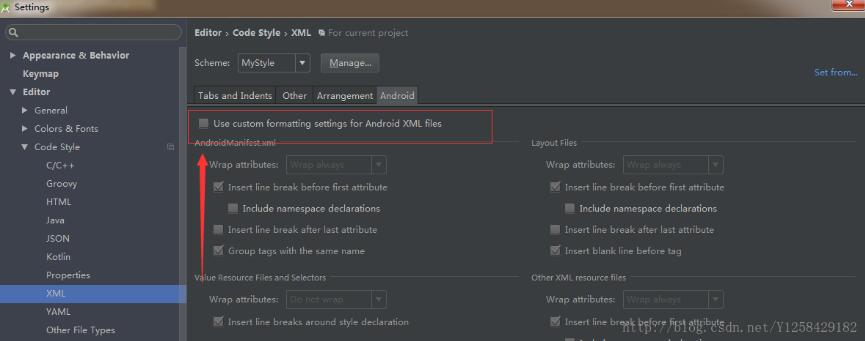
只要把這里打上√就可以了。
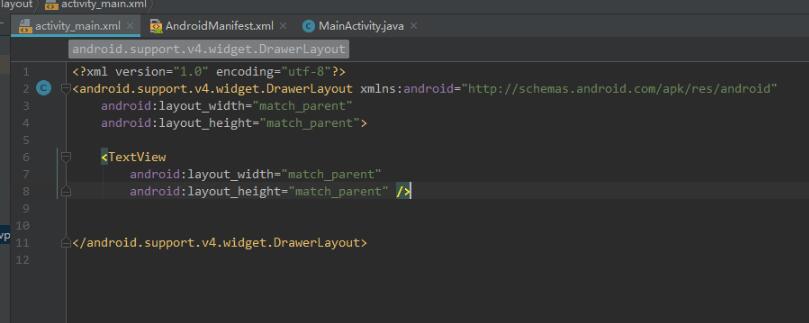
在此記錄一下,希望可以幫到后面的小伙伴
補充知識:Android實現控件內自動換行(比如LinearLayout內部實現子控件換行 )
一、創建類AntoLineUtil(換行操作主要在這里實現)
package com.inpor.fmctv.util;import android.content.Context;import android.content.res.TypedArray;import android.util.AttributeSet;import android.view.View;import android.view.ViewGroup;import com.inpor.fmctv.R;public class AntoLineUtil extends ViewGroup { /** * 子view左右間距 */ private int mHorizontalSpacing; /** * 子view上下行距離 */ private int mVerticalSpacing; private Context context; public AntoLineUtil(Context context) { this(context, null); this.context = context; } public AntoLineUtil(Context context, AttributeSet attrs) { this(context, attrs, 0); } public AntoLineUtil(Context context, AttributeSet attrs, int defStyleAttr) { super(context, attrs, defStyleAttr); if (attrs != null) { TypedArray array = context.obtainStyledAttributes(attrs, R.styleable.AntoLineUtil); mHorizontalSpacing = array.getDimensionPixelOffset( R.styleable.AntoLineUtil_horizontalSpacing, 0); mVerticalSpacing = array.getDimensionPixelOffset( R.styleable.AntoLineUtil_verticalSpacing, 0); array.recycle(); if (mHorizontalSpacing < 0) mHorizontalSpacing = 0; if (mVerticalSpacing < 0) mVerticalSpacing = 0; } } @Override protected void onMeasure(int widthMeasureSpec, int heightMeasureSpec) { int width = MeasureSpec.getSize(widthMeasureSpec); int count = getChildCount(); for (int i = 0; i < count; i++) { measureChild(getChildAt(i), widthMeasureSpec, heightMeasureSpec); } int widthMode = MeasureSpec.getMode(widthMeasureSpec); if (widthMode != MeasureSpec.EXACTLY) { widthMeasureSpec = MeasureSpec.makeMeasureSpec( getAutoLinefeedWidth(width), widthMode); } int heightMode = MeasureSpec.getMode(heightMeasureSpec); if (heightMode != MeasureSpec.EXACTLY) { heightMeasureSpec = MeasureSpec.makeMeasureSpec( getAutoLinefeedHeight(width), heightMode); } super.onMeasure(widthMeasureSpec, heightMeasureSpec); } /** * 自動換行 計算需要的寬度 * * @param width 可用寬度 * @return 需要的寬度 */ private int getAutoLinefeedWidth(int width) { int totalWidth = getPaddingLeft() + getPaddingRight(); for (int i = 0; i < getChildCount(); i++) { if (i > 0) totalWidth += mHorizontalSpacing; View child = getChildAt(i); int childWidth = child.getMeasuredWidth(); totalWidth += childWidth; if (totalWidth >= width) {totalWidth = width;break; } } return totalWidth; } /** * 自動換行 計算需要的高度 * * @param width 可用寬度 * @return 需要的高度 */ private int getAutoLinefeedHeight(int width) { //一行最大可用寬度 int lineWidth = width - getPaddingLeft() - getPaddingRight(); //剩余可用寬度 int availableLineWidth = lineWidth; //需要的高度 int totalHeight = getPaddingTop() + getPaddingBottom(); int lineChildIndex = 0; //本行最大高度 int lineMaxHeight = 0; for (int i = 0; i < getChildCount(); i++) { View child = getChildAt(i); int childWidth = child.getMeasuredWidth(); int childHeight = child.getMeasuredHeight(); //這個child需要的寬度 如果不是第一位的 那么需要加上間距 //這里是用來判斷需不需要換行 int needWidth = i == 0 ? childWidth : (childWidth + mHorizontalSpacing); //如果剩余可用寬度小于需要的長度 那么換行 if (availableLineWidth < needWidth) {totalHeight = totalHeight + lineMaxHeight;if (i > 0) totalHeight += mVerticalSpacing;availableLineWidth = lineWidth;lineMaxHeight = 0;lineChildIndex = 0; } //這個child需要的寬度 如果不是第一位的 那么需要加上間距 int realNeedWidth = lineChildIndex == 0 ? childWidth : (childWidth + mHorizontalSpacing); lineMaxHeight = Math.max(childHeight, lineMaxHeight); availableLineWidth = availableLineWidth - realNeedWidth; lineChildIndex++; } totalHeight = totalHeight + lineMaxHeight; return totalHeight; } @Override protected void onLayout(boolean changed, int l, int t, int r, int b) { layout(); } private void layout() { int count = getChildCount(); int childLeft = getPaddingLeft(); int childTop = getPaddingTop(); int lineWidth = getMeasuredWidth() - getPaddingRight() - getPaddingLeft(); int availableLineWidth = lineWidth; int lineChildIndex = 0; //一行的最大高度 int lineMaxHeight = 0; for (int i = 0; i < count; i++) { View child = getChildAt(i); int childWidth = child.getMeasuredWidth(); int childHeight = child.getMeasuredHeight(); int needWidth = i == 0 ? childWidth : (childWidth + mHorizontalSpacing); if (availableLineWidth < needWidth) {availableLineWidth = lineWidth;childTop += lineMaxHeight;if (i > 0) childTop += mVerticalSpacing;lineMaxHeight = 0;childLeft = getPaddingLeft();lineChildIndex = 0; } int realNeedWidth = lineChildIndex == 0 ? childWidth : (childWidth + mHorizontalSpacing); lineMaxHeight = Math.max(lineMaxHeight, childHeight); child.layout(childLeft + realNeedWidth - childWidth, childTop, childLeft + realNeedWidth, childTop + childHeight); availableLineWidth -= realNeedWidth; childLeft += realNeedWidth; lineChildIndex++; } } public int getHorizontalSpacing() { return mHorizontalSpacing; } public void setHorizontalSpacing(int horizontalSpacing) { mHorizontalSpacing = horizontalSpacing; } public int getVerticalSpacing() { return mVerticalSpacing; } public void setVerticalSpacing(int verticalSpacing) { mVerticalSpacing = verticalSpacing; }}
二、在values中的attrs.xml中添加以下代碼(實現子控件的邊距):
<declare-styleable name='AntoLineUtil'> <attr name='horizontalSpacing' format='dimension'/> <attr name='verticalSpacing' format='dimension'/> </declare-styleable>
三、添加固定的xml布局父控件,事先寫好,布局activity_video_preview.xml :
<com.inpor.fmctv.util.AntoLineUtil android: android:layout_width='@dimen/size_dp_630' android:layout_height='@dimen/size_dp_138' android:layout_marginTop='@dimen/size_dp_18' android:orientation='horizontal' app:horizontalSpacing='@dimen/size_dp_18' app:verticalSpacing='@dimen/size_dp_18'></com.inpor.fmctv.util.AntoLineUtil>
四、添加固定的xml布局子控件,事先寫好,動態添加進去,布局item_camera_info.xml :
<?xml version='1.0' encoding='utf-8'?><LinearLayout xmlns:android='http://schemas.android.com/apk/res/android' android: android:layout_width='@dimen/size_dp_198' android:layout_height='@dimen/size_dp_60' android:orientation='horizontal' android:paddingLeft='@dimen/size_dp_18' android:paddingRight='@dimen/size_dp_18' android:gravity='center_vertical' android:background='@color/textcolor_395878'> <TextView android: android:layout_width='@dimen/size_dp_120' android:layout_height='wrap_content' android:textSize='@dimen/size_sp_24' android:textColor='@color/white'/> <CheckBox android: android:layout_width='@dimen/size_dp_24' android:layout_height='@dimen/size_dp_24' android:button='@null' android:background='@drawable/radio_button_select_ico' /></LinearLayout>
五、在其他方法中動態添加子控件:
AntoLineUtil cameraGroup = (AntoLineUitl) findViewById(R.id.camera_group); // 此處是找到父控件LinearLayoutfor (int i = 0; i<6; i++) { // 用以下方法將layout布局文件換成view LayoutInflater inflater = getLayoutInflater(); View view = inflater.inflate(R.layout.item_camera_info,null); TextView textView = view.findViewById(R.id.video_preview_item_tv); textView.setText('攝像頭'+ (cameraId+1)); cameraGroup.addView(view);}
六、效果圖:

以上這篇解決Android Studio xml 格式化不自動換行的問題就是小編分享給大家的全部內容了,希望能給大家一個參考,也希望大家多多支持好吧啦網。
相關文章:

 網公網安備
網公網安備