Android Studio實現(xiàn)簡易計算器(表格布局TableLayout)
這是一個運用網(wǎng)格布局來做的簡易計算器,可能沒有那么美觀,大家可以繼續(xù)完善
首先先看看成果吧
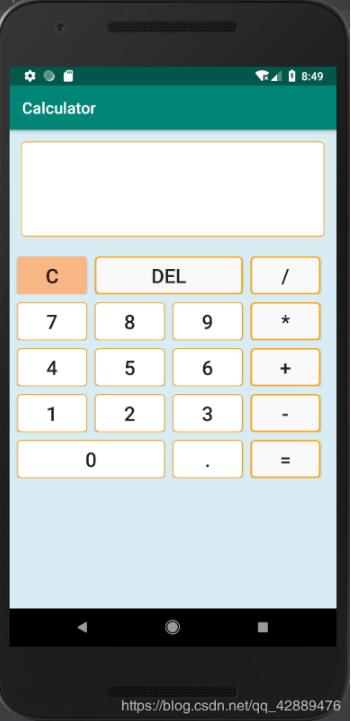
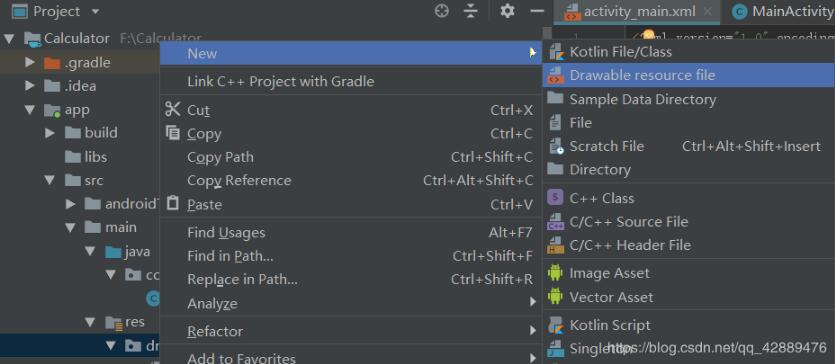
首先先建一個新的Project Calculator然后先編寫顏色背景文件創(chuàng)建一個gray.xml,哪里創(chuàng)建呢?如圖在drawable下右擊,選擇new?Drawable resource file
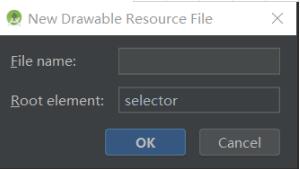
第一個是文件名字,第二個屬性可以自己選擇,我們這里前兩個文件選擇shape,第三個文件選selector,附上顏色背景代碼
gray.xml
<?xml version='1.0' encoding='utf-8'?><shape xmlns:android='http://schemas.android.com/apk/res/android'> <corners android:radius='5dp'/> <solid android:color='#f9f9f9'/> <stroke android: android:color='#ffa600'/></shape>
orange.xml
<?xml version='1.0' encoding='utf-8'?><shape xmlns:android='http://schemas.android.com/apk/res/android'> <corners android:radius='5dp'/> // 圓角 <solid android:color='#F7B684'/> //顏色</shape>
white.xml
<?xml version='1.0' encoding='utf-8'?><shape xmlns:android='http://schemas.android.com/apk/res/android'> <corners android:radius='5dp'/> <solid android:color='#ffffff'/> <stroke android: android:color='#ffa600'/></shape>
change.xml
<?xml version='1.0' encoding='utf-8'?><selector xmlns:android='http://schemas.android.com/apk/res/android'> <item android:drawable='@drawable/gray'/> //默認顏色 <item android:drawable='@drawable/orange' android:state_pressed='true'/> //按下的改變的顏色</selector>
這個是當你按下按鍵的時候按鍵會改變顏色
接下來就是布局文件了
activity_main.xml
我用的是表格布局,大家也可以用表格布局來寫,效果會好一些
<?xml version='1.0' encoding='utf-8'?><TableLayout xmlns:android='http://schemas.android.com/apk/res/android' android:layout_width='match_parent' android:layout_height='match_parent' android:background='#D8ECF3'> <TextView android:gravity='bottom|right' android:textSize='70dp' android:singleLine='true' android:layout_margin='15dp' android:layout_width='match_parent' android:layout_height='120dp' android:background='@drawable/white' android: /> <TableRow android:layout_width='match_parent' android:layout_height='match_parent' android:layout_marginTop='10dp'> <Button android: android:layout_marginLeft='10dp' android:background='@drawable/orange' android:gravity='center' android:text='C' android:textSize='25sp' /> <Button android: android:layout_marginLeft='10dp' android:layout_span='2' android:background='@drawable/gray' android:gravity='center' android:text='Del' android:textSize='25sp' /> <Button android: android:layout_marginLeft='10dp' android:layout_marginRight='10dp' android:background='@drawable/gray' android:gravity='center' android:layout_span='1' android:text='/' android:textSize='25sp' /> </TableRow> <TableRow android:layout_width='match_parent' android:layout_height='match_parent' android:layout_marginTop='10dp'> <Button android: android:layout_marginLeft='10dp' android:background='@drawable/white' android:gravity='center' android:text='7' android:textSize='25sp' /> <Button android: android:layout_marginLeft='10dp' android:background='@drawable/white' android:gravity='center' android:text='8' android:textSize='25sp' /> <Button android: android:layout_marginLeft='10dp' android:background='@drawable/white' android:gravity='center' android:text='9' android:textSize='25sp' /> <Button android: android:layout_marginLeft='10dp' android:layout_marginRight='10dp' android:background='@drawable/gray' android:gravity='center' android:text='*' android:textSize='25sp' /> </TableRow> <TableRow android:layout_width='match_parent' android:layout_height='match_parent' android:layout_marginTop='10dp'> <Button android: android:layout_marginLeft='10dp' android:background='@drawable/white' android:gravity='center' android:text='4' android:textSize='25sp' /> <Button android: android:layout_marginLeft='10dp' android:background='@drawable/white' android:gravity='center' android:text='5' android:textSize='25sp' /> <Button android: android:layout_marginLeft='10dp' android:background='@drawable/white' android:gravity='center' android:text='6' android:textSize='25sp' /> <Button android: android:layout_marginLeft='10dp' android:layout_marginRight='10dp' android:background='@drawable/gray' android:gravity='center' android:text='+' android:textSize='25sp' /> </TableRow> <TableRow android:layout_width='match_parent' android:layout_height='match_parent' android:layout_marginTop='10dp'> <Button android: android:layout_marginLeft='10dp' android:background='@drawable/white' android:gravity='center' android:text='1' android:textSize='25sp' /> <Button android: android:layout_marginLeft='10dp' android:background='@drawable/white' android:gravity='center' android:text='2' android:textSize='25sp' /> <Button android: android:layout_marginLeft='10dp' android:background='@drawable/white' android:gravity='center' android:text='3' android:textSize='25sp' /> <Button android: android:layout_marginLeft='10dp' android:layout_marginRight='10dp' android:background='@drawable/gray' android:gravity='center' android:text='-' android:textSize='25sp' /> </TableRow> <TableRow android:layout_width='wrap_content' android:layout_height='match_parent' android:layout_marginTop='10dp'> <Button android: android:layout_marginLeft='10dp' android:layout_span='2' android:background='@drawable/white' android:gravity='center' android:text='0' android:textSize='25sp' /> <Button android: android:layout_marginLeft='10dp' android:layout_span='1' android:background='@drawable/white' android:gravity='center' android:text='.' android:textSize='25sp' /> <Button android: android:layout_marginLeft='10dp' android:layout_marginRight='10dp' android:layout_span='1' android:background='@drawable/gray' android:gravity='center' android:text='=' android:textSize='25sp' /> </TableRow></TableLayout>
接下來就是MainActivity.java
package com.example.calculator;import android.support.v7.app.AppCompatActivity;import android.os.Bundle;import android.view.View;import android.widget.Button;import android.widget.TextView;public class MainActivity extends AppCompatActivity implements View.OnClickListener { Button btn_clean,btn_del,btn_divide,btn_0,btn_1,btn_2,btn_3,btn_4,btn_5,btn_6,btn_7,btn_8,btn_9, btn_multiply,btn_add,btn_minus,btn_point,btn_equal; TextView textView; boolean clear_flag; //清空標識 @Override protected void onCreate(Bundle savedInstanceState) { super.onCreate (savedInstanceState); setContentView (R.layout.activity_main); btn_0 = findViewById(R.id.btn_0); //初始化 btn_1 = findViewById(R.id.btn_1); btn_2 = findViewById(R.id.btn_2); btn_3 = findViewById(R.id.btn_3); btn_4 = findViewById(R.id.btn_4); btn_5 = findViewById(R.id.btn_5); btn_6 = findViewById(R.id.btn_6); btn_7 = findViewById(R.id.btn_7); btn_8 = findViewById(R.id.btn_8); btn_9 = findViewById(R.id.btn_9); btn_multiply = findViewById(R.id.btn_multiply); btn_divide = findViewById(R.id.btn_divide); btn_add = findViewById(R.id.btn_add); btn_minus = findViewById(R.id.btn_minus); btn_point = findViewById(R.id.btn_point); btn_del =findViewById(R.id.btn_del); btn_equal = findViewById(R.id.btn_equal); btn_clean = findViewById(R.id.btn_clean); textView = findViewById(R.id.textView); btn_0.setOnClickListener(this); //設置按鈕的點擊事件 btn_1.setOnClickListener(this); btn_2.setOnClickListener(this); btn_3.setOnClickListener(this); btn_4.setOnClickListener(this); btn_5.setOnClickListener(this); btn_6.setOnClickListener(this); btn_7.setOnClickListener(this); btn_8.setOnClickListener(this); btn_9.setOnClickListener(this); btn_minus.setOnClickListener(this); btn_multiply.setOnClickListener(this); btn_del.setOnClickListener(this); btn_divide.setOnClickListener(this); btn_point.setOnClickListener(this); btn_add.setOnClickListener(this); btn_equal.setOnClickListener(this); btn_clean.setOnClickListener(this); } public void onClick(View v) { String str = textView.getText().toString(); switch(v.getId ()){ case R.id.btn_0: case R.id.btn_1: case R.id.btn_2: case R.id.btn_3: case R.id.btn_4: case R.id.btn_5: case R.id.btn_6: case R.id.btn_7: case R.id.btn_8: case R.id.btn_9: case R.id.btn_point: if(clear_flag){ clear_flag=false; str=''; textView.setText (''); } textView.setText(str+((Button)v).getText ()); break; case R.id.btn_add: case R.id.btn_minus: case R.id.btn_multiply: case R.id.btn_divide: if(clear_flag){ clear_flag=false; textView.setText(''); } textView.setText(str+' '+((Button)v).getText()+' '); break; case R.id.btn_del: if(clear_flag){ clear_flag=false; textView.setText (''); }else if (str != null && !str.equals ('')){ textView.setText(str.substring(0,str.length()-1)); //刪除一個字符 } break; case R.id.btn_clean: clear_flag=false; str = ''; textView.setText(''); //清空文本內容 break; case R.id.btn_equal: getResult(); //獲取結果 break; } } private void getResult() { //算法 String s = textView.getText().toString(); if(s == null || s.equals ('')){ return; } if (!s.contains ('')){ return; } if (clear_flag){ clear_flag=false; return; } clear_flag=true; String str1 = s.substring(0,s.indexOf(' ')); // 獲取到運算符前面的字符 String str_y = s.substring(s.indexOf(' ')+1,s.indexOf(' ')+2); //獲取到運算符 String str2 = s.substring(s.indexOf(' ')+ 3); //獲取到運算符后面的字符 double result = 0; if (!str1.equals ('') && !str2.equals ('')){ double num1 = Double.parseDouble(str1); //將str1、str2強制轉化為double類型 double num2 = Double.parseDouble(str2); if (str_y.equals ('+')){ result = num1 + num2; }else if (str_y.equals ('-')){ result = num1 - num2; }else if (str_y.equals ('÷')){ if (num2 == 0){ result = 0; }else { result = num1/num2; } }else if (str_y.equals ('*')){ result = num1*num2; } if (!str1.contains ('.') && !str2.contains ('.') && !s.equals ('÷')){ int k = (int) result; //強制轉換 textView.setText (k); }else{ textView.setText (result+''); } }else if (!str1.equals ('') && str2.equals ('')){ textView.setText (s); }else if (str1.equals ('') && !str2.equals ('')){ double num2 = Double.parseDouble(str2); if (s.equals ('+')){ result = 0 + num2; }else if (s.equals('-')){ result = 0 - num2; }else if (s.equals('×')){ result = 0; }else if (s.equals('÷')){ result = 0; } if (!str2.contains ('.')) { int r = (int) result; textView.setText (r + ''); } else { textView.setText (result + ''); } } else { textView.setText (''); } }}
這里的算法可能寫的沒有那么好,大家可以網(wǎng)上找找其他案例參照一下,繼續(xù)完善算法
更多計算器功能實現(xiàn),請點擊專題: 計算器功能匯總 進行學習
關于Android計算器功能的實現(xiàn),查看專題:Android計算器 進行學習。
以上就是本文的全部內容,希望對大家的學習有所幫助,也希望大家多多支持好吧啦網(wǎng)。
相關文章:

 網(wǎng)公網(wǎng)安備