android studio實(shí)現(xiàn)簡(jiǎn)單考試應(yīng)用程序?qū)嵗a詳解
一、問題
1、如圖所示,設(shè)計(jì)一個(gè)包含四種題型的簡(jiǎn)單考試應(yīng)用程序(具體考試題目可以選用以下設(shè)計(jì),也可以自己另外確定),項(xiàng)目名稱:zuoye06_666 ;(666,改成自己的實(shí)際編號(hào))。
2、布局管理器任選(約束布局相對(duì)容易實(shí)現(xiàn))。
3、“提交”按鈕的Text通過字符串資源賦值,不要直接輸入“提交”兩個(gè)字。
4、每題按25分計(jì)算,編寫相應(yīng)的程序,答題完成后單擊“提交”按鈕,在“總得分:”右邊文本框中顯示實(shí)際得分;同時(shí),顯示一個(gè)Toast消息框:
答對(duì)不足3題,顯示:“還需努力啊!”;
答對(duì)3題,顯示:“祝賀你通過考試!”;
全部答對(duì),顯示:“你真棒!祝賀你!”
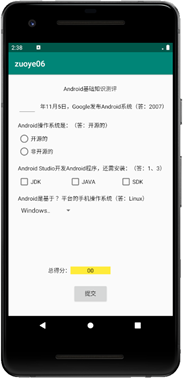
二、分析
1.這次作業(yè)比較簡(jiǎn)單,就是上課講的東西的集合,練習(xí)spinner、checkbox、radiobutton、edittext以及button的監(jiān)聽,還有setText和Toast用法。
2.注意點(diǎn),要考慮到正常考試的時(shí)候?qū)W生第一次選對(duì)后來改錯(cuò),或者一開始選錯(cuò)后來改對(duì)的情況,考生的分?jǐn)?shù)應(yīng)該由最后一次監(jiān)聽到結(jié)果來確定,所以添加了boolean類型的以及checkbox的計(jì)數(shù)。
三、代碼
1.布局代碼
<?xml version='1.0' encoding='utf-8'?><androidx.constraintlayout.widget.ConstraintLayout xmlns:android='http://schemas.android.com/apk/res/android' xmlns:app='http://schemas.android.com/apk/res-auto' xmlns:tools='http://schemas.android.com/tools' android:layout_width='match_parent' android:layout_height='match_parent' tools:context='.MainActivity'> <TextView android: android:layout_width='wrap_content' android:layout_height='wrap_content' android:text='Android基礎(chǔ)知識(shí)測(cè)評(píng)' app:layout_constraintBottom_toBottomOf='parent' app:layout_constraintHorizontal_bias='0.498' app:layout_constraintLeft_toLeftOf='parent' app:layout_constraintRight_toRightOf='parent' app:layout_constraintTop_toTopOf='parent' app:layout_constraintVertical_bias='0.058' /> <EditText android: android:layout_width='wrap_content' android:layout_height='wrap_content' android:layout_marginStart='16dp' android:ems='3' android:inputType='textPersonName' app:layout_constraintBottom_toBottomOf='@+id/textView' app:layout_constraintStart_toStartOf='parent' app:layout_constraintTop_toTopOf='@+id/textView' app:layout_constraintVertical_bias='0.615' /> <TextView android: android:layout_width='wrap_content' android:layout_height='wrap_content' android:layout_marginTop='20dp' android:text='@string/di1ti' app:layout_constraintStart_toEndOf='@+id/et_on' app:layout_constraintTop_toBottomOf='@+id/textView2' /> <TextView android: android:layout_width='wrap_content' android:layout_height='wrap_content' android:layout_marginTop='20dp' android:text='@string/di2ti' app:layout_constraintStart_toStartOf='@+id/et_on' app:layout_constraintTop_toBottomOf='@+id/textView' /> <RadioGroup android: android:layout_width='113dp' android:layout_height='64dp' app:layout_constraintStart_toStartOf='@+id/textView3' app:layout_constraintTop_toBottomOf='@+id/textView3'> <RadioButton android: android:layout_width='match_parent' android:layout_height='wrap_content' android:text='開源的' /> <RadioButton android: android:layout_width='match_parent' android:layout_height='wrap_content' android:text='非開源的' /> </RadioGroup> <TextView android: android:layout_width='wrap_content' android:layout_height='wrap_content' android:layout_marginTop='20dp' android:text='@string/di3ti' app:layout_constraintStart_toStartOf='@+id/textView3' app:layout_constraintTop_toBottomOf='@+id/radioGroup' /> <CheckBox android: android:layout_width='wrap_content' android:layout_height='wrap_content' android:layout_marginStart='60dp' android:text='JAVA' app:layout_constraintStart_toEndOf='@+id/cb1' app:layout_constraintTop_toBottomOf='@+id/textView4' /> <CheckBox android: android:layout_width='wrap_content' android:layout_height='wrap_content' android:text='JDK' app:layout_constraintStart_toStartOf='@+id/textView4' app:layout_constraintTop_toBottomOf='@+id/textView4' /> <CheckBox android: android:layout_width='wrap_content' android:layout_height='wrap_content' android:layout_marginStart='60dp' android:text='SDK' app:layout_constraintStart_toEndOf='@+id/cb2' app:layout_constraintTop_toBottomOf='@+id/textView4' /> <TextView android: android:layout_width='wrap_content' android:layout_height='wrap_content' android:layout_marginTop='20dp' android:text='@string/di4ti' app:layout_constraintStart_toStartOf='@+id/textView4' app:layout_constraintTop_toBottomOf='@+id/cb1' /> <Spinner android: android:layout_width='130dp' android:layout_height='30dp' android:entries='@array/Systems' app:layout_constraintStart_toStartOf='@+id/textView5' app:layout_constraintTop_toBottomOf='@+id/textView5' /> <TextView android: android:layout_width='wrap_content' android:layout_height='wrap_content' android:layout_marginStart='104dp' android:layout_marginBottom='36dp' android:text='總得分:' app:layout_constraintBottom_toTopOf='@+id/button' app:layout_constraintStart_toStartOf='parent' /> <TextView android: android:layout_width='wrap_content' android:layout_height='wrap_content' android:background='#F1ED06' android:text=' 00 ' app:layout_constraintBottom_toBottomOf='@+id/textView6' app:layout_constraintEnd_toEndOf='parent' app:layout_constraintHorizontal_bias='0.025' app:layout_constraintStart_toEndOf='@+id/textView6' app:layout_constraintTop_toTopOf='@+id/textView6' app:layout_constraintVertical_bias='0.0' /> <Button android: android:layout_width='wrap_content' android:layout_height='wrap_content' android:layout_marginBottom='20dp' android:text='@string/subscribe' app:layout_constraintBottom_toBottomOf='parent' app:layout_constraintEnd_toEndOf='parent' app:layout_constraintStart_toStartOf='parent' /> </androidx.constraintlayout.widget.ConstraintLayout>
2.strings.xml
<resources> <string name='app_name'>zuoye06_231</string> <string name='di1ti'>年11月5日,Google發(fā)布安卓系統(tǒng)(答:2007)</string> <string name='di2ti'>Android操作系統(tǒng)是(答:開源的)</string> <string name='di3ti'>Android Studio 開發(fā)Android程序,還需安裝:(1、3)</string> <string name='di4ti'>Android是基于?平臺(tái)手機(jī)的操作系統(tǒng)(Linux)</string> <string name='subscribe'>提交</string></resources>
3.Systems.xml
<?xml version='1.0' encoding='utf-8'?><resources> <string-array name='Systems'> <item>Windows</item> <item>Linux</item> <item>Mac</item> </string-array></resources>
4.java代碼
package com.example.lenovo.zuoye06_231; import androidx.appcompat.app.AppCompatActivity; import android.os.Bundle;import android.view.KeyEvent;import android.view.View;import android.widget.AdapterView;import android.widget.Button;import android.widget.CheckBox;import android.widget.RadioButton;import android.widget.RadioGroup;import android.widget.Spinner;import android.widget.TextView;import android.widget.Toast;import android.widget.CompoundButton; public class MainActivity extends AppCompatActivity { static int i = 0,cb_num = 0; boolean rd_num = false,sp_num = false,et_num = false; TextView sorce; TextView et_on; RadioGroup rd; Button button; CheckBox checkBox1; CheckBox checkBox2; CheckBox checkBox3; @Override protected void onCreate(Bundle savedInstanceState) { super.onCreate(savedInstanceState); setContentView(R.layout.activity_main); //定義 et_on = findViewById(R.id.et_on); sorce = findViewById(R.id.sorce); rd = findViewById(R.id.radioGroup); button = findViewById(R.id.button); checkBox1 = findViewById(R.id.cb1); checkBox2 = findViewById(R.id.cb2); checkBox3 = findViewById(R.id.cb3); //為每個(gè)復(fù)選按鈕設(shè)置狀態(tài)改變監(jiān)聽器 checkBox1.setOnCheckedChangeListener(new CompoundButton.OnCheckedChangeListener(){ @Override public void onCheckedChanged(CompoundButton buttonView, boolean isChecked) { // TODO Auto-generated method stub if(isChecked) cb_num++; else cb_num--; } }); checkBox2.setOnCheckedChangeListener(new CompoundButton.OnCheckedChangeListener(){ @Override public void onCheckedChanged(CompoundButton buttonView, boolean isChecked) { // TODO Auto-generated method stub if(isChecked) cb_num--; else cb_num++; } }); checkBox3.setOnCheckedChangeListener(new CompoundButton.OnCheckedChangeListener(){ @Override public void onCheckedChanged(CompoundButton buttonView, boolean isChecked) { // TODO Auto-generated method stub if(isChecked) cb_num++; else cb_num--; } }); //設(shè)置單選按鈕組添加事件監(jiān)聽 rd.setOnCheckedChangeListener(new RadioGroup.OnCheckedChangeListener() { @Override public void onCheckedChanged(RadioGroup group, int checkedId) { //獲取被選擇的單選按鈕 RadioButton r = (RadioButton) findViewById(checkedId); if(r.getText().equals('開源的')) rd_num = true; else rd_num = false; } }); //edittext監(jiān)聽 et_on.setOnEditorActionListener(new TextView.OnEditorActionListener() { @Override public boolean onEditorAction(TextView textView, int i, KeyEvent keyEvent) { if(et_on.getText().toString().equals('2007')) et_num = true; else et_num = false; return false; } }); //獲取下拉列表對(duì)象 final Spinner spinner = (Spinner) findViewById(R.id.spinner); //為Spinner添加選擇監(jiān)聽器 spinner.setOnItemSelectedListener(new AdapterView.OnItemSelectedListener() { @Override //數(shù)據(jù)選擇事件處理 public void onItemSelected(AdapterView<?> parent, View view, int pos, long id) { String[] Systems = getResources().getStringArray(R.array.Systems); //顯示選擇結(jié)果 if(Systems[pos].equals('Linux')) sp_num = true; else sp_num = false; } //以下方法重寫必須有 @Override public void onNothingSelected(AdapterView<?> parent) { // Another interface callback } }); button.setOnClickListener(new View.OnClickListener() { @Override public void onClick(View v) { if(cb_num == 2) i++; if(sp_num) i++; if(et_num) i++; if(rd_num) i++; sorce.setText(' '+(i*25)+' '); if(i == 4) Toast.makeText(MainActivity.this,'你真棒!祝賀你!', Toast.LENGTH_SHORT).show(); else if(i == 3) Toast.makeText(MainActivity.this,'祝賀你通過考試!', Toast.LENGTH_SHORT).show(); else Toast.makeText(MainActivity.this,'還需努力啊!', Toast.LENGTH_SHORT).show(); } }); }}
四、結(jié)論
1.當(dāng)用戶填寫的時(shí)候最終答案是按最后修改的來確定的。
2.考慮到正常情況下當(dāng)用戶提交后數(shù)據(jù)已經(jīng)上傳到網(wǎng)絡(luò)上,所以沒有添加不能二次修改的代碼,因此測(cè)試的時(shí)候會(huì)出現(xiàn)第一次提交后不退出,修改后結(jié)果會(huì)出問題。
五、參考文章
3.29更新如果想要解決不能2次修改問題可以加一個(gè)狀態(tài)標(biāo)志符。
如果想要解決二次提交后累加的問題,可以在Toast后加一個(gè)i=0。
到此這篇關(guān)于android studio實(shí)現(xiàn)簡(jiǎn)單考試應(yīng)用程序的文章就介紹到這了,更多相關(guān)android studio實(shí)現(xiàn) 考試應(yīng)用程序內(nèi)容請(qǐng)搜索好吧啦網(wǎng)以前的文章或繼續(xù)瀏覽下面的相關(guān)文章希望大家以后多多支持好吧啦網(wǎng)!
相關(guān)文章:
1. idea重置默認(rèn)配置的方法步驟2. idea給項(xiàng)目打war包的方法步驟3. IntelliJ IDEA設(shè)置自動(dòng)提示功能快捷鍵的方法4. IntelliJ IDEA安裝插件的方法步驟5. IntelliJ IDEA設(shè)置背景圖片的方法步驟6. idea 打包的jar運(yùn)行報(bào) "XXX中沒有主清單屬性"7. Docker 部署 Prometheus的安裝詳細(xì)教程8. idea打開多個(gè)窗口的操作方法9. IntelliJ IDEA調(diào)整字體大小的方法10. IntelliJ IDEA刪除類的方法步驟

 網(wǎng)公網(wǎng)安備