Android table布局開發實現簡單計算器
本文實例為大家分享了Android table布局開發實現簡單計算器的具體代碼,供大家參考,具體內容如下
結果如圖:
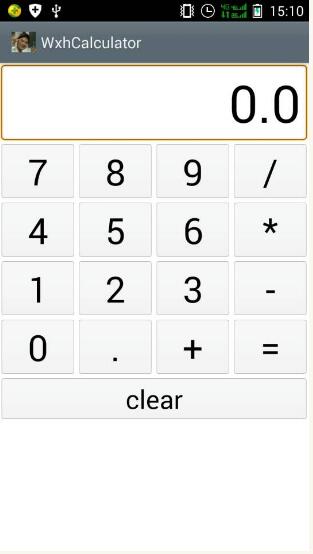
XML文件如下:
<FrameLayout xmlns:android='http://schemas.android.com/apk/res/android'xmlns:tools='http://schemas.android.com/tools'android:id='@+id/container'android:layout_width='match_parent'android:layout_height='match_parent'tools:context='com.example.wxhcalculator.MainActivity'tools:ignore='MergeRootFrame' ><TableLayoutandroid:layout_width='match_parent'android:layout_height='wrap_content'android:stretchColumns='1'android:textSize='42sp' ><TableRow><EditTextandroid:id='@+id/result'android:layout_width='fill_parent'android:layout_height='wrap_content'android:layout_span='4'android:background='@android:drawable/editbox_background'android:cursorVisible='false'android:editable='false'android:gravity='right|center_vertical'android:lines='1'android:textSize='60sp' /></TableRow><TableRow><LinearLayoutandroid:layout_width='fill_parent'android:layout_height='wrap_content'android:layout_weight='1'android:orientation='horizontal'android:textSize='42sp' ><Buttonandroid:id='@+id/num7'android:layout_width='fill_parent'android:layout_height='wrap_content'android:layout_weight='1'android:text='7'android:textSize='42sp' /><Buttonandroid:id='@+id/num8'android:layout_width='fill_parent'android:layout_height='wrap_content'android:layout_weight='1'android:text='8'android:textSize='42sp' /><Buttonandroid:id='@+id/num9'android:layout_width='fill_parent'android:layout_height='wrap_content'android:layout_weight='1'android:text='9'android:textSize='42sp' /><Buttonandroid:id='@+id/divide'android:layout_width='fill_parent'android:layout_height='wrap_content'android:layout_weight='1'android:text='/'android:textSize='42sp' /></LinearLayout></TableRow><TableRow><LinearLayoutandroid:layout_width='fill_parent'android:layout_height='wrap_content'android:layout_weight='1'android:orientation='horizontal'android:textSize='42sp' ><Buttonandroid:id='@+id/num4'android:layout_width='fill_parent'android:layout_height='wrap_content'android:layout_weight='1'android:text='4'android:textSize='42sp' /><Buttonandroid:id='@+id/num5'android:layout_width='fill_parent'android:layout_height='wrap_content'android:layout_weight='1'android:text='5'android:textSize='42sp' /><Buttonandroid:id='@+id/num6'android:layout_width='fill_parent'android:layout_height='wrap_content'android:layout_weight='1'android:text='6'android:textSize='42sp' /><Buttonandroid:id='@+id/multiply'android:layout_width='fill_parent'android:layout_height='wrap_content'android:layout_weight='1'android:text='*'android:textSize='42sp' /></LinearLayout></TableRow><TableRow><LinearLayoutandroid:layout_width='fill_parent'android:layout_height='wrap_content'android:layout_weight='1'android:orientation='horizontal'android:textSize='42sp' ><Buttonandroid:id='@+id/num1'android:layout_width='fill_parent'android:layout_height='wrap_content'android:layout_weight='1'android:text='1'android:textSize='42sp' /><Buttonandroid:id='@+id/num2'android:layout_width='fill_parent'android:layout_height='wrap_content'android:layout_weight='1'android:text='2'android:textSize='42sp' /><Buttonandroid:id='@+id/num3'android:layout_width='fill_parent'android:layout_height='wrap_content'android:layout_weight='1'android:text='3'android:textSize='42sp' /><Buttonandroid:id='@+id/subtract'android:layout_width='fill_parent'android:layout_height='wrap_content'android:layout_weight='1'android:text='-'android:textSize='42sp' /></LinearLayout></TableRow><TableRow><LinearLayoutandroid:layout_width='fill_parent'android:layout_height='wrap_content'android:layout_weight='1'android:orientation='horizontal'android:textSize='42sp' ><Buttonandroid:id='@+id/num0'android:layout_width='fill_parent'android:layout_height='wrap_content'android:layout_weight='1'android:text='0'android:textSize='42sp' /><Buttonandroid:id='@+id/point'android:layout_width='fill_parent'android:layout_height='wrap_content'android:layout_weight='1'android:text='.'android:textSize='42sp' /><Buttonandroid:id='@+id/add'android:layout_width='fill_parent'android:layout_height='wrap_content'android:layout_weight='1'android:text='+'android:textSize='42sp' /><Buttonandroid:id='@+id/equal'android:layout_width='fill_parent'android:layout_height='wrap_content'android:layout_weight='1'android:text='='android:textSize='42sp' /></LinearLayout></TableRow><TableRow><Buttonandroid:id='@+id/clear'android:layout_width='fill_parent'android:layout_height='wrap_content'android:layout_span='4'android:gravity='center_vertical|center_horizontal'android:text='clear'android:textSize='30sp' /></TableRow></TableLayout></FrameLayout>
mainActivity主函數如下:
package com.example.wxhcalculator;import android.support.v7.app.ActionBarActivity;import android.os.Bundle;import android.view.View;import android.view.View.OnClickListener;import android.widget.Button;import android.widget.EditText;public class MainActivity extends ActionBarActivity {private Button[] btnNum = new Button[11];// 數值按鈕private Button[] btnCommand = new Button[5];// 符號按鈕private EditText editText = null;// 顯示區域private Button btnClear = null; // clear按鈕private String lastCommand; // 用于保存運算符private boolean clearFlag; // 用于判斷是否清空顯示區域的值,true需要,false不需要private boolean firstFlag; // 用于判斷是否是首次輸入,true首次,false不是首次private double result; // 計算結果public MainActivity() {// 初始化各項值result = 0; // x的值firstFlag = true; // 是首次運算clearFlag = false; // 不需要清空lastCommand = '='; // 運算符}@Overrideprotected void onCreate(Bundle savedInstanceState) {super.onCreate(savedInstanceState);setContentView(R.layout.activity_main);// 獲取運算符btnCommand[0] = (Button) findViewById(R.id.add);btnCommand[1] = (Button) findViewById(R.id.subtract);btnCommand[2] = (Button) findViewById(R.id.multiply);btnCommand[3] = (Button) findViewById(R.id.divide);btnCommand[4] = (Button) findViewById(R.id.equal);// 獲取數字btnNum[0] = (Button) findViewById(R.id.num0);btnNum[1] = (Button) findViewById(R.id.num1);btnNum[2] = (Button) findViewById(R.id.num2);btnNum[3] = (Button) findViewById(R.id.num3);btnNum[4] = (Button) findViewById(R.id.num4);btnNum[5] = (Button) findViewById(R.id.num5);btnNum[6] = (Button) findViewById(R.id.num6);btnNum[7] = (Button) findViewById(R.id.num7);btnNum[8] = (Button) findViewById(R.id.num8);btnNum[9] = (Button) findViewById(R.id.num9);btnNum[10] = (Button) findViewById(R.id.point);// 初始化顯示結果區域editText = (EditText) findViewById(R.id.result);editText.setText('0.0');// 實例化監聽器對象NumberAction na = new NumberAction();CommandAction ca = new CommandAction();for (Button bc : btnCommand) {bc.setOnClickListener(ca);}for (Button bc : btnNum) {bc.setOnClickListener(na);}// clear按鈕的動作btnClear = (Button) findViewById(R.id.clear);btnClear.setOnClickListener(new View.OnClickListener() {@Overridepublic void onClick(View view) {editText.setText('0.0');// 初始化各項值result = 0; // x的值firstFlag = true; // 是首次運算clearFlag = false; // 不需要清空lastCommand = '='; // 運算符}});}// 數字按鈕監聽器private class NumberAction implements OnClickListener {@Overridepublic void onClick(View view) {Button btn = (Button) view;String input = btn.getText().toString();if (firstFlag) { // 首次輸入// 一上就'.',就什么也不做if (input.equals('.')) {return;}// 如果是'0.0'的話,就清空if (editText.getText().toString().equals('0.0')) {editText.setText('');}firstFlag = false;// 改變是否首次輸入的標記值} else {String editTextStr = editText.getText().toString();// 判斷顯示區域的值里面是否已經有'.',如果有,輸入的又是'.',就什么都不做if (editTextStr.indexOf('.') != -1 && input.equals('.')) {return;}// 判斷顯示區域的值里面只有'-',輸入的又是'.',就什么都不做if (editTextStr.equals('-') && input.equals('.')) {return;}// 判斷顯示區域的值如果是'0',輸入的不是'.',就什么也不做if (editTextStr.equals('0') && !input.equals('.')) {return;}}// 如果我點擊了運算符以后,再輸入數字的話,就要清空顯示區域的值if (clearFlag) {editText.setText('');clearFlag = false;// 還原初始值,不需要清空}editText.setText(editText.getText().toString() + input);// 設置顯示區域的值}}// 符號按鈕監聽器private class CommandAction implements OnClickListener {@Overridepublic void onClick(View view) {Button btn = (Button) view;String inputCommand = (String) btn.getText();if (firstFlag) {// 首次輸入'-'的情況if (inputCommand.equals('-')) {editText.setText('-');// 顯示區域的內容設置為'-'firstFlag = false;// 改變首次輸入的標記}} else {if (!clearFlag) {// 如果flag=false不需要清空顯示區的值,就調用方法計算calculate(Double.parseDouble(editText.getText().toString()));// 保存顯示區域的值,并計算}// 保存你點擊的運算符lastCommand = inputCommand;clearFlag = true;// 因為我這里已經輸入過運算符,}}}// 計算用的方法private void calculate(double x) {if (lastCommand.equals('+')) {result += x;} else if (lastCommand.equals('-')) {result -= x;} else if (lastCommand.equals('*')) {result *= x;} else if (lastCommand.equals('/')) {result /= x;} else if (lastCommand.equals('=')) {result = x;}editText.setText('' + result);}}
更多計算器功能實現,請點擊專題: 計算器功能匯總 進行學習
關于Android計算器功能的實現,查看專題:Android計算器 進行學習。
以上就是本文的全部內容,希望對大家的學習有所幫助,也希望大家多多支持好吧啦網。
相關文章:

 網公網安備
網公網安備