android自定義彈出框樣式的實現方法
前言:
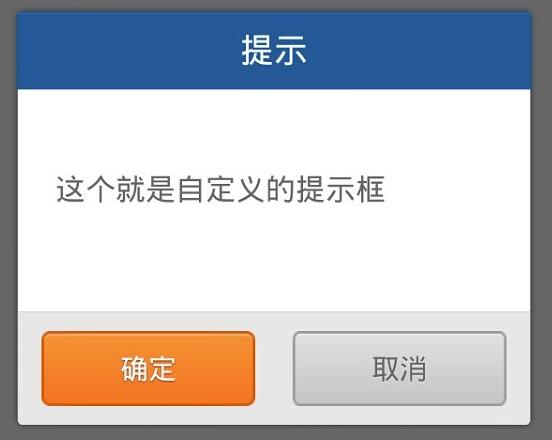
做項目時,感覺android自帶的彈出框樣式比較丑,很多應用都是自己做的彈出框,這里也試著自己做了一個。
廢話不說先上圖片:
實現機制
1.先自定義一個彈出框的樣式
2.自己實現CustomDialog類,繼承自Dialog,實現里面方法,在里面加載自定義樣式的彈出框;
3.使用時,與使用Dialog一樣
具體代碼
dialog_normal_layout.xml樣式文件
<?xml version='1.0' encoding='utf-8'?><FrameLayout xmlns:android='http://schemas.android.com/apk/res/android' android:layout_width='fill_parent' android:layout_height='fill_parent' android:clickable='true' android:orientation='vertical' android:padding='20.0dip' > <LinearLayout android:layout_width='fill_parent' android:layout_height='wrap_content' android:layout_gravity='center' android:background='@drawable/bg_bombbox' android:orientation='vertical' > <TextView android: android:layout_width='fill_parent' android:layout_height='40.0dip' android:gravity='center' android:text='@string/title_alert' android:visibility='visible' /> <LinearLayout android: android:layout_width='fill_parent' android:layout_height='wrap_content' android:gravity='center' ><TextViewandroid: android:layout_width='fill_parent'android:layout_height='wrap_content'android:gravity='left|center'android:lineSpacingMultiplier='1.5'android:minHeight='120.0dip'android:paddingBottom='15.0dip'android:paddingLeft='20.0dip'android:paddingRight='20.0dip'android:paddingTop='15.0dip' /> </LinearLayout> <View android:layout_width='fill_parent' android:layout_height='1.0px' android:background='#ffd0d0d0' /> <LinearLayout android:layout_width='fill_parent' android:layout_height='60.0dip' android:layout_gravity='bottom' android:background='@drawable/dialog_bottom_bg' android:gravity='center' android:orientation='horizontal' > <Buttonandroid: android:layout_width='114.0dip'android:layout_height='40.0dip'android:background='@drawable/btn_ok_selector'android:gravity='center'android:text='@string/ok' /> <Buttonandroid: android:layout_width='114.0dip'android:layout_height='40.0dip'android:layout_marginLeft='20.0dip'android:background='@drawable/btn_cancel_selector'android:gravity='center'android:text='@string/cancel' /> </LinearLayout> </LinearLayout> </FrameLayout>
其中引用的樣式文件styles.xml
<?xml version='1.0' encoding='utf-8'?><resources xmlns:android='http://schemas.android.com/apk/res/android'> <style name='AppBaseTheme' parent='android:Theme.Light'></style> <style name='AppTheme' parent='AppBaseTheme'></style> <style name='text_18_ffffff'> <item name='android:textSize'>18.0dip</item> <item name='android:textColor'>#ffffffff</item> </style> <style name='text_16_666666'> <item name='android:textSize'>16.0dip</item> <item name='android:textColor'>#ff666666</item> </style> <style name='sdw_white'> <item name='android:shadowColor'>#7fffffff</item> <item name='android:shadowDx'>0.0</item> <item name='android:shadowDy'>0.65</item> <item name='android:shadowRadius'>1.0</item> </style> <style name='sdw_79351b'> <item name='android:shadowColor'>#ff79351b</item> <item name='android:shadowDx'>0.0</item> <item name='android:shadowDy'>1.0</item> <item name='android:shadowRadius'>1.0</item> </style> <style name='text_15_ffffff_sdw' parent='@style/sdw_79351b'> <item name='android:textSize'>15.0dip</item> <item name='android:textColor'>#ffffffff</item> </style> <style name='text_15_666666_sdw' parent='@style/sdw_white'> <item name='android:textSize'>15.0dip</item> <item name='android:textColor'>#ff666666</item> </style> <style name='Dialog' parent='android:style/Theme.Dialog'> <item name='android:background'>#00000000</item> <item name='android:windowBackground'>@android:color/transparent</item> <item name='android:windowNoTitle'>true</item> <item name='android:windowIsFloating'>true</item> </style> </resources>
自定義Dialog的實現類CustomDialog
package com.dyr.custom; import android.app.Dialog;import android.content.Context;import android.content.DialogInterface;import android.view.LayoutInflater;import android.view.View;import android.view.ViewGroup.LayoutParams;import android.widget.Button;import android.widget.LinearLayout;import android.widget.TextView; import com.dyr.view.R; public class CustomDialog extends Dialog { public CustomDialog(Context context) { super(context); } public CustomDialog(Context context, int theme) { super(context, theme); } public static class Builder { private Context context; private String title; private String message; private String positiveButtonText; private String negativeButtonText; private View contentView; private DialogInterface.OnClickListener positiveButtonClickListener; private DialogInterface.OnClickListener negativeButtonClickListener; public Builder(Context context) { this.context = context; } public Builder setMessage(String message) { this.message = message; return this; } /** * Set the Dialog message from resource * * @param title * @return */ public Builder setMessage(int message) { this.message = (String) context.getText(message); return this; } /** * Set the Dialog title from resource * * @param title * @return */ public Builder setTitle(int title) { this.title = (String) context.getText(title); return this; } /** * Set the Dialog title from String * * @param title * @return */ public Builder setTitle(String title) { this.title = title; return this; } public Builder setContentView(View v) { this.contentView = v; return this; } /** * Set the positive button resource and it’s listener * * @param positiveButtonText * @return */ public Builder setPositiveButton(int positiveButtonText, DialogInterface.OnClickListener listener) { this.positiveButtonText = (String) context .getText(positiveButtonText); this.positiveButtonClickListener = listener; return this; } public Builder setPositiveButton(String positiveButtonText, DialogInterface.OnClickListener listener) { this.positiveButtonText = positiveButtonText; this.positiveButtonClickListener = listener; return this; } public Builder setNegativeButton(int negativeButtonText, DialogInterface.OnClickListener listener) { this.negativeButtonText = (String) context .getText(negativeButtonText); this.negativeButtonClickListener = listener; return this; } public Builder setNegativeButton(String negativeButtonText, DialogInterface.OnClickListener listener) { this.negativeButtonText = negativeButtonText; this.negativeButtonClickListener = listener; return this; } public CustomDialog create() { LayoutInflater inflater = (LayoutInflater) context .getSystemService(Context.LAYOUT_INFLATER_SERVICE); // instantiate the dialog with the custom Theme final CustomDialog dialog = new CustomDialog(context,R.style.Dialog); View layout = inflater.inflate(R.layout.dialog_normal_layout, null); dialog.addContentView(layout, new LayoutParams( LayoutParams.FILL_PARENT, LayoutParams.WRAP_CONTENT)); // set the dialog title ((TextView) layout.findViewById(R.id.title)).setText(title); // set the confirm button if (positiveButtonText != null) { ((Button) layout.findViewById(R.id.positiveButton)) .setText(positiveButtonText); if (positiveButtonClickListener != null) { ((Button) layout.findViewById(R.id.positiveButton)) .setOnClickListener(new View.OnClickListener() { public void onClick(View v) { positiveButtonClickListener.onClick(dialog, DialogInterface.BUTTON_POSITIVE); } }); } } else { // if no confirm button just set the visibility to GONE layout.findViewById(R.id.positiveButton).setVisibility( View.GONE); } // set the cancel button if (negativeButtonText != null) { ((Button) layout.findViewById(R.id.negativeButton)) .setText(negativeButtonText); if (negativeButtonClickListener != null) { ((Button) layout.findViewById(R.id.negativeButton)) .setOnClickListener(new View.OnClickListener() { public void onClick(View v) { negativeButtonClickListener.onClick(dialog, DialogInterface.BUTTON_NEGATIVE); } }); } } else { // if no confirm button just set the visibility to GONE layout.findViewById(R.id.negativeButton).setVisibility( View.GONE); } // set the content message if (message != null) { ((TextView) layout.findViewById(R.id.message)).setText(message); } else if (contentView != null) { // if no message set // add the contentView to the dialog body ((LinearLayout) layout.findViewById(R.id.content)) .removeAllViews(); ((LinearLayout) layout.findViewById(R.id.content)) .addView(contentView, new LayoutParams(LayoutParams.FILL_PARENT,LayoutParams.FILL_PARENT)); } dialog.setContentView(layout); return dialog; } }}
使用代碼
CustomDialog.Builder builder = new CustomDialog.Builder(this); builder.setMessage('這個就是自定義的提示框'); builder.setTitle('提示'); builder.setPositiveButton('確定', new DialogInterface.OnClickListener() { public void onClick(DialogInterface dialog, int which) { dialog.dismiss(); //設置你的操作事項 } }); builder.setNegativeButton('取消', new android.content.DialogInterface.OnClickListener() { public void onClick(DialogInterface dialog, int which) { dialog.dismiss(); } }); builder.create().show();
至此,自定義彈出框已經完成,是不是感覺很簡單呢。
這里附上一個自定義彈出框的小項目代碼下載地址:點擊打開鏈接
以上就是本文的全部內容,希望對大家的學習有所幫助,也希望大家多多支持好吧啦網。
相關文章:
 網公網安備
網公網安備