Android Studio連接SQLite數(shù)據(jù)庫(kù)的登錄注冊(cè)實(shí)現(xiàn)
1、先看一下項(xiàng)目目錄:
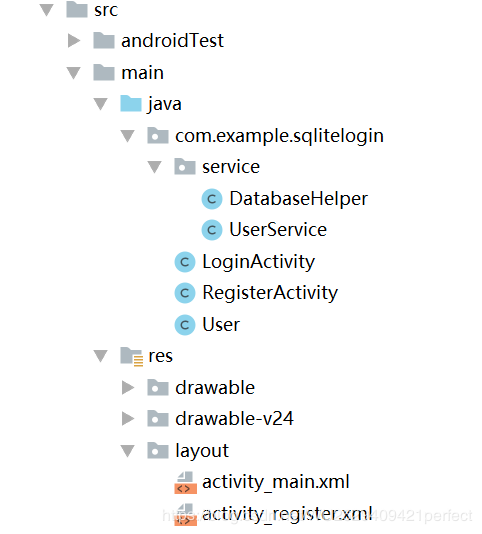
2、新建一個(gè)AS項(xiàng)目,創(chuàng)建如上圖所示的目錄結(jié)構(gòu),然后添加內(nèi)容:
(1)修改添加布局文件:
activity_main.xml:
<?xml version='1.0' encoding='utf-8'?><android.support.constraint.ConstraintLayout xmlns:android='http://schemas.android.com/apk/res/android' xmlns:app='http://schemas.android.com/apk/res-auto' xmlns:tools='http://schemas.android.com/tools' android:layout_width='match_parent' android:layout_height='match_parent' tools:context='.LoginActivity'><LinearLayout android:layout_width='match_parent' android:layout_height='match_parent' android:orientation='vertical'> <TextView android:layout_width='match_parent' android:layout_height='wrap_content' android:layout_gravity='center' android:gravity='center' android:text='歡迎進(jìn)入登錄界面!' android:textSize='30dp' android:textStyle='bold' /> <TableLayout android:layout_width='match_parent' android:layout_height='wrap_content' android:stretchColumns='1' > <TableRow> <TextViewandroid:layout_width='wrap_content'android:layout_height='wrap_content'android:layout_gravity='center'android:text='用戶名:' /> <EditTextandroid: android:layout_width='fill_parent'android:layout_height='wrap_content'android:hint='請(qǐng)輸入用戶名!!!' /> </TableRow> <TableRow> <TextViewandroid:layout_width='wrap_content'android:layout_height='wrap_content'android:layout_gravity='center'android:text='密碼:' /> <EditTextandroid: android:layout_width='fill_parent'android:layout_height='wrap_content'android:hint='請(qǐng)輸入密碼!!!' /> </TableRow> <TableRow> <TextView /> <LinearLayout><Button android: android:layout_width='100dp' android:layout_height='wrap_content' android:text='登錄' /><Button android: android:layout_width='100dp' android:layout_height='wrap_content' android:text='注冊(cè)' /> </LinearLayout> </TableRow> </TableLayout></LinearLayout></android.support.constraint.ConstraintLayout>
activity_register.xml:
<?xml version='1.0' encoding='utf-8'?><android.support.constraint.ConstraintLayout xmlns:android='http://schemas.android.com/apk/res/android' xmlns:app='http://schemas.android.com/apk/res-auto' xmlns:tools='http://schemas.android.com/tools' android:layout_width='match_parent' android:layout_height='match_parent' tools:context='.RegisterActivity'><LinearLayout android:layout_width='match_parent' android:layout_height='match_parent' android:orientation='vertical'> <TextView android:layout_width='fill_parent' android:layout_height='wrap_content' android:layout_gravity='center' android:gravity='center' android:text='歡迎進(jìn)入注冊(cè)界面!' android:textSize='30dp' android:textStyle='bold' /> <TableLayout android:layout_width='fill_parent' android:layout_height='wrap_content' android:stretchColumns='1' > <TableRow > <TextViewandroid:layout_width='wrap_content'android:layout_height='wrap_content'android:layout_gravity='center'android:text='用戶名:' /> <EditTextandroid: android:layout_width='fill_parent'android:layout_height='wrap_content'android:hint='請(qǐng)輸入用戶名!!!' /> </TableRow> <TableRow > <TextViewandroid:layout_width='wrap_content'android:layout_height='wrap_content'android:layout_gravity='center'android:text='密碼:' /> <EditTextandroid: android:layout_width='fill_parent'android:layout_height='wrap_content'android:hint='請(qǐng)輸入密碼!!!' /> </TableRow> <TableRow > <TextViewandroid:layout_width='wrap_content'android:layout_height='wrap_content'android:layout_gravity='center'android:text='年齡:' /> <EditTextandroid: android:layout_width='fill_parent'android:layout_height='wrap_content'android:hint='請(qǐng)輸入年齡!!!' /> </TableRow> <TableRow > <TextViewandroid:layout_width='wrap_content'android:layout_height='wrap_content'android:layout_gravity='center'android:text='性別:'android:textSize='20dp' /> <RadioGroupandroid: android:layout_width='fill_parent'android:layout_height='wrap_content'android:checkedButton='@+id/woman'android:orientation='horizontal' ><RadioButton android: android:text='男' android:layout_height='wrap_content' android:layout_width='wrap_content' /><RadioButton android: android:text='女' android:layout_height='wrap_content' android:layout_width='wrap_content'/> </RadioGroup> </TableRow> <TableRow > <TextView /> <LinearLayout ><Button android: android:layout_width='150dp' android:layout_height='wrap_content' android:text='注冊(cè)' /> </LinearLayout> </TableRow> </TableLayout></LinearLayout></android.support.constraint.ConstraintLayout>
(2)在service包DatabaseHelper中添加鏈接AS自帶數(shù)據(jù)庫(kù)以及創(chuàng)建表的語(yǔ)句:
package com.example.sqlitelogin.service;import android.content.Context;import android.database.sqlite.SQLiteDatabase;import android.database.sqlite.SQLiteDatabase.CursorFactory;import android.database.sqlite.SQLiteOpenHelper;public class DatabaseHelper extends SQLiteOpenHelper {static String name='user.db';static int dbVersion=1;public DatabaseHelper(Context context) {super(context, name, null, dbVersion);}public void onCreate(SQLiteDatabase db) {String sql='create table user(id integer primary key autoincrement,username varchar(20),password varchar(20),age integer,sex varchar(2))';db.execSQL(sql);}public void onUpgrade(SQLiteDatabase db, int oldVersion, int newVersion) {}}
(3)在service包UserService中用sql語(yǔ)句寫登錄注冊(cè)功能的實(shí)現(xiàn):
package com.example.sqlitelogin.service;import android.content.Context;import android.database.Cursor;import android.database.sqlite.SQLiteDatabase;import com.example.sqlitelogin.User;public class UserService {private DatabaseHelper dbHelper;public UserService(Context context){dbHelper=new DatabaseHelper(context);}public boolean login(String username,String password){SQLiteDatabase sdb=dbHelper.getReadableDatabase();String sql='select * from user where username=? and password=?';Cursor cursor=sdb.rawQuery(sql, new String[]{username,password});if(cursor.moveToFirst()==true){cursor.close();return true;}return false;}public boolean register(User user){SQLiteDatabase sdb=dbHelper.getReadableDatabase();String sql='insert into user(username,password,age,sex) values(?,?,?,?)';Object obj[]={user.getUsername(),user.getPassword(),user.getAge(),user.getSex()};sdb.execSQL(sql, obj);return true;}}
(4)在User文件中聲明要用到的表列名的變量,并對(duì)其添加get&&set方法:
package com.example.sqlitelogin;import java.io.Serializable;public class User implements Serializable{ private int id; private String username; private String password; private int age; private String sex; public User() { super(); // TODO Auto-generated constructor stub } public User(String username, String password, int age, String sex) { super(); this.username = username; this.password = password; this.age = age; this.sex = sex; } public int getId() { return id; } public void setId(int id) { this.id = id; } public String getUsername() { return username; } public void setUsername(String username) { this.username = username; } public String getPassword() { return password; } public void setPassword(String password) { this.password = password; } public int getAge() { return age; } public void setAge(int age) { this.age = age; } public String getSex() { return sex; } public void setSex(String sex) { this.sex = sex; } @Override public String toString() { return 'User [id=' + id + ', username=' + username + ', password='+ password + ', age=' + age + ', sex=' + sex + ']'; }}
(5)為注冊(cè)功能添加activity組件:
package com.example.sqlitelogin;import android.support.v7.app.AppCompatActivity;import android.os.Bundle;import android.util.Log;import android.view.View;import android.widget.Button;import android.widget.EditText;import android.widget.RadioButton;import android.widget.RadioGroup;import android.widget.Toast;import com.example.sqlitelogin.service.UserService;public class RegisterActivity extends AppCompatActivity { EditText username; EditText password; EditText age; RadioGroup sex; Button register; protected void onCreate(Bundle savedInstanceState) { super.onCreate(savedInstanceState); setContentView(R.layout.activity_register); findViews(); register.setOnClickListener(new View.OnClickListener() { public void onClick(View v) {String name=username.getText().toString().trim();String pass=password.getText().toString().trim();String agestr=age.getText().toString().trim();String sexstr=((RadioButton)RegisterActivity.this.findViewById(sex.getCheckedRadioButtonId())).getText().toString();Log.i('TAG',name+'_'+pass+'_'+agestr+'_'+sexstr);UserService uService=new UserService(RegisterActivity.this);User user=new User();user.setUsername(name);user.setPassword(pass);user.setAge(Integer.parseInt(agestr));user.setSex(sexstr);uService.register(user);Toast.makeText(RegisterActivity.this, '注冊(cè)成功', Toast.LENGTH_LONG).show(); } }); } private void findViews() { username=(EditText) findViewById(R.id.usernameRegister); password=(EditText) findViewById(R.id.passwordRegister); age=(EditText) findViewById(R.id.ageRegister); sex=(RadioGroup) findViewById(R.id.sexRegister); register=(Button) findViewById(R.id.Register); }}
(6)為登錄功能添加activity組件:
package com.example.sqlitelogin;import android.content.Intent;import android.support.v7.app.AppCompatActivity;import android.os.Bundle;import android.util.Log;import android.view.View;import android.widget.Button;import android.widget.EditText;import android.widget.Toast;import com.example.sqlitelogin.service.UserService;public class LoginActivity extends AppCompatActivity { @Override protected void onCreate(Bundle savedInstanceState) { super.onCreate(savedInstanceState); setContentView(R.layout.activity_main);//即activity_login.xml findViews(); } private EditText username; private EditText password; private Button login; private Button register; private void findViews() { username=(EditText) findViewById(R.id.username); password=(EditText) findViewById(R.id.password); login=(Button) findViewById(R.id.login); register=(Button) findViewById(R.id.register); login.setOnClickListener(new View.OnClickListener() { @Override public void onClick(View v) {String name=username.getText().toString();System.out.println(name);String pass=password.getText().toString();System.out.println(pass);Log.i('TAG',name+'_'+pass);UserService uService=new UserService(LoginActivity.this);boolean flag=uService.login(name, pass);if(flag){ Log.i('TAG','登錄成功'); Toast.makeText(LoginActivity.this, '登錄成功', Toast.LENGTH_LONG).show(); Intent intent = new Intent(LoginActivity.this,RegisterActivity.class); startActivity(intent);}else{ Log.i('TAG','登錄失敗'); Toast.makeText(LoginActivity.this, '登錄失敗', Toast.LENGTH_LONG).show();} } }); register.setOnClickListener(new View.OnClickListener() { public void onClick(View v) {Intent intent=new Intent(LoginActivity.this,RegisterActivity.class);startActivity(intent); } }); }}
3、Androidmanifest.xml清單文件中,程序運(yùn)行必備的內(nèi)容一般都已經(jīng)自動(dòng)完成添加了。也可以進(jìn)行修改:
<?xml version='1.0' encoding='utf-8'?><manifest xmlns:android='http://schemas.android.com/apk/res/android' package='com.example.sqlitelogin'> <application android:allowBackup='true' android:icon='@mipmap/ic_launcher' android:label='@string/app_name' android:roundIcon='@mipmap/ic_launcher_round' android:supportsRtl='true' android:theme='@style/AppTheme'> <activity android:name='.RegisterActivity'> <!--<intent-filter>--><!--<action android:name='android.intent.action.MAIN' />--><!--<category android:name='android.intent.category.LAUNCHER' />--> <!--</intent-filter>--> </activity> <activity android:name='.LoginActivity'> <intent-filter><action android:name='android.intent.action.MAIN'/><category android:name='android.intent.category.LAUNCHER'/> </intent-filter> </activity> <!--<uses-library android:name='android.test.runner'/>--> </application></manifest>
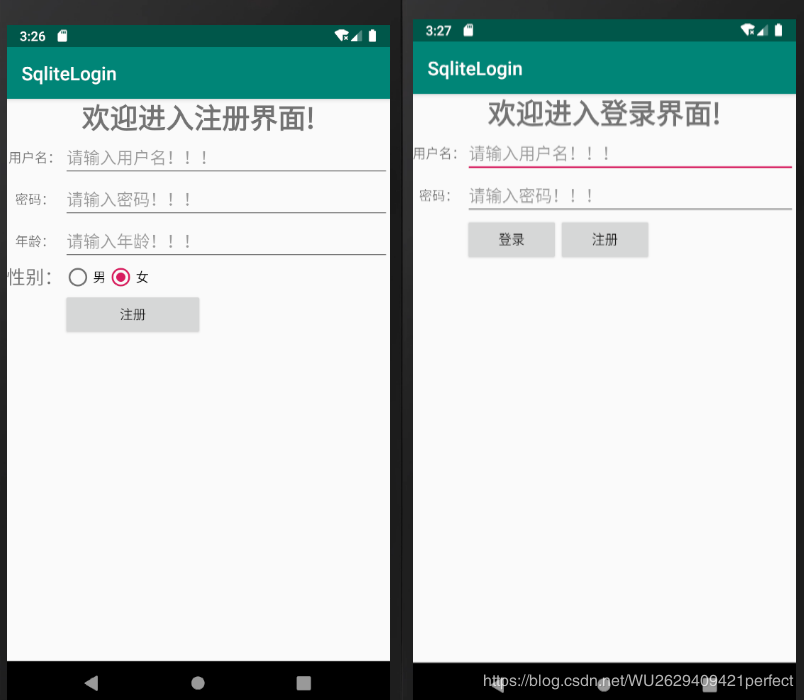
4、在模擬器或者真機(jī)運(yùn)行程序,即可!一個(gè)連接數(shù)據(jù)庫(kù)的登錄注冊(cè)功能已經(jīng)實(shí)現(xiàn),效果如下:
補(bǔ):
如果登錄、注冊(cè)的兩個(gè)布局文件的 Preview 視圖標(biāo)紅,將 android.support.constraint.ConstraintLayout 替換為 LinearLayout 即可
源碼下載:
點(diǎn)擊查看
查看創(chuàng)建的數(shù)據(jù)庫(kù)以及插入的表數(shù)據(jù):
點(diǎn)擊查看
到此這篇關(guān)于Android Studio連接SQLite數(shù)據(jù)庫(kù)的登錄注冊(cè)實(shí)現(xiàn)的文章就介紹到這了,更多相關(guān)Android Studio連接SQLite內(nèi)容請(qǐng)搜索好吧啦網(wǎng)以前的文章或繼續(xù)瀏覽下面的相關(guān)文章希望大家以后多多支持好吧啦網(wǎng)!
相關(guān)文章:
1. Docker 部署 Prometheus的安裝詳細(xì)教程2. idea 打包的jar運(yùn)行報(bào) "XXX中沒(méi)有主清單屬性"3. idea重置默認(rèn)配置的方法步驟4. 通過(guò)Django Admin+HttpRunner1.5.6實(shí)現(xiàn)簡(jiǎn)易接口測(cè)試平臺(tái)5. IntelliJ IDEA設(shè)置自動(dòng)提示功能快捷鍵的方法6. IntelliJ IDEA安裝插件的方法步驟7. idea打開多個(gè)窗口的操作方法8. php過(guò)濾器使用詳解9. IntelliJ IDEA調(diào)整字體大小的方法10. idea設(shè)置代碼格式化的方法步驟

 網(wǎng)公網(wǎng)安備