android簡易計算器的制作
之前有好好完成老師留過的C++大作業(yè),使用MFC制作通訊錄。所以用AS寫一個安卓的計算器并不是很難,但還是想上手操作一下,寫一個只有簡單加減乘除運算的小計算器,后面可能會考慮加一些其他的稍微復雜的計算功能。下面是步驟。
1.首先創(chuàng)建一個empty activity,取名為MyStudyCalculator。
2.打開activity_main.xml文件,創(chuàng)建兩個編輯框(EditText)、四個按鈕(Button)、一個文本框(TextView),并設置相應的id。其中編輯框作用是讓用戶填入兩個數(shù)字,四個按鈕分別對應四種不同的運算(需要對按鈕分別添加響應事件),文本框用于顯示運算結果。我另外添加了兩個文本框,一個用于顯示標題,一個顯示作者,對于該計算器來說沒有任何作用。下面給出代碼:
//第一個數(shù)字 <EditText android: android:layout_width='85dp' android:layout_height='wrap_content' android:layout_marginEnd='56dp' android:layout_marginStart='8dp' android:layout_marginTop='168dp' android:hint='@string/num1' app:layout_constraintEnd_toStartOf='@+id/second' app:layout_constraintHorizontal_bias='0.621' app:layout_constraintStart_toStartOf='parent' app:layout_constraintTop_toTopOf='parent' /> //第二個數(shù)字 <EditText android: android:layout_width='85dp' android:layout_height='wrap_content' android:layout_marginEnd='64dp' android:layout_marginTop='168dp' android:hint='@string/num2' app:layout_constraintEnd_toEndOf='parent' app:layout_constraintTop_toTopOf='parent' /> //第二個數(shù)字 <TextView android: android:layout_width='96dp' android:layout_height='33dp' android:layout_marginBottom='84dp' android:layout_marginEnd='8dp' android:layout_marginStart='8dp' android:gravity='center' app:layout_constraintBottom_toBottomOf='parent' app:layout_constraintEnd_toEndOf='parent' app:layout_constraintHorizontal_bias='0.481' app:layout_constraintStart_toStartOf='parent' /> //加法按鈕 <Button android: android:layout_width='50dp' android:layout_height='50dp' android:layout_marginEnd='8dp' android:layout_marginStart='8dp' android:layout_marginTop='260dp' android:onClick='SUM' android:text='+' app:layout_constraintEnd_toEndOf='parent' app:layout_constraintHorizontal_bias='0.391' app:layout_constraintStart_toStartOf='parent' app:layout_constraintTop_toTopOf='parent' /> //減法按鈕 <Button android: android:layout_width='50dp' android:layout_height='50dp' android:layout_marginBottom='30dp' android:layout_marginEnd='148dp' android:layout_marginTop='8dp' android:onClick='SUB' android:text='-' app:layout_constraintBottom_toBottomOf='parent' app:layout_constraintEnd_toEndOf='parent' app:layout_constraintTop_toTopOf='parent' app:layout_constraintVertical_bias='0.595' /> //乘法按鈕 <Button android: android:layout_width='50dp' android:layout_height='50dp' android:layout_marginBottom='152dp' android:layout_marginEnd='8dp' android:layout_marginStart='8dp' android:onClick='MUL' android:text='*' app:layout_constraintBottom_toBottomOf='parent' app:layout_constraintEnd_toEndOf='parent' app:layout_constraintHorizontal_bias='0.393' app:layout_constraintStart_toStartOf='parent' /> //除法按鈕 <Button android: android:layout_width='50dp' android:layout_height='50dp' android:layout_marginBottom='8dp' android:layout_marginEnd='148dp' android:layout_marginTop='8dp' android:onClick='DIV' android:text='/' app:layout_constraintBottom_toBottomOf='parent' app:layout_constraintEnd_toEndOf='parent' app:layout_constraintTop_toTopOf='parent' app:layout_constraintVertical_bias='0.678' /> //標題 <TextView android: android:layout_width='wrap_content' android:layout_height='wrap_content' android:layout_marginEnd='8dp' android:layout_marginStart='8dp' android:layout_marginTop='36dp' android:text='丑陋的而且只能算加減乘除的計算機' android:textSize='20dp' app:layout_constraintEnd_toEndOf='parent' app:layout_constraintStart_toStartOf='parent' app:layout_constraintTop_toTopOf='parent' /> //作者 <TextView android: android:layout_width='wrap_content' android:layout_height='11dp' android:layout_marginEnd='8dp' android:layout_marginStart='8dp' android:layout_marginTop='496dp' android:text='TimberWolf' android:textSize='10dp' app:layout_constraintEnd_toEndOf='parent' app:layout_constraintHorizontal_bias='0.99' app:layout_constraintStart_toStartOf='parent' app:layout_constraintTop_toTopOf='parent' />
3.打開MainActivity.java寫四個按鈕對應的方法,代碼如下:
//加法 public void SUM(View view) { EditText first = (EditText)findViewById(R.id.first); EditText second = (EditText)findViewById(R.id.second); TextView res = (TextView)findViewById(R.id.res); double num1 = 0; double num2 = 0; double ans = 0; String numfirst = first.getText().toString(); String numsecond = second.getText().toString(); num1 = Double.parseDouble(numfirst); num2 = Double.parseDouble(numsecond); ans = num1 + num2; res.setText(String.valueOf(ans)); } //減法 public void SUB(View view) { EditText first = (EditText)findViewById(R.id.first); EditText second = (EditText)findViewById(R.id.second); TextView res = (TextView)findViewById(R.id.res); double num1 = 0; double num2 = 0; double ans = 0; String numfirst = first.getText().toString(); String numsecond = second.getText().toString(); num1 = Double.parseDouble(numfirst); num2 = Double.parseDouble(numsecond); ans = num1 - num2; res.setText(String.valueOf(ans)); } //乘法 public void MUL(View view) { EditText first = (EditText)findViewById(R.id.first); EditText second = (EditText)findViewById(R.id.second); TextView res = (TextView)findViewById(R.id.res); double num1 = 0; double num2 = 0; double ans = 0; String numfirst = first.getText().toString(); String numsecond = second.getText().toString(); num1 = Double.parseDouble(numfirst); num2 = Double.parseDouble(numsecond); ans = num1 * num2; res.setText(String.valueOf(ans)); } //除法 public void DIV(View view) { EditText first = (EditText)findViewById(R.id.first); EditText second = (EditText)findViewById(R.id.second); TextView res = (TextView)findViewById(R.id.res); double num1 = 0; double num2 = 0; double ans = 0; String numfirst = first.getText().toString(); String numsecond = second.getText().toString(); num1 = Double.parseDouble(numfirst); num2 = Double.parseDouble(numsecond); ans = num1 / num2; res.setText(String.valueOf(ans)); }
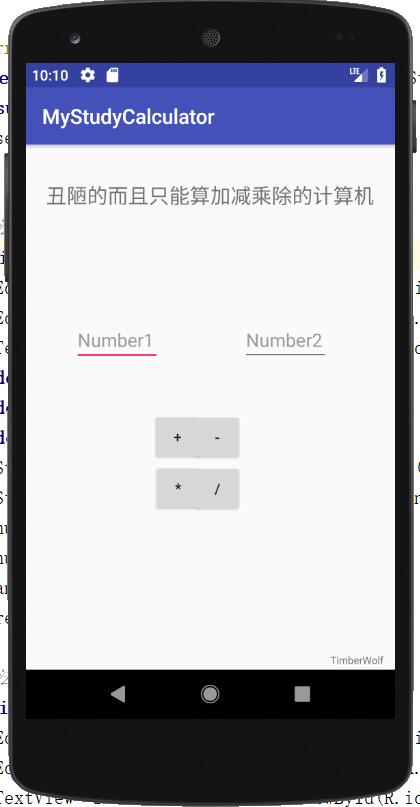
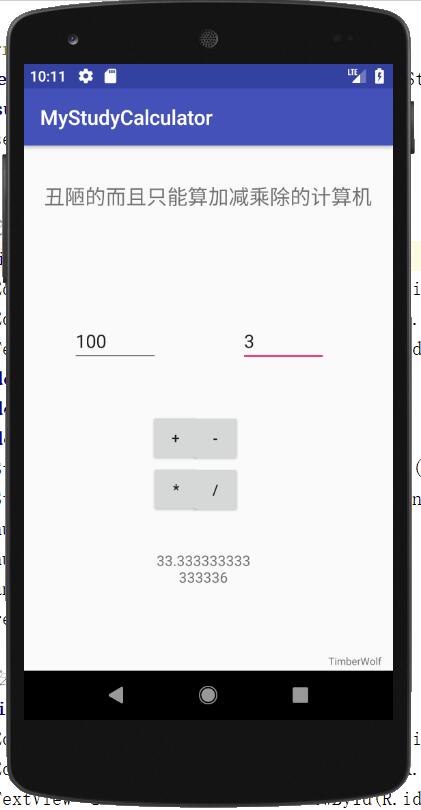
4.看似代碼很長,其實都是一樣的,很簡單就完成了,其中MainActivity.java中的代碼我沒有給出注釋,就是幾種類型的轉換。歡迎大佬指點,初學者不懂的可以給我留言。下面給出仿真機運行效果。
更多計算器功能實現(xiàn),請點擊專題: 計算器功能匯總 進行學習
關于Android計算器功能的實現(xiàn),查看專題:Android計算器 進行學習。
以上就是本文的全部內容,希望對大家的學習有所幫助,也希望大家多多支持好吧啦網(wǎng)。
相關文章:
 網(wǎng)公網(wǎng)安備