Android開發(fā)實現(xiàn)圖片切換APP
本文實例為大家分享了Android開發(fā)實現(xiàn)圖片切換APP的具體代碼,供大家參考,具體內(nèi)容如下
本次介紹的是關(guān)于圖片切換的APP,這里實現(xiàn)了兩種切換效果;不同的效果針對不同的情況,兩種效果的代碼都會介紹:
代碼-布局:
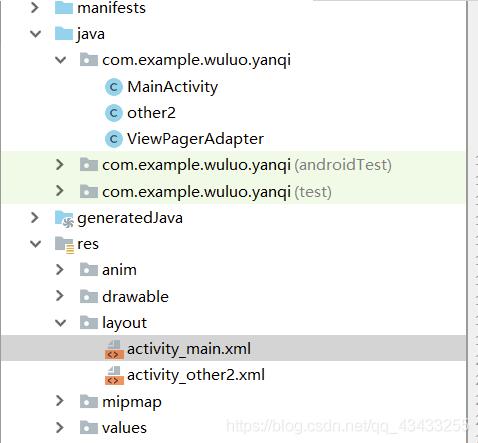
main.xml的代碼:
<?xml version='1.0' encoding='utf-8'?><android.support.constraint.ConstraintLayout xmlns:android='http://schemas.android.com/apk/res/android' xmlns:tools='http://schemas.android.com/tools' xmlns:app='http://schemas.android.com/apk/res-auto' android:layout_width='match_parent' android:layout_height='match_parent' tools:context='.MainActivity'> <ImageSwitcher android: android:layout_width='match_parent' android:layout_height='243dp' android:layout_marginTop='68dp' app:layout_constraintEnd_toEndOf='parent' app:layout_constraintHorizontal_bias='0.0' app:layout_constraintStart_toStartOf='parent' app:layout_constraintTop_toTopOf='parent' /> <LinearLayout android: android:layout_width='match_parent' android:layout_height='wrap_content' android:layout_marginTop='68dp' android:orientation='horizontal' android:paddingTop='15dp' app:layout_constraintEnd_toEndOf='parent' app:layout_constraintStart_toStartOf='parent' app:layout_constraintTop_toBottomOf='@+id/is_1'> <Button android: android:layout_width='0dip' android:layout_height='wrap_content' android:layout_marginLeft='15dp' android:layout_marginRight='15dp' android:layout_weight='1' android:background='@drawable/shape_button_main' android:text='下一張' android:textColor='#ffffff' android:textSize='18dp' /> <Button android: android:layout_width='0dip' android:layout_height='wrap_content' android:layout_marginLeft='15dp' android:layout_marginRight='15dp' android:layout_weight='1' android:background='@drawable/shape_button_main' android:text='上一張' android:textColor='#ffffff' android:textSize='18dp' /> </LinearLayout> <Button android: android:layout_width='176dp' android:layout_height='80dp' android:layout_marginTop='8dp' android:layout_marginBottom='16dp' android:background='@drawable/shape_button_main' android:text='另外一種效果' android:textSize='20dp' app:layout_constraintBottom_toBottomOf='parent' app:layout_constraintEnd_toEndOf='parent' app:layout_constraintStart_toStartOf='parent' app:layout_constraintTop_toBottomOf='@+id/linearLayout' /></android.support.constraint.ConstraintLayout>
mainactivity的代碼:
package com.example.wuluo.yanqi;import android.content.Intent;import android.support.v7.app.AppCompatActivity;import android.os.Bundle;import android.view.View;import android.widget.Button;import android.widget.ImageSwitcher;import android.widget.ImageView;import android.widget.ViewSwitcher;public class MainActivity extends AppCompatActivity implements View.OnClickListener,ViewSwitcher.ViewFactory{ private ImageSwitcher is_1; private Button btn_next; private Button btn_previous; private Button btn_3; private int image[]={R.drawable.tian1,R.drawable.tian2,R.drawable.tian3,R.drawable.tian4};//圖片的id數(shù)組 private int imageIndex=0;//圖片顯示序列號 @Override protected void onCreate(Bundle savedInstanceState) { super.onCreate(savedInstanceState); setContentView(R.layout.activity_main); is_1=(ImageSwitcher) findViewById(R.id.is_1); btn_next=(Button) findViewById(R.id.btn_next); btn_previous=(Button) findViewById(R.id.btn_previous); btn_3=(Button)findViewById(R.id.btn_3); btn_previous.setOnClickListener(this); btn_next.setOnClickListener(this); btn_3.setOnClickListener(this); init(); //設(shè)置Factory } @Override public void onClick(View view) { if (view.getId()==R.id.btn_next){ imageIndex++; if(imageIndex>3){ imageIndex=0; } is_1.setInAnimation(this,R.anim.left_in); is_1.setOutAnimation(this,R.anim.right_out); }else if(view.getId()==R.id.btn_previous){ imageIndex--; if(imageIndex<0){ imageIndex=image.length-1; } is_1.setInAnimation(this,R.anim.right_in); is_1.setOutAnimation(this,R.anim.left_out); }else if(view.getId()==R.id.btn_3){ Intent intent=new Intent(); intent.setClass(this,other2.class); startActivity(intent); } is_1.setImageResource(image[imageIndex]); } @Override public View makeView() {//實現(xiàn)viewFactory接口.生成imageview ImageView imageView=new ImageView(this); return imageView; } private void init(){//初始化imageSwitch is_1.setFactory(this); is_1.setImageResource(image[imageIndex]); }}
ViewPagerAdapter的代碼:
package com.example.wuluo.yanqi;/** * Created by wuluo on 2018/12/21 */import android.support.v4.view.PagerAdapter;import android.support.v4.view.ViewPager;import android.view.View;import java.util.ArrayList;public class ViewPagerAdapter extends PagerAdapter { //界面列表 private ArrayList<View> views; public ViewPagerAdapter(ArrayList<View> views) { this.views = views; } /** * 獲得當(dāng)前界面數(shù) */ @Override public int getCount() { if (views != null) { return views.size(); } return 0; } /** * 初始化position位置的界面 */ @Override public Object instantiateItem(View view, int position) { ((ViewPager) view).addView(views.get(position), 0); return views.get(position); } /** * 判斷是否由對象生成界面 */ @Override public boolean isViewFromObject(View view, Object arg1) { return (view == arg1); } /** * 銷毀position位置的界面 */ @Override public void destroyItem(View view, int position, Object arg2) { ((ViewPager) view).removeView(views.get(position)); }}
other2.xml布局的代碼:
<?xml version='1.0' encoding='utf-8'?><android.support.constraint.ConstraintLayout xmlns:android='http://schemas.android.com/apk/res/android' xmlns:app='http://schemas.android.com/apk/res-auto' xmlns:tools='http://schemas.android.com/tools' android:layout_width='match_parent' android:layout_height='match_parent' tools:context='.other2'> <android.support.v4.view.ViewPager android: android:layout_width='fill_parent' android:layout_height='fill_parent' app:layout_constraintBottom_toBottomOf='parent' app:layout_constraintEnd_toEndOf='parent' app:layout_constraintHorizontal_bias='0.0' app:layout_constraintStart_toStartOf='parent' app:layout_constraintTop_toTopOf='parent' app:layout_constraintVertical_bias='0.0' /> <LinearLayout android: android:layout_width='wrap_content' android:layout_height='wrap_content' android:layout_alignParentBottom='true' android:layout_centerHorizontal='true' android:layout_marginStart='8dp' android:layout_marginEnd='8dp' android:layout_marginBottom='8dp' android:orientation='horizontal' app:layout_constraintBottom_toBottomOf='@+id/viewpager' app:layout_constraintEnd_toEndOf='parent' app:layout_constraintStart_toStartOf='parent'> <ImageView android:layout_width='wrap_content' android:layout_height='40dp' android:layout_gravity='center_vertical' android:clickable='true' android:padding='15.0dip' android:src='http://www.b3g6.com/bcjs/@drawable/point' /> <ImageView android:layout_width='wrap_content' android:layout_height='40dp' android:layout_gravity='center_vertical' android:clickable='true' android:padding='15.0dip' android:src='http://www.b3g6.com/bcjs/@drawable/point' /> <ImageView android:layout_width='wrap_content' android:layout_height='40dp' android:layout_gravity='center_vertical' android:clickable='true' android:padding='15.0dip' android:src='http://www.b3g6.com/bcjs/@drawable/point' /> <ImageView android:layout_width='wrap_content' android:layout_height='40dp' android:layout_gravity='center_vertical' android:clickable='true' android:padding='15.0dip' android:src='http://www.b3g6.com/bcjs/@drawable/point' /> </LinearLayout></android.support.constraint.ConstraintLayout>
other2activity的代碼:
package com.example.wuluo.yanqi;import android.support.v4.view.ViewPager;import android.support.v7.app.ActionBar;import android.support.v7.app.AppCompatActivity;import android.os.Bundle;import android.view.View;import android.widget.ImageView;import android.widget.LinearLayout;import java.util.ArrayList;public class other2 extends AppCompatActivity implements View.OnClickListener,ViewPager.OnPageChangeListener{ private ViewPager viewPager;//定義ViewPager對象 private ViewPagerAdapter vpAdapter;//定義ViewPager適配器 private ArrayList<View> views;//定義一個ArrayList來存放View private static final int[] pics = {R.drawable.one,R.drawable.two,R.drawable.san,R.drawable.si};//引導(dǎo)圖片資源 private ImageView[] points;//底部小點的圖片 private int currentIndex; @Override protected void onCreate(Bundle savedInstanceState) { ActionBar actionBar=getSupportActionBar();// actionBar.hide();//隱藏標(biāo)題欄 super.onCreate(savedInstanceState); setContentView(R.layout.activity_other2); initView(); initData(); } private void initData() { LinearLayout.LayoutParams mParams = new LinearLayout.LayoutParams(LinearLayout.LayoutParams.FILL_PARENT, LinearLayout.LayoutParams.FILL_PARENT); //初始化引導(dǎo)圖片列表 for(int i=0; i<pics.length; i++) { ImageView iv = new ImageView(this); iv.setLayoutParams(mParams); iv.setImageResource(pics[i]); views.add(iv); } viewPager.setAdapter(vpAdapter); //設(shè)置數(shù)據(jù) viewPager.setOnPageChangeListener(this);//設(shè)置監(jiān)聽 initPoint();//初始化底部小點 } private void initPoint() { LinearLayout linearLayout = (LinearLayout) findViewById(R.id.ll); points = new ImageView[pics.length]; //循環(huán)取得小點圖片 for (int i = 0; i < pics.length; i++) { points[i] = (ImageView) linearLayout.getChildAt(i);//得到一個LinearLayout下面的每一個子元素 points[i].setEnabled(true);//默認(rèn)都設(shè)為灰色 points[i].setOnClickListener(this);//給每個小點設(shè)置監(jiān)聽 points[i].setTag(i);//設(shè)置位置tag,方便取出與當(dāng)前位置對應(yīng) } currentIndex = 0;//設(shè)置當(dāng)面默認(rèn)的位置 points[currentIndex].setEnabled(false);//設(shè)置為白色,即選中狀態(tài) } private void initView() { views = new ArrayList<View>();//實例化ArrayList對象 viewPager = (ViewPager) findViewById(R.id.viewpager);//實例化ViewPager vpAdapter = new ViewPagerAdapter(views);//實例化ViewPager適配器 } @Override public void onPageScrolled(int i, float v, int i1) { } @Override public void onPageSelected(int i) { setCurDot(i); } @Override public void onPageScrollStateChanged(int i) { } @Override public void onClick(View view) { int position = (Integer)view.getTag(); setCurView(position); setCurDot(position); } private void setCurView(int position){ if (position < 0 || position >= pics.length) { return; } viewPager.setCurrentItem(position); } private void setCurDot(int positon){ if (positon < 0 || positon > pics.length - 1 || currentIndex == positon) { return; } points[positon].setEnabled(false); points[currentIndex].setEnabled(true); currentIndex = positon; }}
最后的效果圖:
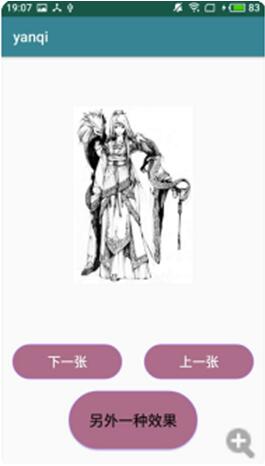
另外一種效果圖:

以上就是本文的全部內(nèi)容,希望對大家的學(xué)習(xí)有所幫助,也希望大家多多支持好吧啦網(wǎng)。
相關(guān)文章:

 網(wǎng)公網(wǎng)安備