Android自定義控件實(shí)現(xiàn)通用驗(yàn)證碼輸入框(二)
本文實(shí)例為大家分享了Android實(shí)現(xiàn)通用驗(yàn)證碼輸入框第2篇具體實(shí)現(xiàn)代碼,供大家參考,具體內(nèi)容如下
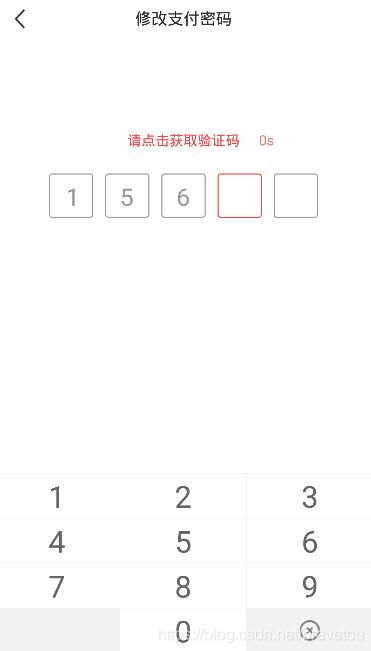
效果圖
話(huà)不多說(shuō),我們還是先上效果圖,可以先先看看是不是自己想要的
閑聊
這種驗(yàn)證碼輸入框使用組合控件就比較煩人了,所以這邊直接使用自定View步奏實(shí)現(xiàn)
源碼
自定義輸入框?qū)傩裕╝ttrs.xml)
<?xml version='1.0' encoding='utf-8'?><resources> <declare-styleable name='CodeInputView'> <!-- 邊框?qū)挾?--> <attr name='borderWidth' format='dimension' /> <!-- 邊框高度 --> <attr name='borderHeight' format='dimension' /> <!-- 邊框間距 --> <attr name='borderSpacing' format='dimension' /> <!-- 邊框背景圖 --> <attr name='borderImage' format='reference' /> <!-- 最大輸入長(zhǎng)度 --> <attr name='android:maxLength' /> </declare-styleable></resources>
資源文件(code_input_view_border_bg.xml)
<?xml version='1.0' encoding='utf-8'?><selector xmlns:android='http://schemas.android.com/apk/res/android'> <item android:state_focused='true'> <shape android:shape='rectangle'> <corners android:radius='5mm' /> <stroke android: android:color='@color/colorMain' /> </shape> </item> <item android:state_enabled='true'> <shape android:shape='rectangle'> <corners android:radius='5mm' /> <stroke android: android:color='@color/colorTextLight' /> </shape> </item></selector>
自定義控件(CodeInputView.java)
import android.annotation.SuppressLint;import android.content.Context;import android.content.res.TypedArray;import android.graphics.Canvas;import android.graphics.Color;import android.graphics.Rect;import android.graphics.drawable.Drawable;import android.os.Build;import android.text.InputFilter;import android.text.TextPaint;import android.util.AttributeSet;import android.widget.EditText;import androidx.annotation.RequiresApi;import androidx.core.content.ContextCompat;/** * <pre> * <b>author</b> :BraveTou * <b>blog</b> :https://blog.csdn.net/bravetou * <b>time</b> :2020/9/8 11:49 * <b>desc</b> :<pre> * 自定義驗(yàn)證碼輸入框 * </pre> * </pre> */@SuppressLint('AppCompatCustomView')public class CodeInputView extends EditText { // <!-- 最大輸入長(zhǎng)度 --> private int mMaxLength = 4; // <!-- 邊框?qū)挾?--> private int mBorderWidth = 100; // <!-- 邊框高度 --> private int mBorderHeight = 100; // <!-- 邊框間距 --> private int mBorderSpacing = 24; // <!-- 邊框背景圖 --> private Drawable mBorderImage; // 用矩形來(lái)保存方框的位置、大小信息 private final Rect mRect = new Rect(); // 文本顏色 private int mTextColor; public CodeInputView(Context context) { super(context); init(context, null); } public CodeInputView(Context context, AttributeSet attrs) { super(context, attrs); init(context, attrs); } public CodeInputView(Context context, AttributeSet attrs, int defStyleAttr) { super(context, attrs, defStyleAttr); init(context, attrs); } @RequiresApi(api = Build.VERSION_CODES.LOLLIPOP) public CodeInputView(Context context, AttributeSet attrs, int defStyleAttr, int defStyleRes) { super(context, attrs, defStyleAttr, defStyleRes); init(context, attrs); } // 初始化 private void init(Context context, AttributeSet attrs) { if (null == mBorderImage) { mBorderImage = ContextCompat.getDrawable(context, R.drawable.code_input_view_border_bg); } initAttrs(context, attrs); // 設(shè)置最大輸入長(zhǎng)度 setMaxLength(mMaxLength); // 禁止長(zhǎng)按 setLongClickable(false); // 去掉背景顏色 setBackgroundColor(Color.TRANSPARENT); // 不顯示光標(biāo) setCursorVisible(false); } // 設(shè)置最大長(zhǎng)度 private void setMaxLength(int maxLength) { if (maxLength >= 0) { setFilters(new InputFilter[]{new InputFilter.LengthFilter(maxLength)}); } else { setFilters(new InputFilter[0]); } } // 初始化屬性 private void initAttrs(Context context, AttributeSet attrs) { if (null != attrs) { // AttributeSet 屬性值的索引 TypedArray o = context.obtainStyledAttributes(attrs, R.styleable.CodeInputView); // <!-- 最大輸入長(zhǎng)度 --> mMaxLength = o.getInteger(R.styleable.CodeInputView_android_maxLength, 4); // <!-- 邊框?qū)挾?--> mBorderWidth = (int) o.getDimension(R.styleable.CodeInputView_borderWidth, 100f); // <!-- 邊框高度 --> mBorderHeight = (int) o.getDimension(R.styleable.CodeInputView_borderHeight, 100f); // <!-- 邊框間距 --> mBorderSpacing = (int) o.getDimension(R.styleable.CodeInputView_borderSpacing, 24); // <!-- 邊框背景圖 --> Drawable drawable = o.getDrawable(R.styleable.CodeInputView_borderImage); if (null != drawable) {mBorderImage = drawable; } // 回收資源 o.recycle(); } } @Override protected void onMeasure(int widthMeasureSpec, int heightMeasureSpec) { super.onMeasure(widthMeasureSpec, heightMeasureSpec); // 當(dāng)前輸入框的寬高信息 int width = getMeasuredWidth(); int height = getMeasuredHeight(); int widthMode = MeasureSpec.getMode(widthMeasureSpec); int heightMode = MeasureSpec.getMode(heightMeasureSpec); // 判斷高度是否小于自定義邊框高度 height = height < mBorderHeight ? mBorderHeight : height; // 自定義輸入框?qū)挾?= 邊框?qū)挾?* 數(shù)量 + 邊框間距 * (數(shù)量 - 1) int customWidth = mBorderWidth * mMaxLength+ mBorderSpacing * ((mMaxLength - 1) > 0 ? (mMaxLength - 1) : 0); // 判斷寬度是否小于自定義寬度 width = width < customWidth ? customWidth : width; widthMeasureSpec = MeasureSpec.makeMeasureSpec(width, widthMode); heightMeasureSpec = MeasureSpec.makeMeasureSpec(height, heightMode); // 重新設(shè)置測(cè)量布局 setMeasuredDimension(widthMeasureSpec, heightMeasureSpec); } @Override protected void onDraw(Canvas canvas) { // 獲取當(dāng)前輸入文本顏色 mTextColor = getCurrentTextColor(); // 屏蔽系統(tǒng)文本顏色,直接透明 setTextColor(Color.TRANSPARENT); // 父類(lèi)繪制 super.onDraw(canvas); // 重新設(shè)置文本顏色 setTextColor(mTextColor); // 重繪背景 drawBorderBackground(canvas); // 重繪文本 drawText(canvas); } // 繪制背景 private void drawBorderBackground(Canvas canvas) { // 下面繪制方框背景顏色 // 確定反饋位置 mRect.left = 0; mRect.top = 0; mRect.right = mBorderWidth; mRect.bottom = mBorderHeight; // 當(dāng)前畫(huà)布保存的狀態(tài) int count = canvas.getSaveCount(); // 保存畫(huà)布 canvas.save(); // 獲取當(dāng)前輸入字符串長(zhǎng)度 int length = getEditableText().length(); for (int i = 0; i < mMaxLength; i++) { // 設(shè)置位置 mBorderImage.setBounds(mRect); // 設(shè)置圖像狀態(tài) if (i == length) {// 當(dāng)前輸入位高亮的索引mBorderImage.setState(new int[]{android.R.attr.state_focused}); } else {// 其他輸入位置默認(rèn)mBorderImage.setState(new int[]{android.R.attr.state_enabled}); } // 畫(huà)到畫(huà)布上 mBorderImage.draw(canvas); // 確定下一個(gè)方框的位置 // X坐標(biāo)位置 float dx = mRect.right + mBorderSpacing; // 保存畫(huà)布 canvas.save(); // [注意細(xì)節(jié)] 移動(dòng)畫(huà)布到下一個(gè)位置 canvas.translate(dx, 0); } // [注意細(xì)節(jié)] 把畫(huà)布還原到畫(huà)反饋之前的狀態(tài),這樣就還原到最初位置了 canvas.restoreToCount(count); // 畫(huà)布?xì)w位 canvas.translate(0, 0); } // 繪制文本 private void drawText(Canvas canvas) { int count = canvas.getSaveCount(); canvas.translate(0, 0); int length = getEditableText().length(); for (int i = 0; i < length; i++) { String text = String.valueOf(getEditableText().charAt(i)); TextPaint textPaint = getPaint(); textPaint.setColor(mTextColor); // 獲取文本大小 textPaint.getTextBounds(text, 0, 1, mRect); // 計(jì)算(x,y) 坐標(biāo) int x = mBorderWidth / 2 + (mBorderWidth + mBorderSpacing) * i - (mRect.centerX()); int y = canvas.getHeight() / 2 + mRect.height() / 2; canvas.drawText(text, x, y, textPaint); } canvas.restoreToCount(count); }}
使用
<RelativeLayout android:layout_width='match_parent' android:layout_height='wrap_content'> <*.*.*.widget.CodeInputView android: android:layout_width='wrap_content' android:layout_height='wrap_content' android:layout_centerInParent='true' android:layout_marginTop='56mm' android:maxLength='5' android:text='156' android:textSize='48mm' app:borderHeight='88mm' app:borderSpacing='24mm' app:borderWidth='88mm' /></RelativeLayout>
以上就是本文的全部?jī)?nèi)容,希望對(duì)大家的學(xué)習(xí)有所幫助,也希望大家多多支持好吧啦網(wǎng)。
相關(guān)文章:
 網(wǎng)公網(wǎng)安備