Android自定義廣播接收
本文實(shí)例為大家分享了Android自定義廣播接收的具體代碼,供大家參考,具體內(nèi)容如下
實(shí)現(xiàn)效果:
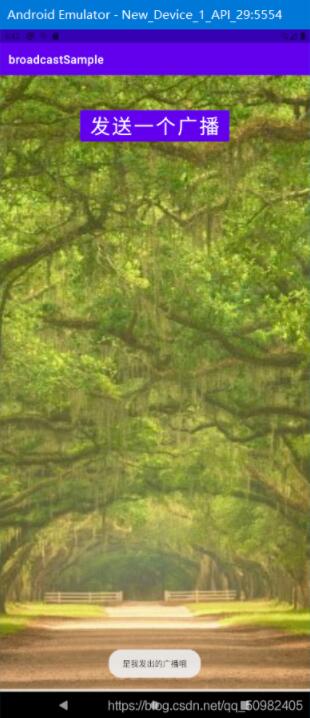
MainActivity.java代碼:
package com.henu.broadcastsample;import androidx.appcompat.app.AppCompatActivity;import android.content.Intent;import android.content.IntentFilter;import android.os.Bundle;import android.util.Log;import android.view.View;import android.widget.Toast;public class MainActivity extends AppCompatActivity { private MyBroadcastReceiver receiver; @Override protected void onCreate(Bundle savedInstanceState) {super.onCreate(savedInstanceState);setContentView(R.layout.activity_main); } public void send(View v) {//動態(tài)注冊廣播接收receiver = new MyBroadcastReceiver();String action = 'henurjxy';IntentFilter intentFilter=new IntentFilter(action);registerReceiver(receiver,intentFilter);Intent intend = new Intent('henurjxy');sendBroadcast(intend); }//在頁面銷毀時,注銷廣播接收者 @Override protected void onDestroy() {super.onDestroy();unregisterReceiver(receiver); }}
MyBroadcastReceiver.java代碼:
package com.henu.broadcastsample;import android.content.BroadcastReceiver;import android.content.Context;import android.content.Intent;import android.util.Log;import android.widget.Toast;public class MyBroadcastReceiver extends BroadcastReceiver {public MyBroadcastReceiver(){} @Override public void onReceive(Context context, Intent intent) {Toast.makeText(context,'是我發(fā)出的廣播哦',Toast.LENGTH_SHORT).show(); }}
以上就是本文的全部內(nèi)容,希望對大家的學(xué)習(xí)有所幫助,也希望大家多多支持好吧啦網(wǎng)。
相關(guān)文章:
1. python 制作python包,封裝成可用模塊教程2. 解決Django響應(yīng)JsonResponse返回json格式數(shù)據(jù)報錯問題3. asp.net core服務(wù)限制堆內(nèi)存大小的操作方法4. Python爬取12306車次信息代碼詳解5. Python文字截圖識別OCR工具實(shí)例解析6. python實(shí)現(xiàn)處理mysql結(jié)果輸出方式7. 通過vue如何設(shè)置header8. 解決python腳本中error: unrecognized arguments: True錯誤9. Python 實(shí)現(xiàn)將某一列設(shè)置為str類型10. Python使用paramiko連接遠(yuǎn)程服務(wù)器執(zhí)行Shell命令的實(shí)現(xiàn)
 網(wǎng)公網(wǎng)安備