文章詳情頁
基于Spring Boot利用 ajax實(shí)現(xiàn)上傳圖片功能
瀏覽:466日期:2022-06-11 17:53:44
效果如下:
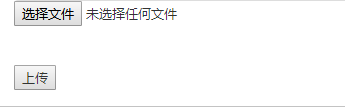

1.啟動(dòng)類中加入

SpringBoot重寫addResourceHandlers映射文件路徑
@Override public void addResourceHandlers(ResourceHandlerRegistry registry) { registry.addResourceHandler("/imctemp-rainy/**").addResourceLocations("file:D:/E/"); }設(shè)置靜態(tài)資源路徑
2. 表單 前端 頁面
<input type="file" name="file" id="file"><p id="url"><img src="" width=200></p><input type="button" id="button" value="上傳" >$(function () { $("#button").click(function () { var form = new FormData(); form.append("file", document.getElementById("file").files[0]); $.ajax({ url: "/stu/upload", //后臺(tái)url data: form, cache: false, async: false, type: "POST", //類型,POST或者GET dataType: "json", //數(shù)據(jù)返回類型,可以是xml、json等 processData: false, contentType: false, success: function (data) { //成功,回調(diào)函數(shù) if (data) { var pic="/imctemp-rainy/"+data.fileName; $("#url img").attr("src",pic); // alert(JSON.stringify(data)); } else { alert("失敗"); } }, error: function (er) { //失敗,回調(diào)函數(shù) alert(JSON.stringify(data)); } }); }) })控制器
public static void uploadFile(byte[] file, String filePath, String fileName) throws Exception { File targetFile = new File(filePath); if (!targetFile.exists()) { targetFile.mkdirs(); } FileOutputStream out = new FileOutputStream(filePath +"/"+ fileName); out.write(file); out.flush(); out.close(); } //處理文件上傳 @ResponseBody //返回json數(shù)據(jù) @RequestMapping(value = "upload", method = RequestMethod.POST) public JSONObject uploadImg(@RequestParam("file") MultipartFile file,HttpServletRequest request) { String contentType = file.getContentType(); System.out.print(contentType); String fileName = System.currentTimeMillis()+file.getOriginalFilename(); String filePath = "D:/E"; JSONObject jo = new JSONObject();//實(shí)例化json數(shù)據(jù) if (file.isEmpty()) { jo.put("success", 0); jo.put("fileName", ""); } try { uploadFile(file.getBytes(), filePath, fileName); jo.put("success", 1); jo.put("fileName", fileName); // jo.put("xfileName", filePath+"/"+fileName); } catch (Exception e) { // TODO: handle exception } //返回json return jo; } 總結(jié)
以上所述是小編給大家介紹的基于Spring Boot利用 ajax實(shí)現(xiàn)上傳圖片功能,希望對(duì)大家有所幫助,如果大家有任何疑問請(qǐng)給我留言,小編會(huì)及時(shí)回復(fù)大家的。在此也非常感謝大家對(duì)網(wǎng)站的支持!
如果你覺得本文對(duì)你有幫助,歡迎轉(zhuǎn)載,煩請(qǐng)注明出處,謝謝!
標(biāo)簽:
Ajax
相關(guān)文章:
1. 使用Maven 搭建 Spring MVC 本地部署Tomcat的詳細(xì)教程2. 通過IEAD+Maven快速搭建SSM項(xiàng)目的過程(Spring + Spring MVC + Mybatis)3. SpringMail使用過程中的報(bào)錯(cuò)解決辦法4. Springboot非分布式定時(shí)任務(wù)實(shí)現(xiàn)代碼5. springboot maven 項(xiàng)目打包jar 最后名稱自定義的教程6. 解決springboot bean中大寫的字段返回變成小寫的問題7. SpringBoot參數(shù)校驗(yàn)與國際化使用教程8. 詳解SpringBoot Redis自適應(yīng)配置(Cluster Standalone Sentinel)9. Springboot配置過濾器實(shí)現(xiàn)過程解析10. SpringBoot+JavaMailSender實(shí)現(xiàn)騰訊企業(yè)郵箱配置
排行榜
 網(wǎng)公網(wǎng)安備