Flutter刷新組件RefreshIndicator自定義樣式demo
目錄
- 前言
- 效果圖
- RefreshIndicator初始樣式
- RefreshIndicator樣式修改(簡單)
- RefreshIndicator樣式修改(復(fù)雜)
- 簡單的樣式修改
- 復(fù)雜的樣式修改
前言
RefreshIndicator是Flutter里常見的下拉刷新組件,使用是比較方便的。但由于產(chǎn)品兄弟對其固定的刷新樣式很是不滿,而且代碼中已經(jīng)引入了很多RefreshIndicator,直接替換其他組件的話,對代碼的改動(dòng)可能比較大,所以只能自己動(dòng)手改一改源碼,在達(dá)到產(chǎn)品的要求的同時(shí)盡可能減少代碼的修改。
效果圖
RefreshIndicator初始樣式

RefreshIndicator樣式修改(簡單)

RefreshIndicator樣式修改(復(fù)雜)

h2>源碼修改
簡單的樣式修改
簡單的樣式修改,如想換成順時(shí)針旋轉(zhuǎn)的 iOS 風(fēng)格活動(dòng)指示器,只需替換對應(yīng)樣式代碼即可。查看RefreshIndicator的源碼,代碼翻到最下面就可以看到其實(shí)是自定義了一個(gè)RefreshProgressIndicator樣式,通過繼承CircularProgressIndicator來實(shí)現(xiàn)初始樣式。
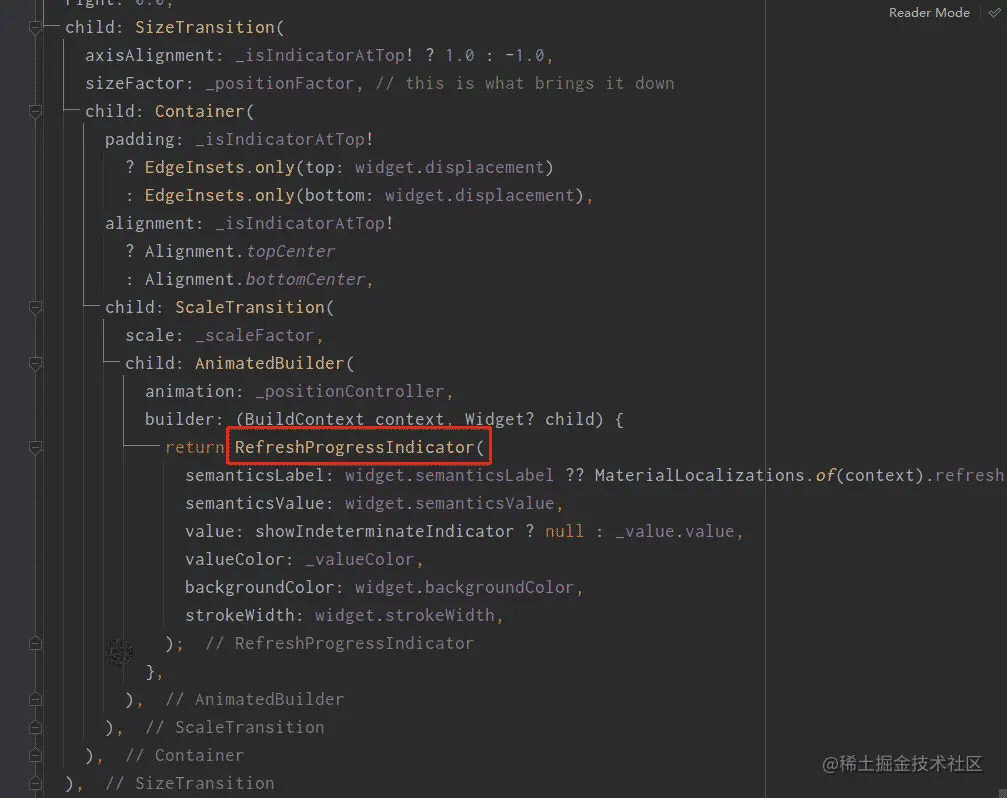
所以我們只需簡單的替換掉該樣式即可實(shí)現(xiàn)簡單的樣式修改。
AnimatedBuilder( animation: _positionController, builder: (BuildContext context, Widget? child) { return ClipOval( child: Container( padding: const EdgeInsets.all(10), decoration: BoxDecoration( color: widget.backgroundColor ?? Colors.white), child: CupertinoActivityIndicator( color: widget.color)), ); },)如此便可實(shí)現(xiàn)簡單的樣式修改。
復(fù)雜的樣式修改
簡單的樣式修改只是換換樣式,對刷新動(dòng)作本身是沒有任何修改的,也就是刷新操作樣式本身沒有變,只是換了個(gè)皮。而國內(nèi)的刷新操作樣式基本是上圖效果3,所以如果要在RefreshIndicator上修改成效果3,除了要將原有樣式Stack改為Column外,還需要自己處理手勢,這里可以使用Listener來操作手勢。
代碼如下,修改的地方都有注釋。
// Copyright 2014 The Flutter Authors. All rights reserved.// Use of this source code is governed by a BSD-style license that can be// found in the LICENSE file.import "dart:async";import "dart:math" as math;import "dart:ui";import "package:flutter/cupertino.dart";import "package:flutter/material.dart";import "package:get/get.dart";// The over-scroll distance that moves the indicator to its maximum// displacement, as a percentage of the scrollable"s container extent.const double _kDragContainerExtentPercentage = 0.25;// How much the scroll"s drag gesture can overshoot the RefreshIndicator"s// displacement; max displacement = _kDragSizeFactorLimit * displacement.const double _kDragSizeFactorLimit = 1.5;// When the scroll ends, the duration of the refresh indicator"s animation// to the RefreshIndicator"s displacement.const Duration _kIndicatorSnapDuration = Duration(milliseconds: 150);// The duration of the ScaleTransition that starts when the refresh action// has completed.const Duration _kIndicatorScaleDuration = Duration(milliseconds: 200);/// The signature for a function that"s called when the user has dragged a/// [RefreshIndicator] far enough to demonstrate that they want the app to/// refresh. The returned [Future] must complete when the refresh operation is/// finished.////// Used by [RefreshIndicator.onRefresh].typedef RefreshCallback = Future<void> Function();// The state machine moves through these modes only when the scrollable// identified by scrollableKey has been scrolled to its min or max limit.enum _RefreshIndicatorMode { drag, // Pointer is down. armed, // Dragged far enough that an up event will run the onRefresh callback. snap, // Animating to the indicator"s final "displacement". refresh, // Running the refresh callback. done, // Animating the indicator"s fade-out after refreshing. canceled, // Animating the indicator"s fade-out after not arming.}/// Used to configure how [RefreshIndicator] can be triggered.enum RefreshIndicatorTriggerMode { /// The indicator can be triggered regardless of the scroll position /// of the [Scrollable] when the drag starts. anywhere, /// The indicator can only be triggered if the [Scrollable] is at the edge /// when the drag starts. onEdge,}/// A widget that supports the Material "swipe to refresh" idiom.////// {@youtube 560 315 https://www.youtube.com/watch?v=ORApMlzwMdM}////// When the child"s [Scrollable] descendant overscrolls, an animated circular/// progress indicator is faded into view. When the scroll ends, if the/// indicator has been dragged far enough for it to become completely opaque,/// the [onRefresh] callback is called. The callback is expected to update the/// scrollable"s contents and then complete the [Future] it returns. The refresh/// indicator disappears after the callback"s [Future] has completed.////// The trigger mode is configured by [RefreshIndicator.triggerMode].////// {@tool dartpad}/// This example shows how [RefreshIndicator] can be triggered in different ways.////// ** See code in examples/api/lib/material/refresh_indicator/refresh_indicator.0.dart **/// {@end-tool}////// ## Troubleshooting////// ### Refresh indicator does not show up////// The [RefreshIndicator] will appear if its scrollable descendant can be/// overscrolled, i.e. if the scrollable"s content is bigger than its viewport./// To ensure that the [RefreshIndicator] will always appear, even if the/// scrollable"s content fits within its viewport, set the scrollable"s/// [Scrollable.physics] property to [AlwaysScrollableScrollPhysics]:////// ```dart/// ListView(/// physics: const AlwaysScrollableScrollPhysics(),/// children: .../// )/// ```////// A [RefreshIndicator] can only be used with a vertical scroll view.////// See also:////// * <https://material.io/design/platform-guidance/android-swipe-to-refresh.html>/// * [RefreshIndicatorState], can be used to programmatically show the refresh indicator./// * [RefreshProgressIndicator], widget used by [RefreshIndicator] to show/// the inner circular progress spinner during refreshes./// * [CupertinoSliverRefreshControl], an iOS equivalent of the pull-to-refresh pattern./// Must be used as a sliver inside a [CustomScrollView] instead of wrapping/// around a [ScrollView] because it"s a part of the scrollable instead of/// being overlaid on top of it.class RefreshIndicatorNeo extends StatefulWidget { /// Creates a refresh indicator. /// /// The [onRefresh], [child], and [notificationPredicate] arguments must be /// non-null. The default /// [displacement] is 40.0 logical pixels. /// /// The [semanticsLabel] is used to specify an accessibility label for this widget. /// If it is null, it will be defaulted to [MaterialLocalizations.refreshIndicatorSemanticLabel]. /// An empty string may be passed to avoid having anything read by screen reading software. /// The [semanticsValue] may be used to specify progress on the widget. const RefreshIndicatorNeo({ Key? key, required this.child, this.displacement = 40.0, this.edgeOffset = 0.0, required this.onRefresh, this.color, this.backgroundColor, this.notificationPredicate = defaultScrollNotificationPredicate, this.semanticsLabel, this.semanticsValue, this.strokeWidth = RefreshProgressIndicator.defaultStrokeWidth, this.triggerMode = RefreshIndicatorTriggerMode.onEdge, }) : assert(child != null),assert(onRefresh != null),assert(notificationPredicate != null),assert(strokeWidth != null),assert(triggerMode != null),super(key: key); /// The widget below this widget in the tree. /// /// The refresh indicator will be stacked on top of this child. The indicator /// will appear when child"s Scrollable descendant is over-scrolled. /// /// Typically a [ListView] or [CustomScrollView]. final Widget child; /// The distance from the child"s top or bottom [edgeOffset] where /// the refresh indicator will settle. During the drag that exposes the refresh /// indicator, its actual displacement may significantly exceed this value. /// /// In most cases, [displacement] distance starts counting from the parent"s /// edges. However, if [edgeOffset] is larger than zero then the [displacement] /// value is calculated from that offset instead of the parent"s edge. final double displacement; /// The offset where [RefreshProgressIndicator] starts to appear on drag start. /// /// Depending whether the indicator is showing on the top or bottom, the value /// of this variable controls how far from the parent"s edge the progress /// indicator starts to appear. This may come in handy when, for example, the /// UI contains a top [Widget] which covers the parent"s edge where the progress /// indicator would otherwise appear. /// /// By default, the edge offset is set to 0. /// /// See also: /// /// * [displacement], can be used to change the distance from the edge that /// the indicator settles. final double edgeOffset; /// A function that"s called when the user has dragged the refresh indicator /// far enough to demonstrate that they want the app to refresh. The returned /// [Future] must complete when the refresh operation is finished. final RefreshCallback onRefresh; /// The progress indicator"s foreground color. The current theme"s /// [ColorScheme.primary] by default. final Color? color; /// The progress indicator"s background color. The current theme"s /// [ThemeData.canvasColor] by default. final Color? backgroundColor; /// A check that specifies whether a [ScrollNotification] should be /// handled by this widget. /// /// By default, checks whether `notification.depth == 0`. Set it to something /// else for more complicated layouts. final ScrollNotificationPredicate notificationPredicate; /// {@macro flutter.progress_indicator.ProgressIndicator.semanticsLabel} /// /// This will be defaulted to [MaterialLocalizations.refreshIndicatorSemanticLabel] /// if it is null. final String? semanticsLabel; /// {@macro flutter.progress_indicator.ProgressIndicator.semanticsValue} final String? semanticsValue; /// Defines `strokeWidth` for `RefreshIndicator`. /// /// By default, the value of `strokeWidth` is 2.0 pixels. final double strokeWidth; /// Defines how this [RefreshIndicator] can be triggered when users overscroll. /// /// The [RefreshIndicator] can be pulled out in two cases, /// 1, Keep dragging if the scrollable widget at the edge with zero scroll position /// when the drag starts. /// 2, Keep dragging after overscroll occurs if the scrollable widget has /// a non-zero scroll position when the drag starts. /// /// If this is [RefreshIndicatorTriggerMode.anywhere], both of the cases above can be triggered. /// /// If this is [RefreshIndicatorTriggerMode.onEdge], only case 1 can be triggered. /// /// Defaults to [RefreshIndicatorTriggerMode.onEdge]. final RefreshIndicatorTriggerMode triggerMode; @override RefreshIndicatorNeoState createState() => RefreshIndicatorNeoState();}/// Contains the state for a [RefreshIndicator]. This class can be used to/// programmatically show the refresh indicator, see the [show] method.class RefreshIndicatorNeoState extends State<RefreshIndicatorNeo> with TickerProviderStateMixin<RefreshIndicatorNeo> { late AnimationController _positionController; late AnimationController _scaleController; late Animation<double> _positionFactor; late Animation<double> _scaleFactor; late Animation<double> _value; late Animation<Color?> _valueColor; _RefreshIndicatorMode? _mode; late Future<void> _pendingRefreshFuture; bool? _isIndicatorAtTop; double? _dragOffset; static final Animatable<double> _threeQuarterTween = Tween<double>(begin: 0.0, end: 0.75); static final Animatable<double> _kDragSizeFactorLimitTween = Tween<double>(begin: 0.0, end: _kDragSizeFactorLimit); static final Animatable<double> _oneToZeroTween = Tween<double>(begin: 1.0, end: 0.0); @override void initState() { super.initState(); _positionController = AnimationController(vsync: this); _positionFactor = _positionController.drive(_kDragSizeFactorLimitTween); _value = _positionController.drive(_threeQuarterTween); // The "value" of the circular progress indicator during a drag. _scaleController = AnimationController(vsync: this); _scaleFactor = _scaleController.drive(_oneToZeroTween); } @override void didChangeDependencies() { final ThemeData theme = Theme.of(context); _valueColor = _positionController.drive( ColorTween(begin: (widget.color ?? theme.colorScheme.primary).withOpacity(0.0),end: (widget.color ?? theme.colorScheme.primary).withOpacity(1.0), ).chain(CurveTween(curve: const Interval(0.0, 1.0 / _kDragSizeFactorLimit), )), ); super.didChangeDependencies(); } @override void didUpdateWidget(covariant RefreshIndicatorNeo oldWidget) { super.didUpdateWidget(oldWidget); if (oldWidget.color != widget.color) { final ThemeData theme = Theme.of(context); _valueColor = _positionController.drive(ColorTween( begin: (widget.color ?? theme.colorScheme.primary).withOpacity(0.0), end: (widget.color ?? theme.colorScheme.primary).withOpacity(1.0),).chain(CurveTween( curve: const Interval(0.0, 1.0 / _kDragSizeFactorLimit),)), ); } } @override void dispose() { _positionController.dispose(); _scaleController.dispose(); super.dispose(); } bool _shouldStart(ScrollNotification notification) { // If the notification.dragDetails is null, this scroll is not triggered by // user dragging. It may be a result of ScrollController.jumpTo or ballistic scroll. // In this case, we don"t want to trigger the refresh indicator. return ((notification is ScrollStartNotification &&notification.dragDetails != null) || (notification is ScrollUpdateNotification &&notification.dragDetails != null &&widget.triggerMode == RefreshIndicatorTriggerMode.anywhere)) &&((notification.metrics.axisDirection == AxisDirection.up &&notification.metrics.extentAfter == 0.0) || (notification.metrics.axisDirection == AxisDirection.down &&notification.metrics.extentBefore == 0.0)) &&_mode == null &&_start(notification.metrics.axisDirection); } bool _handleScrollNotification(ScrollNotification notification) { if (!widget.notificationPredicate(notification)) return false; if (_shouldStart(notification)) { setState(() {_mode = _RefreshIndicatorMode.drag; }); return false; } bool? indicatorAtTopNow; switch (notification.metrics.axisDirection) { case AxisDirection.down: case AxisDirection.up:indicatorAtTopNow = true;break; case AxisDirection.left: case AxisDirection.right:indicatorAtTopNow = true;break; } if (indicatorAtTopNow != _isIndicatorAtTop) { if (_mode == _RefreshIndicatorMode.drag || _mode == _RefreshIndicatorMode.armed)_dismiss(_RefreshIndicatorMode.canceled); } else if (notification is ScrollUpdateNotification) { if (_mode == _RefreshIndicatorMode.drag || _mode == _RefreshIndicatorMode.armed) {if ((notification.metrics.axisDirection == AxisDirection.down &&notification.metrics.extentBefore > 0.0) || (notification.metrics.axisDirection == AxisDirection.up &&notification.metrics.extentAfter > 0.0)) { _dismiss(_RefreshIndicatorMode.canceled);} else { if (notification.metrics.axisDirection == AxisDirection.down) { _dragOffset = _dragOffset! - notification.scrollDelta!; } else if (notification.metrics.axisDirection == AxisDirection.up) { _dragOffset = _dragOffset! + notification.scrollDelta!; } _checkDragOffset(notification.metrics.viewportDimension);} } if (_mode == _RefreshIndicatorMode.armed && notification.dragDetails == null) {// On iOS start the refresh when the Scrollable bounces back from the// overscroll (ScrollNotification indicating this don"t have dragDetails// because the scroll activity is not directly triggered by a drag)._show(); } } else if (notification is OverscrollNotification) { if (_mode == _RefreshIndicatorMode.drag || _mode == _RefreshIndicatorMode.armed) {if (notification.metrics.axisDirection == AxisDirection.down) { _dragOffset = _dragOffset! - notification.overscroll;} else if (notification.metrics.axisDirection == AxisDirection.up) { _dragOffset = _dragOffset! + notification.overscroll;}_checkDragOffset(notification.metrics.viewportDimension, needIntercept: true); } } else if (notification is ScrollEndNotification) { switch (_mode) {case _RefreshIndicatorMode.armed: _show(); break;case _RefreshIndicatorMode.drag: _dismiss(_RefreshIndicatorMode.canceled); break;case _RefreshIndicatorMode.canceled:case _RefreshIndicatorMode.done:case _RefreshIndicatorMode.refresh:case _RefreshIndicatorMode.snap:case null: // do nothing break; } } return false; } bool _handleGlowNotification(OverscrollIndicatorNotification notification) { if (notification.depth != 0 || !notification.leading) return false; if (_mode == _RefreshIndicatorMode.drag) { notification.disallowGlow(); return true; } return false; } bool _start(AxisDirection direction) { assert(_mode == null); assert(_isIndicatorAtTop == null); assert(_dragOffset == null); switch (direction) { case AxisDirection.down: case AxisDirection.up:_isIndicatorAtTop = true;break; case AxisDirection.left: case AxisDirection.right:_isIndicatorAtTop = null;// we do not support horizontal scroll views.return false; } _dragOffset = 0.0; _scaleController.value = 0.0; _positionController.value = 0.0; return true; } void _checkDragOffset(double containerExtent, {bool needIntercept = true}) { if (needIntercept) { assert(_mode == _RefreshIndicatorMode.drag || _mode == _RefreshIndicatorMode.armed); } double newValue =_dragOffset! / (containerExtent * _kDragContainerExtentPercentage); if (_mode == _RefreshIndicatorMode.armed) { newValue = math.max(newValue, 1.0 / _kDragSizeFactorLimit); } _positionController.value =newValue.clamp(0.0, 1.0); // this triggers various rebuilds if (_mode == _RefreshIndicatorMode.drag &&_valueColor.value!.alpha == 0xFF) { _mode = _RefreshIndicatorMode.armed; } } // Stop showing the refresh indicator. Future<void> _dismiss(_RefreshIndicatorMode newMode, {Duration? time}) async { await Future<void>.value(); // This can only be called from _show() when refreshing and // _handleScrollNotification in response to a ScrollEndNotification or // direction change. assert(newMode == _RefreshIndicatorMode.canceled ||newMode == _RefreshIndicatorMode.done); setState(() { _mode = newMode; }); switch (_mode!) { // 注釋:刷新結(jié)束,關(guān)閉動(dòng)畫 case _RefreshIndicatorMode.done:_scaleController .animateTo(1.0, duration: time ?? _kIndicatorScaleDuration) .whenComplete(() {});_doneAnimation = Tween<double>(begin: getPos(pos.value), end: 0) .animate(_scaleController);if (_doneAnimation != null) { _doneAnimation?.addListener(() { //賦值高度 pos(_doneAnimation?.value ?? 0); if ((_doneAnimation?.value ?? 0) == 0) { _doneAnimation = null; } });}break; case _RefreshIndicatorMode.canceled:await _positionController.animateTo(0.0, duration: time ?? _kIndicatorScaleDuration);break; case _RefreshIndicatorMode.armed: case _RefreshIndicatorMode.drag: case _RefreshIndicatorMode.refresh: case _RefreshIndicatorMode.snap:assert(false); } if (mounted && _mode == newMode) { _dragOffset = null; _isIndicatorAtTop = null; setState(() {_mode = null; }); } } void _show() { assert(_mode != _RefreshIndicatorMode.refresh); assert(_mode != _RefreshIndicatorMode.snap); // final Completer<void> completer = Completer<void>(); // _pendingRefreshFuture = completer.future; _mode = _RefreshIndicatorMode.snap; _positionController.animateTo(1.0 / _kDragSizeFactorLimit, duration: _kIndicatorSnapDuration).then<void>((void value) { if (mounted && _mode == _RefreshIndicatorMode.snap) {assert(widget.onRefresh != null);setState(() { // Show the indeterminate progress indicator. _mode = _RefreshIndicatorMode.refresh;});// 注釋:刪掉這段代碼,因?yàn)樾枰S手勢,在手勢釋放的時(shí)候才執(zhí)行,見下方手勢控制onPointerUp// final Future<void> refreshResult = widget.onRefresh();// assert(() {// if (refreshResult == null)// FlutterError.reportError(FlutterErrorDetails(// exception: FlutterError(// "The onRefresh callback returned null.\n"http:// "The RefreshIndicator onRefresh callback must return a Future.",// ),// context: ErrorDescription("when calling onRefresh"),// library: "material library",// ));// return true;// }());// if (refreshResult == null) return;// refreshResult.whenComplete(() {// if (mounted && _mode == _RefreshIndicatorMode.refresh) {// completer.complete();// _dismiss(_RefreshIndicatorMode.done);// }// }); } }); } /// Show the refresh indicator and run the refresh callback as if it had /// been started interactively. If this method is called while the refresh /// callback is running, it quietly does nothing. /// /// Creating the [RefreshIndicator] with a [GlobalKey<RefreshIndicatorState>] /// makes it possible to refer to the [RefreshIndicatorState]. /// /// The future returned from this method completes when the /// [RefreshIndicator.onRefresh] callback"s future completes. /// /// If you await the future returned by this function from a [State], you /// should check that the state is still [mounted] before calling [setState]. /// /// When initiated in this manner, the refresh indicator is independent of any /// actual scroll view. It defaults to showing the indicator at the top. To /// show it at the bottom, set `atTop` to false. Future<void> show({bool atTop = true}) { if (_mode != _RefreshIndicatorMode.refresh &&_mode != _RefreshIndicatorMode.snap) { if (_mode == null) _start(atTop ? AxisDirection.down : AxisDirection.up); _show(); } return _pendingRefreshFuture; } //點(diǎn)擊時(shí)的Y double _downY = 0.0; //最后的移動(dòng)Y double _lastMoveY = 0.0; //手勢移動(dòng)距離,對應(yīng)下拉效果的位移 //因?yàn)樾枰圃鞆椥孕Ч{(diào)用getPos()模擬彈性 RxDouble pos = 0.0.obs; //手勢狀態(tài) MoveType moveType = MoveType.UP; final double bottomImg = 10; //手勢下拉動(dòng)畫,主要對pos賦值 late Animation<double>? _animation; //結(jié)束動(dòng)畫,主要對pos重新賦值至0 late Animation<double>? _doneAnimation; late AnimationController _controller; ///模擬下拉的彈性 double getPos(double pos) { if (pos <= 0) { return 0; } else if (pos < 100) { return pos * 0.7; } else if (pos < 200) { return 70 + ((pos - 100) * 0.5); } else if (pos < 300) { return 120 + ((pos - 200) * 0.3); } else { return 150 + ((pos - 300) * 0.1); } } @override Widget build(BuildContext context) { assert(debugCheckHasMaterialLocalizations(context)); final Widget child = NotificationListener<ScrollNotification>( onNotification: _handleScrollNotification, child: widget.child, // NotificationListener<OverscrollIndicatorNotification>( // // onNotification: _handleGlowNotification, // child: widget.child, // ), ); assert(() { if (_mode == null) {assert(_dragOffset == null);assert(_isIndicatorAtTop == null); } else {assert(_dragOffset != null);assert(_isIndicatorAtTop != null); } return true; }()); final bool showIndeterminateIndicator =_mode == _RefreshIndicatorMode.refresh || _mode == _RefreshIndicatorMode.done; double imgHeight = MediaQueryData.fromWindow(window).size.width / 7; double imgAllHeight = imgHeight + bottomImg; return Listener(onPointerDown: (PointerDownEvent event) { //手指按下的距離 _downY = event.position.distance; moveType = MoveType.DOWN;},onPointerMove: (PointerMoveEvent event) { if (moveType != MoveType.MOVE || _mode == null) { setState(() { moveType = MoveType.MOVE; }); } moveType = MoveType.MOVE; //手指移動(dòng)的距離 var position = event.position.distance; //判斷距離差 var detal = position - _lastMoveY; ///到達(dá)頂部才計(jì)算 if (_isIndicatorAtTop != null && _isIndicatorAtTop! && _mode != null) { pos(position - _downY); if (detal > 0) { //================向下移動(dòng)================ } else { //================向上移動(dòng)================ ///當(dāng)刷新動(dòng)畫執(zhí)行時(shí),手指上滑就直接取消刷新動(dòng)畫 if (_mode == _RefreshIndicatorMode.refresh && pos.value != 0) {_dismiss(_RefreshIndicatorMode.canceled, time: Duration(microseconds: 500)); } } } _lastMoveY = position;},onPointerUp: (PointerUpEvent event) { if (_isIndicatorAtTop != null && _isIndicatorAtTop!) { double heightPos = pos.value; double imgHeight = 0; ///計(jì)算圖片高度,因?yàn)樽罱K轉(zhuǎn)成pos,因?yàn)閜os被轉(zhuǎn)換過getPos() //所以反轉(zhuǎn)的時(shí)候需要再次計(jì)算 if (imgAllHeight < 100) { imgHeight = imgAllHeight / 0.7; } else if (imgAllHeight < 200) { imgHeight = (imgAllHeight - 20) / 0.5; } else if (imgAllHeight < 300) { imgHeight = (imgAllHeight - 60) / 0.3; } //松手后的回彈效果 _controller = AnimationController( vsync: this, duration: Duration(milliseconds: 250), )..forward().whenComplete(() {///動(dòng)畫結(jié)束后觸發(fā)onRefresh()方法if (_mode == _RefreshIndicatorMode.refresh) { final Completer<void> completer = Completer<void>(); _pendingRefreshFuture = completer.future; final Future<void> refreshResult = widget.onRefresh(); assert(() { if (refreshResult == null) { FlutterError.reportError(FlutterErrorDetails(exception: FlutterError( "The onRefresh callback returned null.\n" "The RefreshIndicator onRefresh callback must return a Future.",),context: ErrorDescription("when calling onRefresh"),library: "material library", )); } return true; }()); if (refreshResult == null) return; refreshResult.whenComplete(() { if (mounted && _mode == _RefreshIndicatorMode.refresh) { completer.complete(); ///onRefresh()執(zhí)行完后關(guān)閉動(dòng)畫 _dismiss(_RefreshIndicatorMode.done); } });} }); _animation = Tween<double>(begin: heightPos, end: imgHeight).animate(_controller); _animation?.addListener(() { //下拉動(dòng)畫變化,賦值高度 if (_mode == _RefreshIndicatorMode.refresh) {pos(_animation?.value ?? 0);if (_animation?.value == imgHeight) { _animation = null;} } }); } moveType = MoveType.UP;},child: Obx(() => Column( children: [if (_isIndicatorAtTop != null &&_isIndicatorAtTop! &&_mode != null &&moveType == MoveType.MOVE || pos.value != 0) ScaleTransition( scale: _scaleFactor, child: AnimatedBuilder( animation: _positionController, builder: (BuildContext context, Widget? child) {//使用gif動(dòng)畫return Obx(() => Container( height: getPos(pos.value), alignment: Alignment.bottomCenter, child: Container(padding: EdgeInsets.only(bottom: bottomImg),child: Image.asset( "assets/gif_load.gif", width: imgHeight * 2, height: imgHeight,), ), )); }, ), ),Expanded(child: child), ], ))); }}enum MoveType { DOWN, MOVE, UP,}代碼如上,其中還額外使用了GetX來控制手勢位移距離,然后再將末尾的assets/gif_load.gif更換為各自需要的gif資源即可。
以上就是Flutter刷新組件RefreshIndicator自定義樣式demo的詳細(xì)內(nèi)容,更多關(guān)于Flutter RefreshIndicator樣式的資料請關(guān)注其它相關(guān)文章!
 網(wǎng)公網(wǎng)安備