Python實(shí)現(xiàn)Canny及Hough算法代碼實(shí)例解析
任務(wù)說(shuō)明:編寫一個(gè)錢幣定位系統(tǒng),其不僅能夠檢測(cè)出輸入圖像中各個(gè)錢幣的邊緣,同時(shí),還能給出各個(gè)錢幣的圓心坐標(biāo)與半徑。
效果
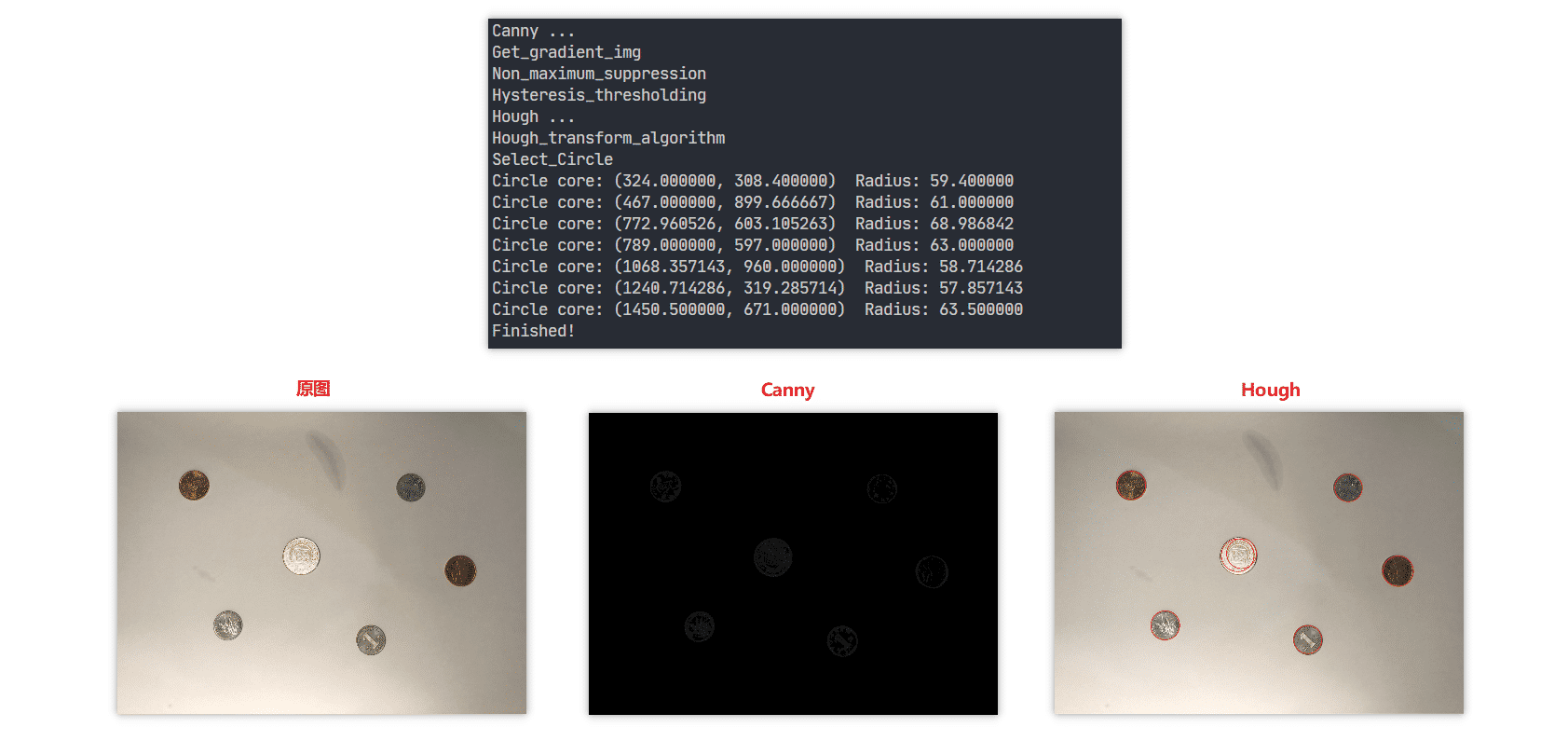
代碼實(shí)現(xiàn)
Canny邊緣檢測(cè):
# Author: Ji Qiu (BUPT)# filename: my_canny.pyimport cv2import numpy as npclass Canny: def __init__(self, Guassian_kernal_size, img, HT_high_threshold, HT_low_threshold): ’’’ :param Guassian_kernal_size: 高斯濾波器尺寸 :param img: 輸入的圖片,在算法過(guò)程中改變 :param HT_high_threshold: 滯后閾值法中的高閾值 :param HT_low_threshold: 滯后閾值法中的低閾值 ’’’ self.Guassian_kernal_size = Guassian_kernal_size self.img = img self.y, self.x = img.shape[0:2] self.angle = np.zeros([self.y, self.x]) self.img_origin = None self.x_kernal = np.array([[-1, 1]]) self.y_kernal = np.array([[-1], [1]]) self.HT_high_threshold = HT_high_threshold self.HT_low_threshold = HT_low_threshold def Get_gradient_img(self): ’’’ 計(jì)算梯度圖和梯度方向矩陣。 :return: 生成的梯度圖 ’’’ print (’Get_gradient_img’)new_img_x = np.zeros([self.y, self.x], dtype=np.float) new_img_y = np.zeros([self.y, self.x], dtype=np.float) for i in range(0, self.x): for j in range(0, self.y):if j == 0: new_img_y[j][i] = 1else: new_img_y[j][i] = np.sum(np.array([[self.img[j - 1][i]], [self.img[j][i]]]) * self.y_kernal)if i == 0: new_img_x[j][i] = 1else: new_img_x[j][i] = np.sum(np.array([self.img[j][i - 1], self.img[j][i]]) * self.x_kernal) gradient_img, self.angle = cv2.cartToPolar(new_img_x, new_img_y)#返回幅值和相位 self.angle = np.tan(self.angle) self.img = gradient_img.astype(np.uint8) return self.img def Non_maximum_suppression (self): ’’’ 對(duì)生成的梯度圖進(jìn)行非極大化抑制,將tan值的大小與正負(fù)結(jié)合,確定離散中梯度的方向。 :return: 生成的非極大化抑制結(jié)果圖 ’’’ print (’Non_maximum_suppression’)result = np.zeros([self.y, self.x]) for i in range(1, self.y - 1): for j in range(1, self.x - 1):if abs(self.img[i][j]) <= 4: result[i][j] = 0 continueelif abs(self.angle[i][j]) > 1: gradient2 = self.img[i - 1][j] gradient4 = self.img[i + 1][j] # g1 g2 # C # g4 g3 if self.angle[i][j] > 0: gradient1 = self.img[i - 1][j - 1] gradient3 = self.img[i + 1][j + 1] # g2 g1 # C # g3 g4 else: gradient1 = self.img[i - 1][j + 1] gradient3 = self.img[i + 1][j - 1]else: gradient2 = self.img[i][j - 1] gradient4 = self.img[i][j + 1] # g1 # g2 C g4 # g3 if self.angle[i][j] > 0: gradient1 = self.img[i - 1][j - 1] gradient3 = self.img[i + 1][j + 1] # g3 # g2 C g4 # g1 else: gradient3 = self.img[i - 1][j + 1] gradient1 = self.img[i + 1][j - 1]temp1 = abs(self.angle[i][j]) * gradient1 + (1 - abs(self.angle[i][j])) * gradient2temp2 = abs(self.angle[i][j]) * gradient3 + (1 - abs(self.angle[i][j])) * gradient4if self.img[i][j] >= temp1 and self.img[i][j] >= temp2: result[i][j] = self.img[i][j]else: result[i][j] = 0 self.img = result return self.img def Hysteresis_thresholding(self): ’’’ 對(duì)生成的非極大化抑制結(jié)果圖進(jìn)行滯后閾值法,用強(qiáng)邊延伸弱邊,這里的延伸方向?yàn)樘荻鹊拇怪狈较颍? 將比低閾值大比高閾值小的點(diǎn)置為高閾值大小,方向在離散點(diǎn)上的確定與非極大化抑制相似。 :return: 滯后閾值法結(jié)果圖 ’’’ print (’Hysteresis_thresholding’)for i in range(1, self.y - 1): for j in range(1, self.x - 1):if self.img[i][j] >= self.HT_high_threshold: if abs(self.angle[i][j]) < 1: if self.img_origin[i - 1][j] > self.HT_low_threshold: self.img[i - 1][j] = self.HT_high_threshold if self.img_origin[i + 1][j] > self.HT_low_threshold: self.img[i + 1][j] = self.HT_high_threshold # g1 g2 # C # g4 g3 if self.angle[i][j] < 0: if self.img_origin[i - 1][j - 1] > self.HT_low_threshold:self.img[i - 1][j - 1] = self.HT_high_threshold if self.img_origin[i + 1][j + 1] > self.HT_low_threshold:self.img[i + 1][j + 1] = self.HT_high_threshold # g2 g1 # C # g3 g4 else: if self.img_origin[i - 1][j + 1] > self.HT_low_threshold:self.img[i - 1][j + 1] = self.HT_high_threshold if self.img_origin[i + 1][j - 1] > self.HT_low_threshold:self.img[i + 1][j - 1] = self.HT_high_threshold else: if self.img_origin[i][j - 1] > self.HT_low_threshold: self.img[i][j - 1] = self.HT_high_threshold if self.img_origin[i][j + 1] > self.HT_low_threshold: self.img[i][j + 1] = self.HT_high_threshold # g1 # g2 C g4 # g3 if self.angle[i][j] < 0: if self.img_origin[i - 1][j - 1] > self.HT_low_threshold:self.img[i - 1][j - 1] = self.HT_high_threshold if self.img_origin[i + 1][j + 1] > self.HT_low_threshold:self.img[i + 1][j + 1] = self.HT_high_threshold # g3 # g2 C g4 # g1 else: if self.img_origin[i - 1][j + 1] > self.HT_low_threshold:self.img[i + 1][j - 1] = self.HT_high_threshold if self.img_origin[i + 1][j - 1] > self.HT_low_threshold:self.img[i + 1][j - 1] = self.HT_high_threshold return self.img def canny_algorithm(self): ’’’ 按照順序和步驟調(diào)用以上所有成員函數(shù)。 :return: Canny 算法的結(jié)果 ’’’ self.img = cv2.GaussianBlur(self.img, (self.Guassian_kernal_size, self.Guassian_kernal_size), 0) self.Get_gradient_img() self.img_origin = self.img.copy() self.Non_maximum_suppression() self.Hysteresis_thresholding() return self.img
Hough變換
# Author: Ji Qiu (BUPT)# filename: my_hough.pyimport numpy as npimport mathclass Hough_transform: def __init__(self, img, angle, step=5, threshold=135): ’’’ :param img: 輸入的圖像 :param angle: 輸入的梯度方向矩陣 :param step: Hough 變換步長(zhǎng)大小 :param threshold: 篩選單元的閾值 ’’’ self.img = img self.angle = angle self.y, self.x = img.shape[0:2] self.radius = math.ceil(math.sqrt(self.y**2 + self.x**2)) self.step = step self.vote_matrix = np.zeros([math.ceil(self.y / self.step), math.ceil(self.x / self.step), math.ceil(self.radius / self.step)]) self.threshold = threshold self.circles = [] def Hough_transform_algorithm(self): ’’’ 按照 x,y,radius 建立三維空間,根據(jù)圖片中邊上的點(diǎn)沿梯度方向?qū)臻g中的所有單 元進(jìn)行投票。每個(gè)點(diǎn)投出來(lái)結(jié)果為一折線。 :return: 投票矩陣 ’’’ print (’Hough_transform_algorithm’)for i in range(1, self.y - 1): for j in range(1, self.x - 1):if self.img[i][j] > 0: y = i x = j r = 0 while y < self.y and x < self.x and y >= 0 and x >= 0: self.vote_matrix[math.floor(y / self.step)][math.floor(x / self.step)][math.floor(r / self.step)] += 1 y = y + self.step * self.angle[i][j] x = x + self.step r = r + math.sqrt((self.step * self.angle[i][j])**2 + self.step**2) y = i - self.step * self.angle[i][j] x = j - self.step r = math.sqrt((self.step * self.angle[i][j])**2 + self.step**2) while y < self.y and x < self.x and y >= 0 and x >= 0: self.vote_matrix[math.floor(y / self.step)][math.floor(x / self.step)][math.floor(r / self.step)] += 1 y = y - self.step * self.angle[i][j] x = x - self.step r = r + math.sqrt((self.step * self.angle[i][j])**2 + self.step**2) return self.vote_matrix def Select_Circle(self): ’’’ 按照閾值從投票矩陣中篩選出合適的圓,并作極大化抑制,這里的非極大化抑制我采 用的是鄰近點(diǎn)結(jié)果取平均值的方法,而非單純的取極大值。 :return: None ’’’ print (’Select_Circle’)houxuanyuan = [] for i in range(0, math.ceil(self.y / self.step)): for j in range(0, math.ceil(self.x / self.step)):for r in range(0, math.ceil(self.radius / self.step)): if self.vote_matrix[i][j][r] >= self.threshold: y = i * self.step + self.step / 2 x = j * self.step + self.step / 2 r = r * self.step + self.step / 2 houxuanyuan.append((math.ceil(x), math.ceil(y), math.ceil(r))) if len(houxuanyuan) == 0: print('No Circle in this threshold.') return x, y, r = houxuanyuan[0] possible = [] middle = [] for circle in houxuanyuan: if abs(x - circle[0]) <= 20 and abs(y - circle[1]) <= 20:possible.append([circle[0], circle[1], circle[2]]) else:result = np.array(possible).mean(axis=0)middle.append((result[0], result[1], result[2]))possible.clear()x, y, r = circlepossible.append([x, y, r]) result = np.array(possible).mean(axis=0) middle.append((result[0], result[1], result[2])) def takeFirst(elem): return elem[0] middle.sort(key=takeFirst) x, y, r = middle[0] possible = [] for circle in middle: if abs(x - circle[0]) <= 20 and abs(y - circle[1]) <= 20:possible.append([circle[0], circle[1], circle[2]]) else:result = np.array(possible).mean(axis=0)print('Circle core: (%f, %f) Radius: %f' % (result[0], result[1], result[2]))self.circles.append((result[0], result[1], result[2]))possible.clear()x, y, r = circlepossible.append([x, y, r]) result = np.array(possible).mean(axis=0) print('Circle core: (%f, %f) Radius: %f' % (result[0], result[1], result[2])) self.circles.append((result[0], result[1], result[2])) def Calculate(self): ’’’ 按照算法順序調(diào)用以上成員函數(shù) :return: 圓形擬合結(jié)果圖,圓的坐標(biāo)及半徑集合 ’’’ self.Hough_transform_algorithm() self.Select_Circle() return self.circles
調(diào)用
# Author: Ji Qiu (BUPT)# filename: main.pyimport cv2import mathfrom my_hough import Hough_transformfrom my_canny import Canny# np.set_printoptions(threshold=np.inf)Path = 'picture_source/picture.jpg'Save_Path = 'picture_result/'Reduced_ratio = 2Guassian_kernal_size = 3HT_high_threshold = 25HT_low_threshold = 6Hough_transform_step = 6Hough_transform_threshold = 110if __name__ == ’__main__’: img_gray = cv2.imread(Path, cv2.IMREAD_GRAYSCALE) img_RGB = cv2.imread(Path) y, x = img_gray.shape[0:2] img_gray = cv2.resize(img_gray, (int(x / Reduced_ratio), int(y / Reduced_ratio))) img_RGB = cv2.resize(img_RGB, (int(x / Reduced_ratio), int(y / Reduced_ratio))) # canny takes about 40 seconds print (’Canny ...’) canny = Canny(Guassian_kernal_size, img_gray, HT_high_threshold, HT_low_threshold) canny.canny_algorithm() cv2.imwrite(Save_Path + 'canny_result.jpg', canny.img) # hough takes about 30 seconds print (’Hough ...’) Hough = Hough_transform(canny.img, canny.angle, Hough_transform_step, Hough_transform_threshold) circles = Hough.Calculate() for circle in circles: cv2.circle(img_RGB, (math.ceil(circle[0]), math.ceil(circle[1])), math.ceil(circle[2]), (28, 36, 237), 2) cv2.imwrite(Save_Path + 'hough_result.jpg', img_RGB) print (’Finished!’)
運(yùn)行效果
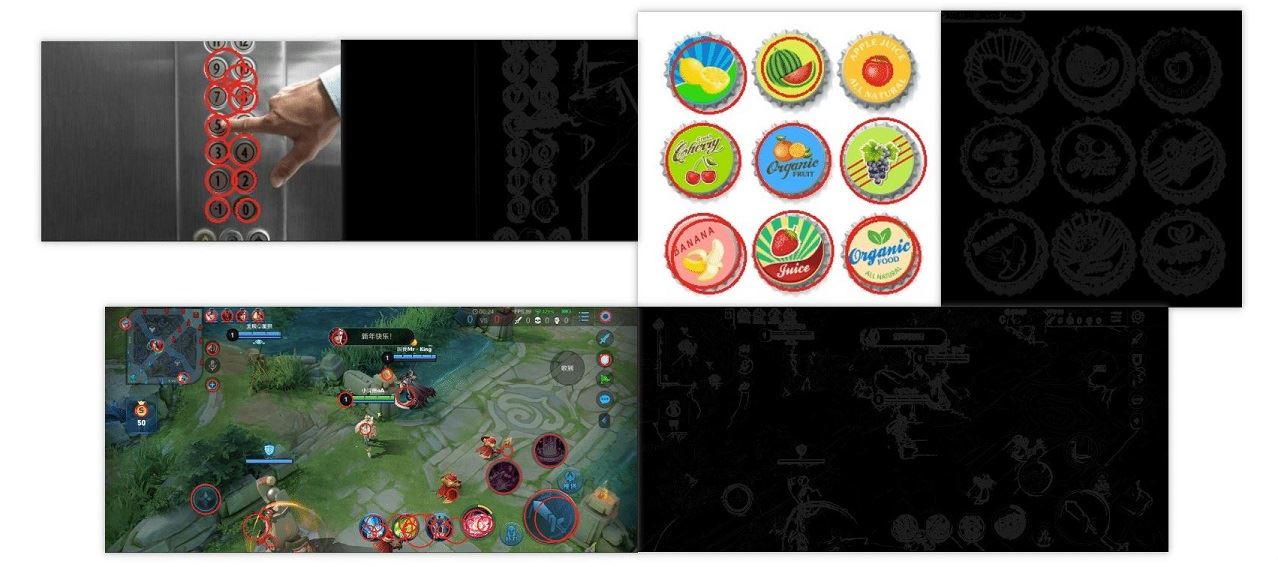
以上就是本文的全部?jī)?nèi)容,希望對(duì)大家的學(xué)習(xí)有所幫助,也希望大家多多支持好吧啦網(wǎng)。
相關(guān)文章:
 網(wǎng)公網(wǎng)安備