文章詳情頁
ASP實現(xiàn)加法驗證碼
瀏覽:827日期:2022-06-05 11:07:37
將驗證碼改為加法運算,比如驗證碼顯示“25+64等于?”,那么輸入“91”就能通過驗證。
來看看效果圖對比:字符驗證碼: → 加法驗證碼: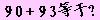
優(yōu)點:
①與純字符驗證碼相比,本程序效防止了絕大部分(99%以上)廣告機的自動識別。即使是中文驗證碼, 也能被市面上的部分廣告機識別。
②與中文驗證碼相比,避免了用戶輸入用戶名密碼驗證碼的時候需要切換輸入法的麻煩。
說明:該程序需要網(wǎng)站空間支持ASPJpeg組件、楷體_GB2312字體。
代碼如下:
<%Const FontColor = &H000000 " 字體顏色Const BgColor = &HFFCCFF " 背景顏色Call CreatValidCode("GetCode")Sub CreatValidCode(pSN) Dim x, Jpeg Randomize x = Array(1+Int(Rnd()*9), Int(Rnd()*10), 1+Int(Rnd()*9), Int(Rnd()*10), 0, 0, "+") x(4) = x(0)*10 + x(1) x(5) = x(2)*10 + x(3) "Session(pSN) = CStr(Eval(x(4) & x(6) & x(5))) Session(pSN) = CStr(x(4) + x(5)) Set Jpeg = Server.CreateObject("Persits.Jpeg") Jpeg.New 100,20,BgColor Jpeg.Quality=100 With Jpeg.Canvas .Font.Bold = True .Font.Size = 16 .Font.Rotation = 0 .Font.Family = "楷體_GB2312" .Font.Color = FontColor .PrintText 4, 3, CStr(x(0)) .PrintText 14, 3, CStr(x(1)) .PrintText 26, 3, x(6) .PrintText 38, 3, CStr(x(2)) .PrintText 48, 3, CStr(x(3)) .Font.Rotation = 15 .PrintText 55, 3, "等" .PrintText 70, 3, "于" .PrintText 85, 3, "?" End With "禁止緩存 Response.ContentType = "image/jpeg" Response.Expires = -9999 Response.AddHeader "pragma", "no-cache" Response.AddHeader "cache-ctrol", "no-cache" Response.AddHeader "Content-Disposition","inline; filename=vcode.jpg" Jpeg.SendBinary Jpeg.Close Set Jpeg = NothingEnd Sub%>以上就是關(guān)于asp實現(xiàn)加法驗證碼的關(guān)鍵代碼,有興趣的朋友,還可以擴展為其他的運算,比如乘法,減法,乘方等,希望本文對大家的學(xué)習(xí)有所幫助。
標(biāo)簽:
ASP
相關(guān)文章:
1. asp中Request.ServerVariables的參數(shù)集合2. asp文件如何打開3. ASP.Net MVC利用NPOI導(dǎo)入導(dǎo)出Excel的示例代碼4. asp.net core服務(wù)限制堆內(nèi)存大小的操作方法5. ASP.NET MVC實現(xiàn)單個圖片上傳、限制圖片格式與大小并在服務(wù)端裁剪圖片6. ASP中常用的22個FSO文件操作函數(shù)整理7. ASP.NET泛型二之泛型的使用方法8. 基于spring@aspect注解的aop實現(xiàn)過程代碼實例9. ASP常用源代碼的總結(jié)(上)10. ASP.NET Core依賴注入DI容器的方法實現(xiàn)
排行榜
 網(wǎng)公網(wǎng)安備