Python 作圖實現坐標軸截斷(打斷)的效果
主題:利用python畫圖實現坐標軸截斷或打斷
關鍵詞:python, plot, matplotlib, break axes
方法一:首先介紹一種簡單快速的方法——調用包 brokenaxes。
詳細請點擊參考
import matplotlib.pyplot as pltfrom brokenaxes import brokenaxesimport numpy as npfig = plt.figure(figsize=(5,2))bax = brokenaxes(xlims=((0, .1), (.4, .7)), ylims=((-1, .7), (.79, 1)), hspace=.05, despine=False)x = np.linspace(0, 1, 100)bax.plot(x, np.sin(10 * x), label=’sin’)bax.plot(x, np.cos(10 * x), label=’cos’)bax.legend(loc=3)bax.set_xlabel(’time’)bax.set_ylabel(’value’)
效果如下:

拼接法,該種方法代碼更繁瑣,但更有可能滿足個性化的需求。
請點擊參考鏈接
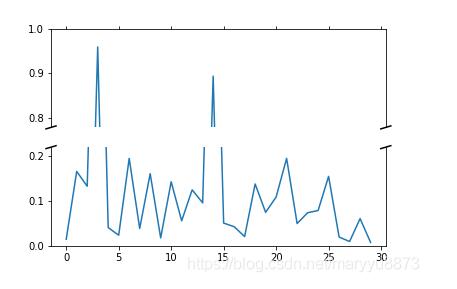
'''Broken axis example, where the y-axis will have a portion cut out.'''import matplotlib.pyplot as pltimport numpy as np# 30 points between [0, 0.2) originally made using np.random.rand(30)*.2pts = np.array([ 0.015, 0.166, 0.133, 0.159, 0.041, 0.024, 0.195, 0.039, 0.161, 0.018, 0.143, 0.056, 0.125, 0.096, 0.094, 0.051, 0.043, 0.021, 0.138, 0.075, 0.109, 0.195, 0.050, 0.074, 0.079, 0.155, 0.020, 0.010, 0.061, 0.008])# Now let’s make two outlier points which are far away from everything.pts[[3, 14]] += .8# If we were to simply plot pts, we’d lose most of the interesting# details due to the outliers. So let’s ’break’ or ’cut-out’ the y-axis# into two portions - use the top (ax) for the outliers, and the bottom# (ax2) for the details of the majority of our dataf, (ax, ax2) = plt.subplots(2, 1, sharex=True)# plot the same data on both axesax.plot(pts)ax2.plot(pts)# zoom-in / limit the view to different portions of the dataax.set_ylim(.78, 1.) # outliers onlyax2.set_ylim(0, .22) # most of the data# hide the spines between ax and ax2ax.spines[’bottom’].set_visible(False)ax2.spines[’top’].set_visible(False)ax.xaxis.tick_top()ax.tick_params(labeltop=’off’) # don’t put tick labels at the topax2.xaxis.tick_bottom()# This looks pretty good, and was fairly painless, but you can get that# cut-out diagonal lines look with just a bit more work. The important# thing to know here is that in axes coordinates, which are always# between 0-1, spine endpoints are at these locations (0,0), (0,1),# (1,0), and (1,1). Thus, we just need to put the diagonals in the# appropriate corners of each of our axes, and so long as we use the# right transform and disable clipping.d = .015 # how big to make the diagonal lines in axes coordinates# arguments to pass to plot, just so we don’t keep repeating themkwargs = dict(transform=ax.transAxes, color=’k’, clip_on=False)ax.plot((-d, +d), (-d, +d), **kwargs)# top-left diagonalax.plot((1 - d, 1 + d), (-d, +d), **kwargs) # top-right diagonalkwargs.update(transform=ax2.transAxes) # switch to the bottom axesax2.plot((-d, +d), (1 - d, 1 + d), **kwargs) # bottom-left diagonalax2.plot((1 - d, 1 + d), (1 - d, 1 + d), **kwargs) # bottom-right diagonal# What’s cool about this is that now if we vary the distance between# ax and ax2 via f.subplots_adjust(hspace=...) or plt.subplot_tool(),# the diagonal lines will move accordingly, and stay right at the tips# of the spines they are ’breaking’plt.show()
效果如下:
補充:python繪制折線圖--縱坐標y軸截斷
看代碼吧~
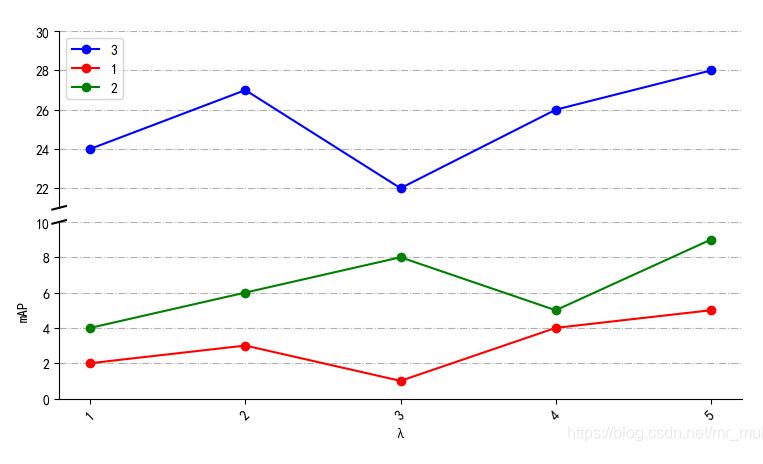
# -*- coding: utf-8 -*-'''Created on Wed Dec 4 21:50:38 2019@author: muli'''import matplotlib.pyplot as pltfrom pylab import * mpl.rcParams[’font.sans-serif’] = [’SimHei’] #支持中文 names = ['1','2','3','4','5'] # 刻度值命名x = [1,2,3,4,5] # 橫坐標y3= [2,3,1,4,5] # 縱坐標y4= [4,6,8,5,9] # 縱坐標y5=[24,27,22,26,28] # 縱坐標f, (ax3, ax) = plt.subplots(2, 1, sharex=False) # 繪制兩個子圖plt.subplots_adjust(wspace=0,hspace=0.08) # 設置 子圖間距ax.plot(x, y3, color=’red’, marker=’o’, linestyle=’solid’,label=u’1’) # 繪制折線ax.plot(x, y4, color=’g’, marker=’o’, linestyle=’solid’,label=u’2’) # 繪制折線plt.xticks(x, names, rotation=45) # 刻度值ax3.xaxis.set_major_locator(plt.NullLocator()) # 刪除坐標軸的刻度顯示ax3.plot(x, y5, color=’blue’, marker=’o’, linestyle=’solid’,label=u’3’) # 繪制折線ax3.plot(x, y3, color=’red’, marker=’o’, linestyle=’solid’,label=u’1’) # 起圖例作用ax3.plot(x, y4, color=’g’, marker=’o’, linestyle=’solid’,label=u’2’) # 起圖例作用ax3.set_ylim(21, 30) # 設置縱坐標范圍ax.set_ylim(0, 10) # 設置縱坐標范圍ax3.grid(axis=’both’,linestyle=’-.’) # 打開網格線ax.grid(axis=’y’,linestyle=’-.’) # 打開網格線ax3.legend() # 讓圖例生效plt.xlabel(u'λ') #X軸標簽plt.ylabel('mAP') #Y軸標簽ax.spines[’top’].set_visible(False) # 邊框控制ax.spines[’bottom’].set_visible(True) # 邊框控制ax.spines[’right’].set_visible(False) # 邊框控制ax3.spines[’top’].set_visible(False) # 邊框控制ax3.spines[’bottom’].set_visible(False) # 邊框控制ax3.spines[’right’].set_visible(False) # 邊框控制ax.tick_params(labeltop=’off’) # 繪制斷層線d = 0.01 # 斷層線的大小kwargs = dict(transform=ax3.transAxes, color=’k’, clip_on=False)ax3.plot((-d, +d), (-d, +d), **kwargs)# top-left diagonalkwargs.update(transform=ax.transAxes, color=’k’) # switch to the bottom axesax.plot((-d, +d), (1 - d, 1 + d), **kwargs) # bottom-left diagonalplt.show()
結果如圖所示:
以上為個人經驗,希望能給大家一個參考,也希望大家多多支持好吧啦網。如有錯誤或未考慮完全的地方,望不吝賜教。
相關文章:
 網公網安備
網公網安備