文章詳情頁
zabbix 監(jiān)控mysql的方法
瀏覽:375日期:2023-04-06 15:09:37
zabbix部署文檔
zabbix部署完之后
zabbix-agent操作
1.監(jiān)控mysql,首先要先安裝mysql
[root@localhost ~]# yum -y install mariadb mariadb-server
2.編寫mysql監(jiān)控項的腳本
在zabbix-agent先授權個用戶 不然測試時沒有權限
[root@localhost ~]# mysqlWelcome to the MariaDB monitor. Commands end with ; or \g.Your MariaDB connection id is 33Server version: 5.5.65-MariaDB MariaDB ServerCopyright (c) 2000, 2018, Oracle, MariaDB Corporation Ab and others.Type "help;" or "\h" for help. Type "\c" to clear the current input statement.MariaDB [(none)]> grant all on *.* to "check"@"localhost" identified by "123";Query OK, 0 rows affected (0.00 sec)
mysql監(jiān)控的內(nèi)容主要有
- 主從的狀態(tài) (得先配置主從 在下面)
- 流量檢測 發(fā)送,接受常規(guī)操作 增刪改查
- 某個庫、某個表的大小
- tps(每秒查詢處理的事務數(shù))qps(每秒能處理多少次請求數(shù))
[root@localhost ~]# mkdir /etc/zabbix/scipts[root@localhost ~]# cd /etc/zabbix/scipts/[root@localhost scipts]# vim mysql.sh #!/bin/bashmysql="mysql -ucheck -p123"case $1 in # mysql主從狀態(tài) slave_status) $mysql -e "show slave status\G" |grep "Yes" |wc -l ;; # mysql流量 接受 Bytes_received) mysqladmin extended-status |grep "Bytes_received" |awk "{print $4}" ;; # mysql流量 發(fā)送 Bytes_sent) mysqladmin extended-status |grep "Bytes_sent" |awk "{print $4}" ;; # mysql常規(guī)操作 增 Com_insert) mysqladmin extended-status |grep -w "Com_insert" |awk "{print $4}" ;; # mysql常規(guī)操作 刪 Com_delete) mysqladmin extended-status |grep -w "Com_delete" |awk "{print $4}" ;; # mysql常規(guī)操作 改 Com_update) mysqladmin extended-status |grep -w "Com_update" |awk "{print $4}" ;; # mysql常規(guī)操作 查 Com_select) mysqladmin extended-status |grep -w "Com_select" |awk "{print $4}" ;; # mysql tps tps) mysqladmin status |awk "{print $6/$2}" ;; # mysql qps=(rollback+commit)/uptime qps) rollback=$(mysqladmin extended-status |grep -w "Com_rollback" |awk "{print $4}") commit=$(mysqladmin extended-status |grep -w "Com_commit" |awk "{print $4}") uptime=$(mysqladmin status |awk "{print $2}") count=$[$rollback+$commit] echo "$count $uptime" > /tmp/a.txt cat /tmp/a.txt |awk "{print $1/$2}" ;; # 庫大小 我們這里拿mysql庫舉例 db) $mysql -e "select sum(data_length) from information_schema.tables where table_schema="mysql"" |sed -n "2p" ;; # 表大小 我們這里拿mysql下面的user表舉例 tb) $mysql -e "select sum(data_length) from information_schema.tables where table_schema="mysql" and table_name="user"" |sed -n "2p" ;;esac3.自定義鍵值key 重啟zabbix-agent
[root@localhost scipts]# cd /etc/zabbix/zabbix_agentd.d/[root@localhost zabbix_agentd.d]# vim mysql.confUserParameter=mysql[*],/etc/zabbix/scipts/mysql.sh $1[root@localhost zabbix_agentd.d]# systemctl restart zabbix-agent
4.在zabbix-server測試 先安裝zabbix-get
[root@localhost ~]# yum -y install zabbix-get[root@localhost ~]# zabbix_get -s 192.168.27.137 -k mysql[slave_status]2[root@localhost ~]# zabbix_get -s 192.168.27.137 -k mysql[Bytes_received]850970[root@localhost ~]# zabbix_get -s 192.168.27.137 -k mysql[Bytes_sent]224906[root@localhost ~]# zabbix_get -s 192.168.27.137 -k mysql[Com_insert]3001[root@localhost ~]# zabbix_get -s 192.168.27.137 -k mysql[Com_delete]135[root@localhost ~]# zabbix_get -s 192.168.27.137 -k mysql[Com_update]128[root@localhost ~]# zabbix_get -s 192.168.27.137 -k mysql[Com_select]19[root@localhost ~]# zabbix_get -s 192.168.27.137 -k mysql[qps]0.864842[root@localhost ~]# zabbix_get -s 192.168.27.137 -k mysql[tps]1.92936[root@localhost ~]# zabbix_get -s 192.168.27.137 -k mysql[db]555118[root@localhost ~]# zabbix_get -s 192.168.27.137 -k mysql[tb]420
報錯處理
[root@localhost ~]# zabbix_get -s 192.168.27.137 -k mysql[slave_status]sh: /etc/zabbix/scipts/mysql.sh: 權限不夠腳本執(zhí)行權限不夠 去zabbix-agent 加權限[root@localhost zabbix_agentd.d]# chmod +x /etc/zabbix/scipts/mysql.sh [root@localhost ~]# zabbix_get -s 192.168.27.137 -k mysql[slave_status]ERROR 1227 (42000) at line 1: Access denied; you need (at least one of) the SUPER,REPLICATION CLIENT privilege(s) for this operation是因為用戶沒有權限查看 去zabbix-agent 授權個用戶在腳本里面加上[root@localhost ~]# mysqlWelcome to the MariaDB monitor. Commands end with ; or \g.Your MariaDB connection id is 33Server version: 5.5.65-MariaDB MariaDB ServerCopyright (c) 2000, 2018, Oracle, MariaDB Corporation Ab and others.Type "help;" or "\h" for help. Type "\c" to clear the current input statement.MariaDB [(none)]> grant all on *.* to "check"@"localhost" identified by "123";Query OK, 0 rows affected (0.00 sec)[root@localhost scipts]# vim mysql.sh #!/bin/bashmysql="mysql -ucheck -p123"case $1 in # mysql主從狀態(tài) slave_status) $mysql -e "show slave status\G" |grep "Yes" |wc -l ;;
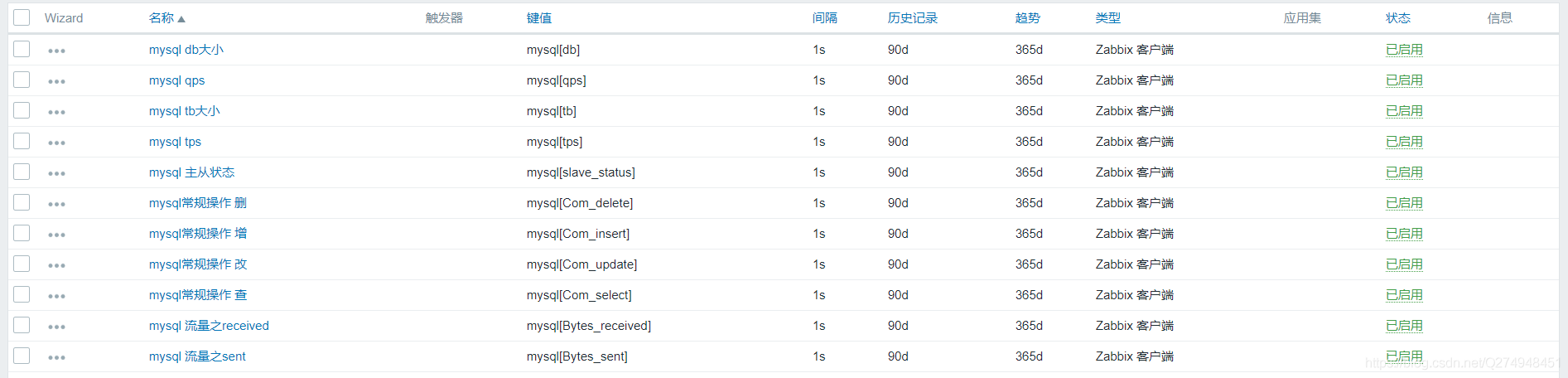
zabbix頁面上添加監(jiān)控項和圖形

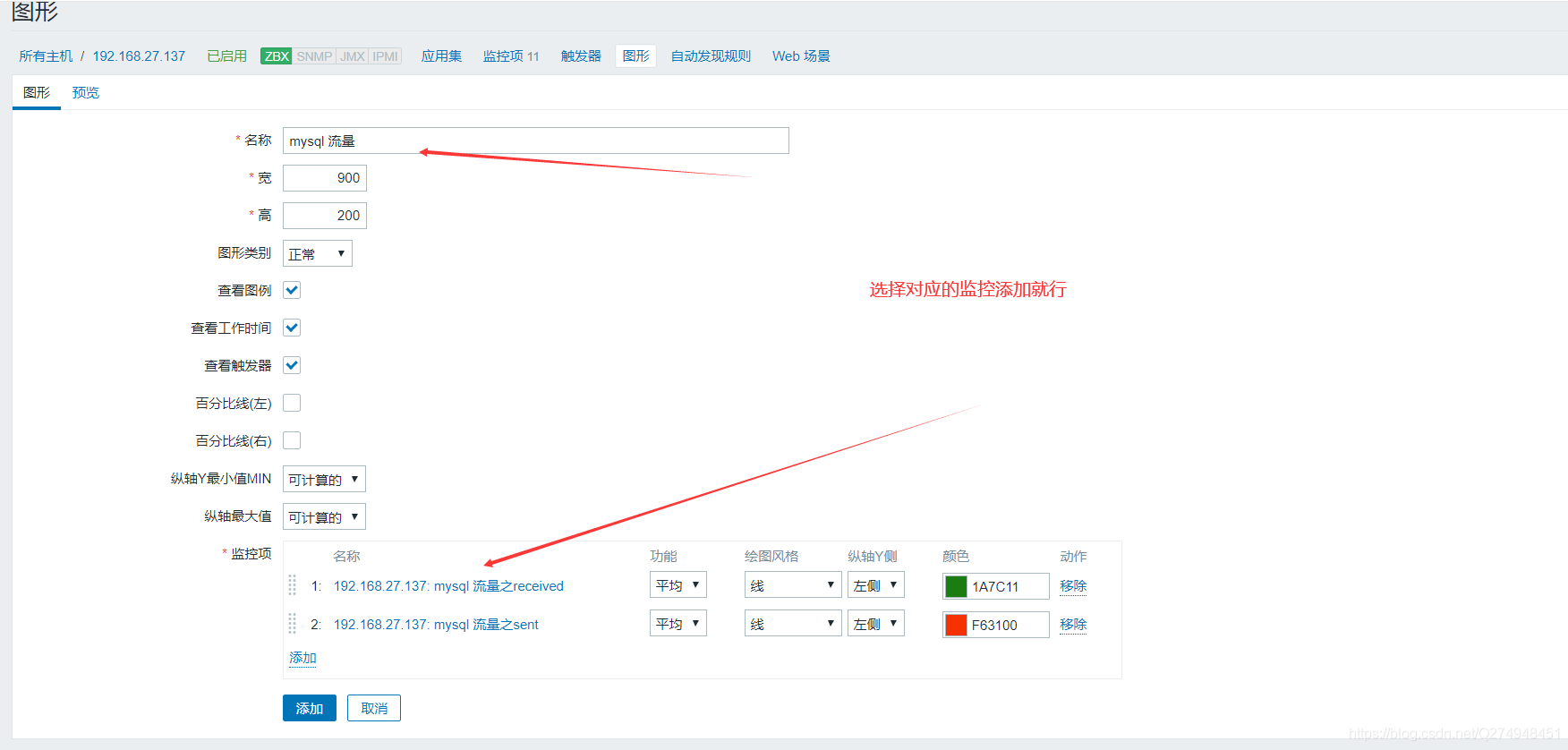

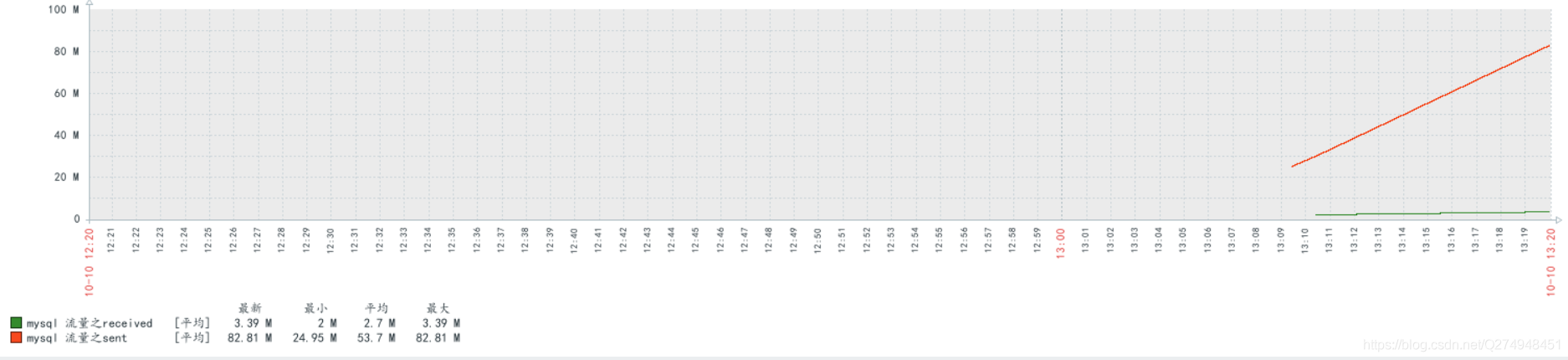
查看mysql流量數(shù)據(jù)

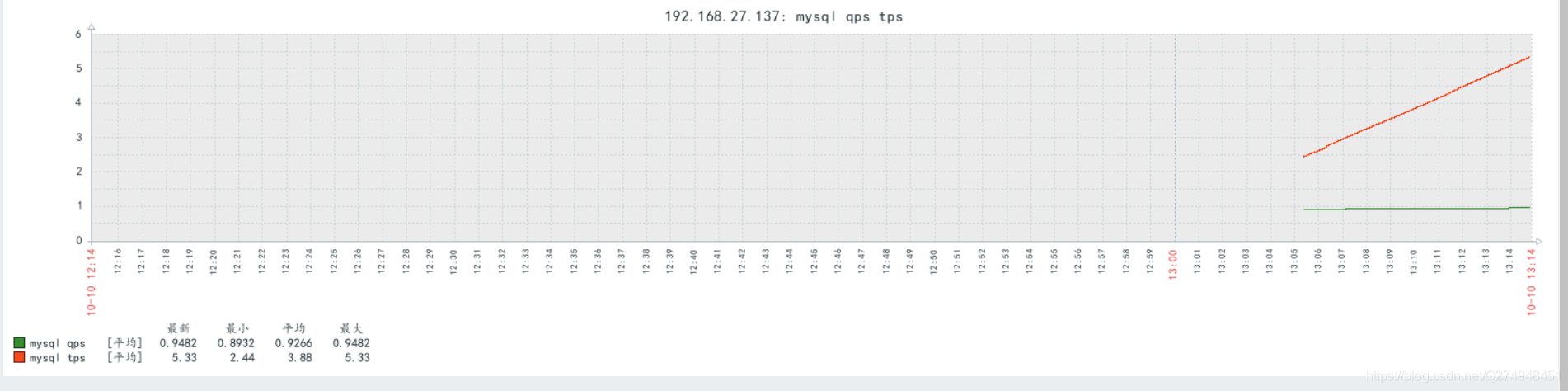
查看mysql qps tps
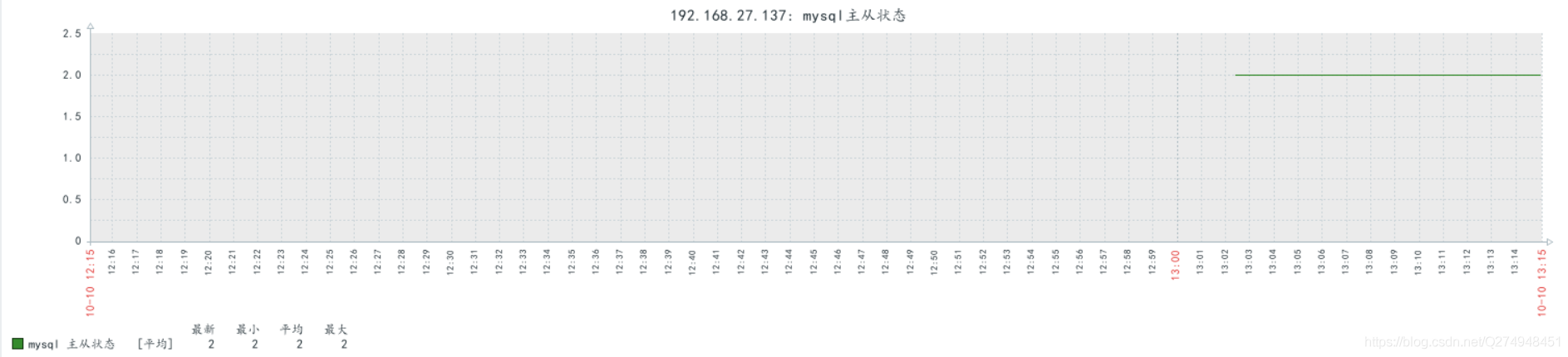
查看mysql主從狀態(tài)
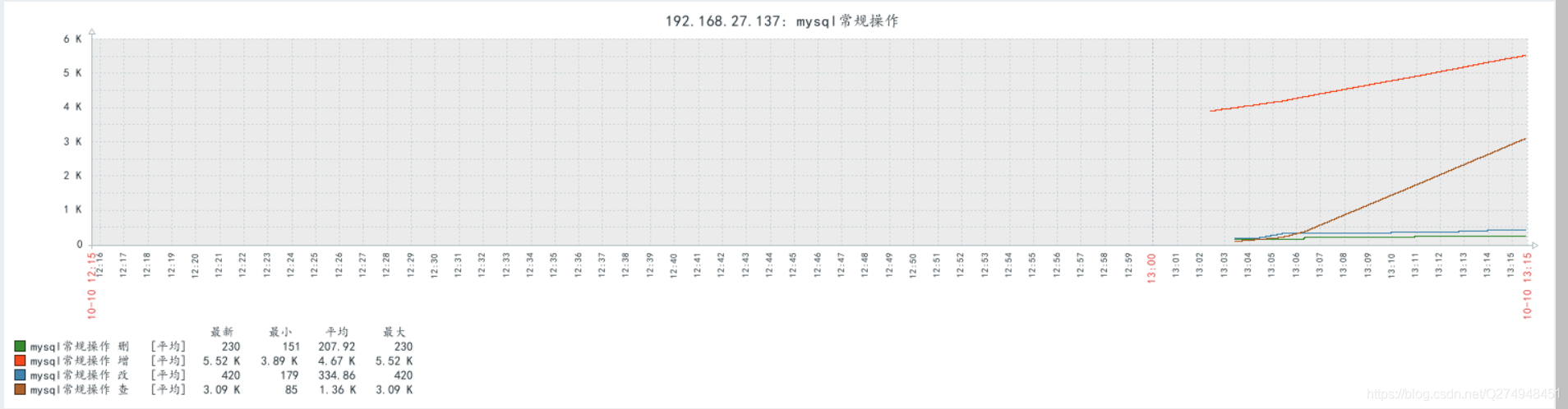
查看mysql常規(guī)操作
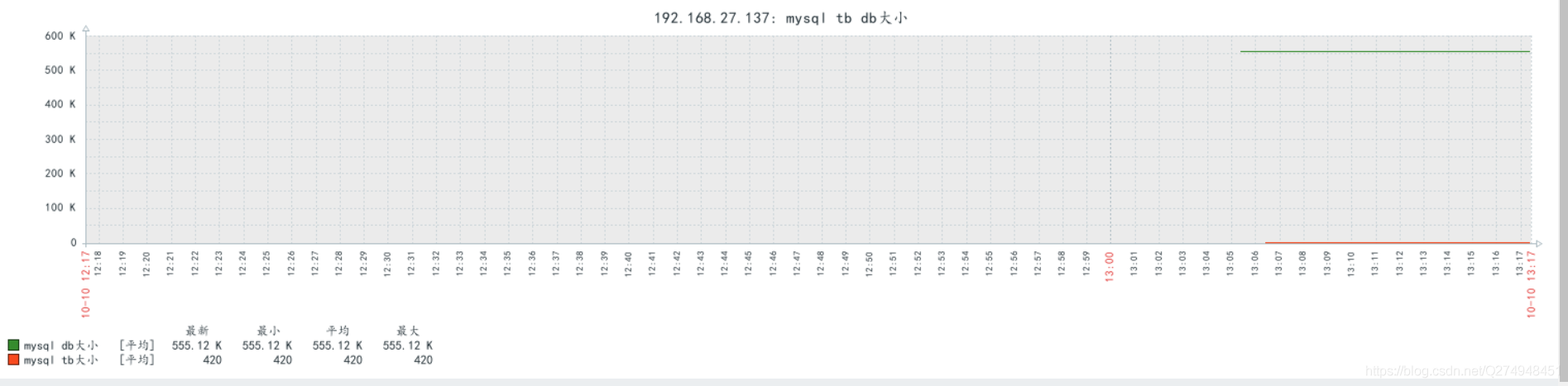
查看mysql庫表大小
mysql主從配置
一.zabbix-server端
[root@localhost ~]# vim /etc/my.cnf
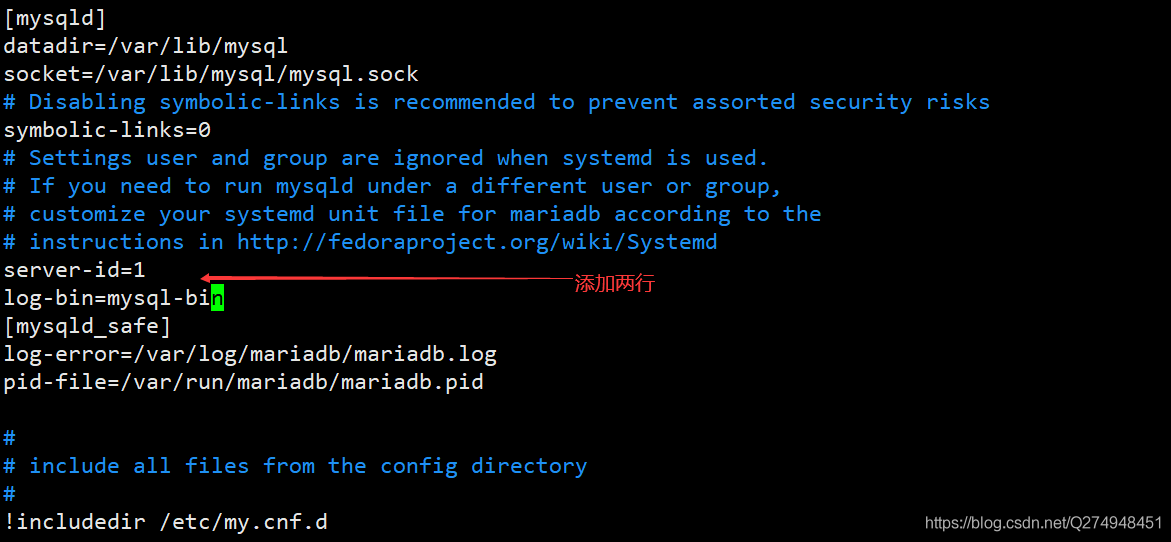
[root@localhost ~]# systemctl restart mariadb[root@localhost ~]# mysqlWelcome to the MariaDB monitor. Commands end with ; or \g.Your MariaDB connection id is 7Server version: 5.5.65-MariaDB MariaDB ServerCopyright (c) 2000, 2018, Oracle, MariaDB Corporation Ab and others.Type "help;" or "\h" for help. Type "\c" to clear the current input statement.MariaDB [(none)]> show master status;+------------------+----------+--------------+------------------+| File | Position | Binlog_Do_DB | Binlog_Ignore_DB |+------------------+----------+--------------+------------------+| mysql-bin.000001 | 175170 | | |+------------------+----------+--------------+------------------+1 row in set (0.00 sec)MariaDB [(none)]> grant all on *.* to "tom"@"%" identified by "123";Query OK, 0 rows affected (0.00 sec)MariaDB [(none)]> flush privileges;Query OK, 0 rows affected (0.00 sec)
二.zabbix-agent端
[root@localhost ~]# vim /etc/my.cnf
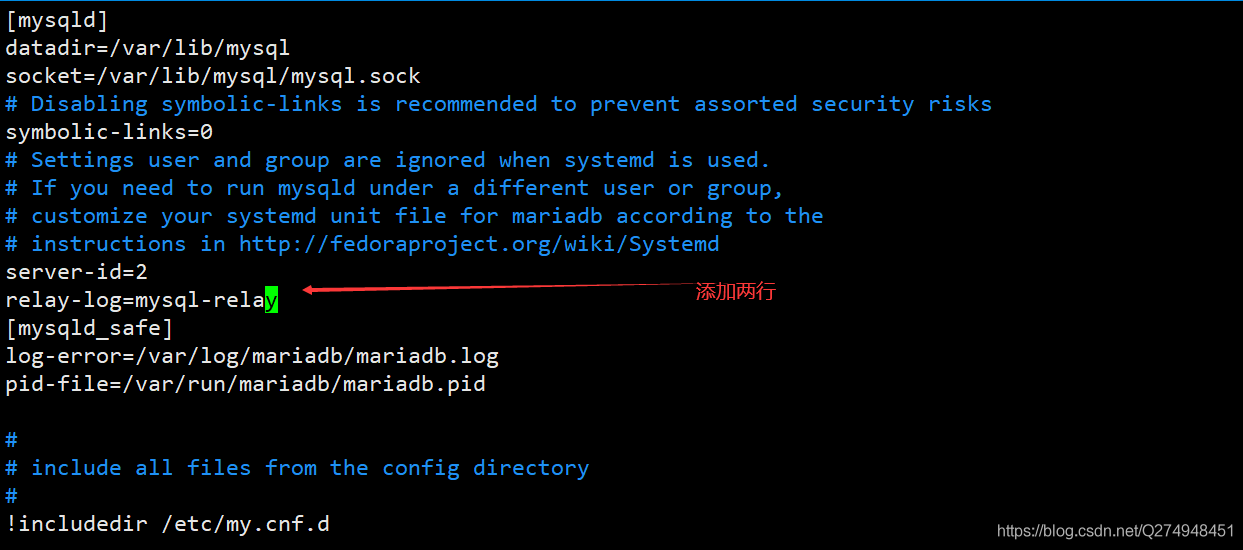
[root@localhost ~]# systemctl restart mariadb[root@localhost ~]# mysqlWelcome to the MariaDB monitor. Commands end with ; or \g.Your MariaDB connection id is 2Server version: 5.5.65-MariaDB MariaDB ServerCopyright (c) 2000, 2018, Oracle, MariaDB Corporation Ab and others.Type "help;" or "\h" for help. Type "\c" to clear the current input statement.MariaDB [(none)]> change master to -> master_host="192.168.27.136", -> master_user="tom", -> master_password="123", -> master_log_file="mysql-bin.000001", -> master_log_pos=175170;Query OK, 0 rows affected (0.01 sec)MariaDB [(none)]> start slave;Query OK, 0 rows affected (0.00 sec)MariaDB [(none)]> show slave status \G;*************************** 1. row *************************** Slave_IO_State: Waiting for master to send event Master_Host: 192.168.27.136 Master_User: tom Master_Port: 3306 Connect_Retry: 60 Master_Log_File: mysql-bin.000001 Read_Master_Log_Pos: 175170 Relay_Log_File: mysql-relay.000004 Relay_Log_Pos: 529 Relay_Master_Log_File: mysql-bin.000001 Slave_IO_Running: Yes Slave_SQL_Running: No Replicate_Do_DB: Replicate_Ignore_DB: Replicate_Do_Table: Replicate_Ignore_Table: Replicate_Wild_Do_Table: Replicate_Wild_Ignore_Table: Last_Errno: 1146 Last_Error: Error "Table "zabbix.history_uint" doesn"t exist" on query. Default database: "zabbix". Query: "insert into history_uint (itemid,clock,ns,value) values (23287,1602301747,810415730,1)" Skip_Counter: 0 Exec_Master_Log_Pos: 173424 Relay_Log_Space: 2565 Until_Condition: None Until_Log_File: Until_Log_Pos: 0 Master_SSL_Allowed: No Master_SSL_CA_File: Master_SSL_CA_Path: Master_SSL_Cert: Master_SSL_Cipher: Master_SSL_Key: Seconds_Behind_Master: NULLMaster_SSL_Verify_Server_Cert: No Last_IO_Errno: 0 Last_IO_Error: Last_SQL_Errno: 1146 Last_SQL_Error: Error "Table "zabbix.history_uint" doesn"t exist" on query. Default database: "zabbix". Query: "insert into history_uint (itemid,clock,ns,value) values (23287,1602301747,810415730,1)" Replicate_Ignore_Server_Ids: Master_Server_Id: 11 row in set (0.00 sec)ERROR: No query specified
報錯處理
[root@localhost ~]# vim /etc/my.cnf
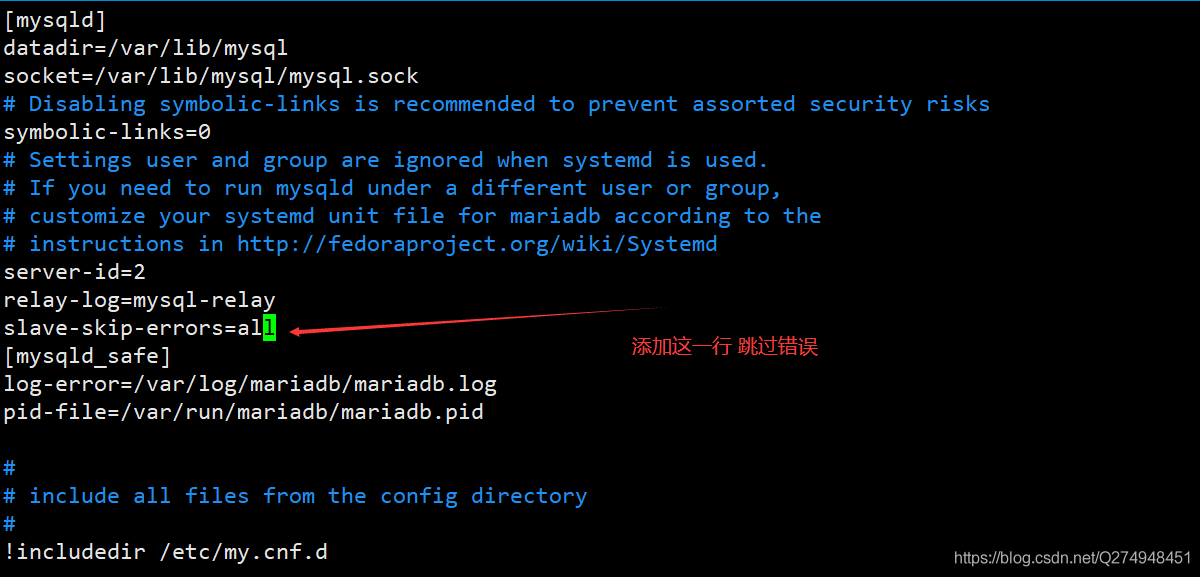
[root@localhost ~]# systemctl restart mariadb[root@localhost ~]# mysqlWelcome to the MariaDB monitor. Commands end with ; or \g.Your MariaDB connection id is 4Server version: 5.5.65-MariaDB MariaDB ServerCopyright (c) 2000, 2018, Oracle, MariaDB Corporation Ab and others.Type "help;" or "\h" for help. Type "\c" to clear the current input statement.MariaDB [(none)]> show slave status \G;*************************** 1. row *************************** Slave_IO_State: Waiting for master to send event Master_Host: 192.168.27.136 Master_User: tom Master_Port: 3306 Connect_Retry: 60 Master_Log_File: mysql-bin.000001 Read_Master_Log_Pos: 199126 Relay_Log_File: mysql-relay.000006 Relay_Log_Pos: 3950 Relay_Master_Log_File: mysql-bin.000001 Slave_IO_Running: Yes Slave_SQL_Running: Yes Replicate_Do_DB: Replicate_Ignore_DB: Replicate_Do_Table: Replicate_Ignore_Table: Replicate_Wild_Do_Table: Replicate_Wild_Ignore_Table: Last_Errno: 0 Last_Error: Skip_Counter: 0 Exec_Master_Log_Pos: 199126 Relay_Log_Space: 4240 Until_Condition: None Until_Log_File: Until_Log_Pos: 0 Master_SSL_Allowed: No Master_SSL_CA_File: Master_SSL_CA_Path: Master_SSL_Cert: Master_SSL_Cipher: Master_SSL_Key: Seconds_Behind_Master: 0Master_SSL_Verify_Server_Cert: No Last_IO_Errno: 0 Last_IO_Error: Last_SQL_Errno: 0 Last_SQL_Error: Replicate_Ignore_Server_Ids: Master_Server_Id: 11 row in set (0.00 sec)
到此這篇關于zabbix 監(jiān)控mysql的方法的文章就介紹到這了,更多相關zabbix 監(jiān)控mysql內(nèi)容請搜索以前的文章或繼續(xù)瀏覽下面的相關文章希望大家以后多多支持!
標簽:
Zabbix
相關文章:
1. Zabbix 結合 bat 腳本實現(xiàn)多個應用程序狀態(tài)監(jiān)控的方法2. 詳解ZABBIX監(jiān)控ESXI主機的問題3. Zabbix 配置釘釘告警功能的實現(xiàn)代碼4. 在centos7安裝zabbix3.0的超詳細步驟記錄5. Zabbix指定時間內(nèi)變化值設置方法詳解6. zabbix 6.0 使用 JavaScript 發(fā)出釘釘告警的方法7. zabbix 添加你需要監(jiān)控的主機步驟詳解8. Linux平臺Zabbix Agent的安裝配置方法9. Zabbix實現(xiàn)監(jiān)控多個mysql過程解析10. zabbix的psk加密結合zabbix_get取值
排行榜
 網(wǎng)公網(wǎng)安備