文章詳情頁
Mariadb數據庫主從復制同步配置過程實例
瀏覽:678日期:2023-03-30 13:21:07
目錄
- 一、環境規劃
- 二、Mariadb的主從復制介紹
- 1.主從復制簡介
- 2.半同步復制介紹
- 3.主從復制原理圖
- 三、安裝Mariadb
- 1.配置yum倉庫
- 2.檢查yum倉庫
- 3.安裝mariadb
- 4.啟動mariadb服務
- 5.從節點安裝mariadb
- 四、mariadb主庫配置
- 1.mariadb的初始化
- 2.修改主庫配置文件
- 3.重啟mariadb服務
- 五、mariadb從庫配置
- 1.修改從庫node01節點的server.cnf文件
- 2.修改從庫node02節點的server.cnf文件
- 3.重啟node01和node02的mariadb服務
- 六、查看mariadb主庫狀態
- 1.創建數據庫用戶
- 2.查看數據庫用戶信息
- 3.查看主庫狀態
- 4.查看mysql-bin日志文件
- 5.gtid查詢
- 七、啟動從庫
- 1.從庫設置主庫的gtid
- 2.連接主庫
- 3.啟動從庫
- 4.查詢從庫狀態
- 八、測試主從同步
- 1.主庫寫入數據
- 2.主庫查看數據表
- 3.從庫查看數據表
一、環境規劃
二、Mariadb的主從復制介紹
1.主從復制簡介
主從同步使得數據可以從一個數據庫服務器復制到其他服務器上,在復制數據時,一個服務器充當主服務器(master),其余的服務器充當從服務器(slave)。
2.半同步復制介紹
半同步復制是解決主庫數據掛掉,從庫數據不一致的問題。 解決方法:半同步復制,半同步復制場景中,master會監視所有的slave,確保其中至少一臺數據完全同步成功,master才會返回客戶端信息,此數據寫成功。
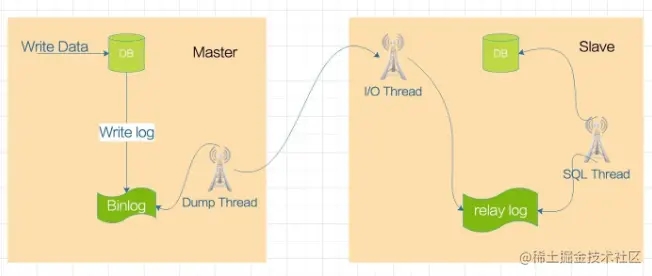
3.主從復制原理圖
三、安裝Mariadb
1.配置yum倉庫
3個節點都安裝Mariadb數據庫
[root@master yum.repos.d]# cat mariadb.repo # MariaDB 10.6 CentOS repository list - created 2021-12-27 11:21 UTC# https://mariadb.org/download/[mariadb]name = MariaDBbaseurl = https://mirrors.ustc.edu.cn/mariadb/yum/10.6/centos7-amd64gpgkey=https://mirrors.ustc.edu.cn/mariadb/yum/RPM-GPG-KEY-MariaDBgpgcheck=0
sed -i "s#//mirrors.xtom.com.hk#//mirrors.ustc.edu.cn#g" /etc/yum.repos.d/mariadb.repo
2.檢查yum倉庫
[root@master yum.repos.d]# yum repolist allLoaded plugins: fastestmirrorLoading mirror speeds from cached hostfilerepo id repo name statusmariadb MariaDB enabled: 96repolist: 96
3.安裝mariadb
yum -y install mariadb-server
4.啟動mariadb服務
[root@master yum.repos.d]# systemctl start mariadb[root@master yum.repos.d]# systemctl enable mariadbCreated symlink from /etc/systemd/system/multi-user.target.wants/mariadb.service to /usr/lib/systemd/system/mariadb.service.[root@master yum.repos.d]#
5.從節點安裝mariadb
如上步驟安裝即可。
四、mariadb主庫配置
1.mariadb的初始化
[root@master ~]# mariadb-secure-installation NOTE: RUNNING ALL PARTS OF THIS SCRIPT IS RECOMMENDED FOR ALL MariaDB SERVERS IN PRODUCTION USE! PLEASE READ EACH STEP CAREFULLY!In order to log into MariaDB to secure it, we"ll need the currentpassword for the root user. If you"ve just installed MariaDB, andhaven"t set the root password yet, you should just press enter here.Enter current password for root (enter for none): OK, successfully used password, moving on...Setting the root password or using the unix_socket ensures that nobodycan log into the MariaDB root user without the proper authorisation.You already have your root account protected, so you can safely answer "n".Switch to unix_socket authentication [Y/n] n ... skipping.You already have your root account protected, so you can safely answer "n".Change the root password? [Y/n] n ... skipping.By default, a MariaDB installation has an anonymous user, allowing anyoneto log into MariaDB without having to have a user account created forthem. This is intended only for testing, and to make the installationgo a bit smoother. You should remove them before moving into aproduction environment.Remove anonymous users? [Y/n] y ... Success!Normally, root should only be allowed to connect from "localhost". Thisensures that someone cannot guess at the root password from the network.Disallow root login remotely? [Y/n] n ... skipping.By default, MariaDB comes with a database named "test" that anyone canaccess. This is also intended only for testing, and should be removedbefore moving into a production environment.Remove test database and access to it? [Y/n] y - Dropping test database... ... Success! - Removing privileges on test database... ... Success!Reloading the privilege tables will ensure that all changes made so farwill take effect immediately.Reload privilege tables now? [Y/n] y ... Success!Cleaning up...All done! If you"ve completed all of the above steps, your MariaDBinstallation should now be secure.Thanks for using MariaDB![root@master ~]#
2.修改主庫配置文件
[root@master ~]# grep -Ev "^$|^#" /etc/my.cnf.d/server.cnf[server][mysqld]character-set-server=utf8collation-server=utf8_general_ciserver_id = 12 # 一組主從組里的每個id必須是唯一值。推薦用ip位數log-bin= mysql-bin # 二進制日志,后面指定存放位置。如果只是指定名字,默認存放在/var/lib/mysql下lower_case_table_names=1 # 不區分大小寫binlog-format=ROW # 二進制日志文件格式log-slave-updates=True # slave更新是否記入日志sync-master-info=1 # 值為1確保信息不會丟失slave-parallel-threads=3 #同時啟動多少個復制線程,最多與要復制的數據庫數量相等即可binlog-checksum=CRC32 # 效驗碼master-verify-checksum=1 # 啟動主服務器效驗slave-sql-verify-checksum=1 # 啟動從服務器效驗[galera][embedded][mariadb][mariadb-10.6][root@master ~]#
3.重啟mariadb服務
[root@master ~]# systemctl restart mariadb[root@master ~]#
五、mariadb從庫配置
1.修改從庫node01節點的server.cnf文件
[root@node01 ~]# cat /etc/my.cnf.d/server.cnf## These groups are read by MariaDB server.# Use it for options that only the server (but not clients) should see## See the examples of server my.cnf files in /usr/share/mysql/## this is read by the standalone daemon and embedded servers[server]# this is only for the mysqld standalone daemon[mysqld]character-set-server=utf8collation-server=utf8_general_ciserver_id=15#log-bin= mysql-bin #log-bin是二進制文件relay_log = relay-bin # 中繼日志, 后面指定存放位置。如果只是指定名字,默認存放在/var/lib/mysql下lower_case_table_names=1## * Galera-related settings#[galera]# Mandatory settings#wsrep_on=ON#wsrep_provider=#wsrep_cluster_address=#binlog_format=row#default_storage_engine=InnoDB#innodb_autoinc_lock_mode=2## Allow server to accept connections on all interfaces.##bind-address=0.0.0.0## Optional setting#wsrep_slave_threads=1#innodb_flush_log_at_trx_commit=0# this is only for embedded server[embedded]# This group is only read by MariaDB servers, not by MySQL.# If you use the same .cnf file for MySQL and MariaDB,# you can put MariaDB-only options here[mariadb]# This group is only read by MariaDB-10.6 servers.# If you use the same .cnf file for MariaDB of different versions,# use this group for options that older servers don"t understand[mariadb-10.6]
2.修改從庫node02節點的server.cnf文件
[root@node02 ~]# cat /etc/my.cnf.d/server.cnf## These groups are read by MariaDB server.# Use it for options that only the server (but not clients) should see## See the examples of server my.cnf files in /usr/share/mysql/## this is read by the standalone daemon and embedded servers[server]# this is only for the mysqld standalone daemon[mysqld]character-set-server=utf8collation-server=utf8_general_ciserver_id=16#log-bin= mysql-bin #log-bin是二進制文件relay_log = relay-bin # 中繼日志, 后面指定存放位置。如果只是指定名字,默認存放在/var/lib/mysql下lower_case_table_names=1## * Galera-related settings#[galera]# Mandatory settings#wsrep_on=ON#wsrep_provider=#wsrep_cluster_address=#binlog_format=row#default_storage_engine=InnoDB#innodb_autoinc_lock_mode=2## Allow server to accept connections on all interfaces.##bind-address=0.0.0.0## Optional setting#wsrep_slave_threads=1#innodb_flush_log_at_trx_commit=0# this is only for embedded server[embedded]# This group is only read by MariaDB servers, not by MySQL.# If you use the same .cnf file for MySQL and MariaDB,# you can put MariaDB-only options here[mariadb]# This group is only read by MariaDB-10.6 servers.# If you use the same .cnf file for MariaDB of different versions,# use this group for options that older servers don"t understand[mariadb-10.6]
3.重啟node01和node02的mariadb服務
systemctl restart mariadb
六、查看mariadb主庫狀態
1.創建數據庫用戶
MariaDB [(none)]> grant replication slave, replication client on *.* to "redhat"@"%" identified by "admin";Query OK, 0 rows affected (0.025 sec)MariaDB [(none)]> flush privileges;Query OK, 0 rows affected (0.000 sec)
2.查看數據庫用戶信息
MariaDB [(none)]> select user,password,host from mysql.user;+-------------+-------------------------------------------+-----------+| User| Password | Host |+-------------+-------------------------------------------+-----------+| mariadb.sys | | localhost || root| invalid | localhost || mysql | invalid | localhost || redhat | *4ACFE3202A5FF5CF467898FC58AAB1D615029441 | % |+-------------+-------------------------------------------+-----------+4 rows in set (0.002 sec)MariaDB [(none)]>
3.查看主庫狀態
MariaDB [(none)]> show master status;+------------------+----------+--------------+------------------+| File | Position | Binlog_Do_DB | Binlog_Ignore_DB |+------------------+----------+--------------+------------------+| mysql-bin.000002 | 659 | | |+------------------+----------+--------------+------------------+1 row in set (0.000 sec)MariaDB [(none)]>
4.查看mysql-bin日志文件
[root@master ~]# ll /var/lib/mysql/mysql-bin.index -rw-rw----. 1 mysql mysql 38 Nov 23 23:31 /var/lib/mysql/mysql-bin.index[root@master ~]# cat /var/lib/mysql/mysql-bin.index ./mysql-bin.000001./mysql-bin.000002
5.gtid查詢
MariaDB [(none)]> select binlog_gtid_pos("mysql-bin.000002",659);+-----------------------------------------+| binlog_gtid_pos("mysql-bin.000002",659) |+-----------------------------------------+| 0-12-2 |+-----------------------------------------+1 row in set (0.000 sec)MariaDB [(none)]> 七、啟動從庫
1.從庫設置主庫的gtid
MariaDB [(none)]> set global gtid_slave_pos="0-12-2";Query OK, 0 rows affected (0.080 sec)
2.連接主庫
MariaDB [(none)]> change master to master_host="192.168.3.171",master_user="redhat",master_password="admin",master_use_gtid=slave_pos;Query OK, 0 rows affected (0.182 sec)
3.啟動從庫
MariaDB [(none)]> start slave;Query OK, 0 rows affected (0.123 sec)
4.查詢從庫狀態
MariaDB [(none)]> show slave status\G*************************** 1. row ***************************Slave_IO_State: Waiting for master to send event Master_Host: 192.168.3.171 Master_User: redhat Master_Port: 3306 Connect_Retry: 60 Master_Log_File: mysql-bin.000002 Read_Master_Log_Pos: 1450Relay_Log_File: relay-bin.000002 Relay_Log_Pos: 1461 Relay_Master_Log_File: mysql-bin.000002 Slave_IO_Running: Yes Slave_SQL_Running: Yes Replicate_Do_DB: Replicate_Ignore_DB: Replicate_Do_Table: Replicate_Ignore_Table: Replicate_Wild_Do_Table: Replicate_Wild_Ignore_Table: Last_Errno: 0 Last_Error: Skip_Counter: 0 Exec_Master_Log_Pos: 1450 Relay_Log_Space: 1764 Until_Condition: NoneUntil_Log_File: Until_Log_Pos: 0 Master_SSL_Allowed: No Master_SSL_CA_File: Master_SSL_CA_Path: Master_SSL_Cert: Master_SSL_Cipher: Master_SSL_Key: Seconds_Behind_Master: 0 Master_SSL_Verify_Server_Cert: No Last_IO_Errno: 0 Last_IO_Error: Last_SQL_Errno: 0Last_SQL_Error: Replicate_Ignore_Server_Ids: Master_Server_Id: 12Master_SSL_Crl: Master_SSL_Crlpath: Using_Gtid: Slave_Pos Gtid_IO_Pos: 0-12-7 Replicate_Do_Domain_Ids: Replicate_Ignore_Domain_Ids: Parallel_Mode: optimistic SQL_Delay: 0 SQL_Remaining_Delay: NULL Slave_SQL_Running_State: Slave has read all relay log; waiting for more updates Slave_DDL_Groups: 3Slave_Non_Transactional_Groups: 2 Slave_Transactional_Groups: 01 row in set (0.000 sec)MariaDB [(none)]>
八、測試主從同步
1.主庫寫入數據
MariaDB [(none)]> create database school;Query OK, 1 row affected (0.001 sec)MariaDB [(none)]> use school;Database changedMariaDB [school]> CREATE TABLE IF NOT EXISTS `student`( -> `id` INT UNSIGNED AUTO_INCREMENT, -> `name` VARCHAR(100) NOT NULL, -> `gender` TINYINT NOT NULL, -> `age` INT UNSIGNED, -> `class` INT UNSIGNED, -> `course` VARCHAR(100) NOT NULL, -> `grade` INT UNSIGNED, -> PRIMARY KEY ( `id` ) -> )ENGINE=InnoDB DEFAULT CHARSET=utf8;Query OK, 0 rows affected (0.206 sec)MariaDB [school]> insert into student ( name, gender, age, class, Course, grade ) values ( "高峰", "0", "22", "4", "英語", "100"), ( "陳林", "1", "15", "5", "化學", "99" );Query OK, 2 rows affected (0.012 sec)Records: 2 Duplicates: 0 Warnings: 0MariaDB [school]> insert into student ( name, gender, age, class, course, grade ) values ( "王明", "0", "16", "2", "數學", "88"), ( "萬易", "0", "17", "4", "地理", "79" ), ( "李依依", "1", "17", "3", "語文", "90" ) ;Query OK, 3 rows affected (0.017 sec)Records: 3 Duplicates: 0 Warnings: 0
2.主庫查看數據表
MariaDB [school]> select * from school.student;+----+-----------+--------+------+-------+--------+-------+| id | name | gender | age | class | course | grade |+----+-----------+--------+------+-------+--------+-------+| 1 | 高峰 | 0 | 22 | 4 | 英語 | 100 || 2 | 陳林 | 1 | 15 | 5 | 化學 | 99 || 3 | 王明 | 0 | 16 | 2 | 數學 | 88 || 4 | 萬易 | 0 | 17 | 4 | 地理 | 79 || 5 | 李依依 | 1 | 17 | 3 | 語文 | 90 |+----+-----------+--------+------+-------+--------+-------+5 rows in set (0.000 sec)MariaDB [school]>
3.從庫查看數據表
[root@node01 ~]# hostnamenode01[root@node01 ~]# mariadbWelcome to the MariaDB monitor. Commands end with ; or \g.Your MariaDB connection id is 12Server version: 10.6.11-MariaDB MariaDB ServerCopyright (c) 2000, 2018, Oracle, MariaDB Corporation Ab and others.Type "help;" or "\h" for help. Type "\c" to clear the current input statement.MariaDB [(none)]> select * from school.student;+----+-----------+--------+------+-------+--------+-------+| id | name | gender | age | class | course | grade |+----+-----------+--------+------+-------+--------+-------+| 1 | 高峰 | 0 | 22 | 4 | 英語 | 100 || 2 | 陳林 | 1 | 15 | 5 | 化學 | 99 || 3 | 王明 | 0 | 16 | 2 | 數學 | 88 || 4 | 萬易 | 0 | 17 | 4 | 地理 | 79 || 5 | 李依依 | 1 | 17 | 3 | 語文 | 90 |+----+-----------+--------+------+-------+--------+-------+5 rows in set (0.000 sec)MariaDB [(none)]>
以上就是Mariadb數據庫主從復制同步配置過程實例的詳細內容,更多關于Mariadb主從復制同步配置的資料請關注其它相關文章!
標簽:
MariaDB
排行榜

 網公網安備
網公網安備