SpringBoot集成SSM、Dubbo、Redis、JSP的案例小結及思路講解
這個案例其實就是SpringBoot集成SSM、Dubbo、Redis、JSP,看起來集成了一大堆,感覺挺麻煩的,但實際上并不是很麻煩,下面我來說一下我的思路:
接口工程:存放實體bean和業務接口
服務提供者:它是一個SpringBoot框架web項目,集成MyBatis、Redis
1)pom文件中添加依賴:MyBatis、MySQL驅動、Dubbo、zookeeper、redis、接口工程。
2)配置springboot核心配置文件(連接數據庫、連接redis、dubbo、內嵌tomcat)
服務消費者:它也是一個SpringBoot框架web項目,集成JSP、Dubbo
2)配置springboot核心配置文件(dubbo、內嵌tomcat、視圖解析器)
1)pom文件中添加依賴:Dubbo、zookeeper、接口工程、解析jsp頁面的依賴。
文章比較長,因為代碼比較多,大家一定要有這個耐心去看完,相信我講的還是有點用的!!!
2.案例分析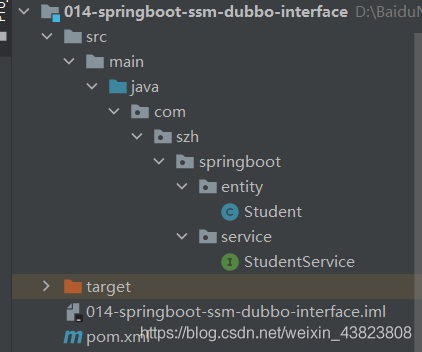
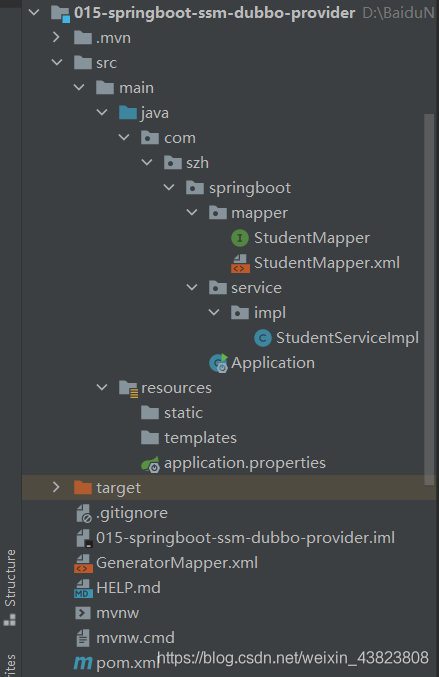
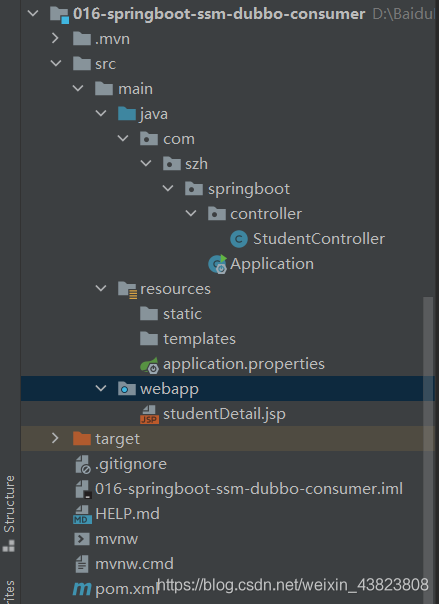
這里SpringBoot集成MyBatis,我用的是MyBatis逆向工程來直接生成的實體bean、dao、mapper,所以這里首先給出MyBatis逆向工程的配置文件。
這個文件主要是負責生成你項目中的實體bean、dao、mapper,那么再加上集成dubbo的情況下,我們的實體bean是需要放在接口工程中的,而dao、mapper則需要放在服務提供者中,所以在MyBatis逆向工程的配置文件中,需要將實體bean的生成位置改為第一個接口工程的絕對路徑。數據庫這里的表結構和數據,我就不再給出了,大家自行創建一下就可以了。
<?xml version='1.0' encoding='UTF-8'?><!DOCTYPE generatorConfigurationPUBLIC '-//mybatis.org//DTD MyBatis Generator Configuration 1.0//EN''http://mybatis.org/dtd/mybatis-generator-config_1_0.dtd'><generatorConfiguration><!-- 指定連接數據庫的 JDBC 驅動包所在位置,指定到你本機的完整路徑 --><classPathEntry location='E:mysql-connector-java-5.1.9.jar'/><!-- 配置 table 表信息內容體,targetRuntime 指定采用 MyBatis3 的版本 --><context targetRuntime='MyBatis3'> <!-- 抑制生成注釋,由于生成的注釋都是英文的,可以不讓它生成 --> <commentGenerator><property name='suppressAllComments' value='true'/> </commentGenerator> <!-- 配置數據庫連接信息 --> <jdbcConnection driverClass='com.mysql.jdbc.Driver' connectionURL='jdbc:mysql://localhost:3306/springboot' userId='root' password='12345678'> </jdbcConnection> <!-- 生成 entity 類,targetPackage 指定 entity 類的包名, targetProject指定生成的 entity 放在 IDEA 的哪個工程下面--> <javaModelGenerator targetPackage='com.szh.springboot.entity'targetProject='D:BaiduNetdiskDownload014-springboot-ssm-dubbo-interfacesrcmainjava'><property name='enableSubPackages' value='false'/><property name='trimStrings' value='false'/> </javaModelGenerator> <!-- 生成 MyBatis 的 Mapper.xml 文件,targetPackage 指定 mapper.xml 文件的包名, targetProject 指定生成的 mapper.xml 放在 IDEA 的哪個工程下面 --> <sqlMapGenerator targetPackage='com.szh.springboot.mapper' targetProject='src/main/java'><property name='enableSubPackages' value='false'/> </sqlMapGenerator> <!-- 生成 MyBatis 的 Mapper 接口類文件,targetPackage 指定 Mapper 接口類的包名, targetProject 指定生成的 Mapper 接口放在 IDEA 的哪個工程下面 --> <javaClientGenerator type='XMLMAPPER' targetPackage='com.szh.springboot.mapper' targetProject='src/main/java'><property name='enableSubPackages' value='false'/> </javaClientGenerator> <!-- 數據庫表名及對應的 Java 模型類名 --> <table tableName='t_student' domainObjectName='Student' enableCountByExample='false' enableUpdateByExample='false' enableDeleteByExample='false' enableSelectByExample='false' selectByExampleQueryId='false'/></context></generatorConfiguration>2.1 接口工程
MyBatis逆向工程生成的實體bean。
package com.szh.springboot.entity; import java.io.Serializable; public class Student implements Serializable { private Integer id; private String name; private Integer age; //getter and setter}
接口服務,其中有兩個方法。
package com.szh.springboot.service; import com.szh.springboot.entity.Student; /** * */public interface StudentService { Student queryStudentById(Integer id); Integer queryAllStudentCount();}2.2 服務提供者
SpringBoot核心配置文件
# 配置內嵌tomcat端口號和上下文根server.port=8081server.servlet.context-path=/ # 設置連接數據庫的信息spring.datasource.driver-class-name=com.mysql.jdbc.Driverspring.datasource.url=jdbc:mysql://localhost:3306/springboot?useUnicode=true&characterEncoding=UTF-8&useJDBCCompliantTimezoneShift=true&useLegacyDatetimeCode=false&serverTimezone=GMT%2B8spring.datasource.username=rootspring.datasource.password=12345678 # 設置dubbospring.application.name=015-springboot-ssm-dubbo-providerspring.dubbo.server=truespring.dubbo.registry=zookeeper://localhost:2181 # 設置redisspring.redis.host=localhostspring.redis.port=6379
MyBatis逆向工程生成的dao接口和對應的mapper映射文件(這里就做一個簡單的案例,所以只用到了 selectByPrimaryKey、queryAllStudentCount 這兩個方法)
package com.szh.springboot.mapper; import com.szh.springboot.entity.Student; public interface StudentMapper { int deleteByPrimaryKey(Integer id); int insert(Student record); int insertSelective(Student record); Student selectByPrimaryKey(Integer id); int updateByPrimaryKeySelective(Student record); int updateByPrimaryKey(Student record); Integer queryAllStudentCount(); }
<?xml version='1.0' encoding='UTF-8'?><!DOCTYPE mapper PUBLIC '-//mybatis.org//DTD Mapper 3.0//EN' 'http://mybatis.org/dtd/mybatis-3-mapper.dtd'><mapper namespace='com.szh.springboot.mapper.StudentMapper'> <resultMap type='com.szh.springboot.entity.Student'> <id column='id' jdbcType='INTEGER' property='id' /> <result column='name' jdbcType='VARCHAR' property='name' /> <result column='age' jdbcType='INTEGER' property='age' /> </resultMap> <sql id='Base_Column_List'> id, name, age </sql> <select parameterType='java.lang.Integer' resultMap='BaseResultMap'> select <include refid='Base_Column_List' /> from t_student where id = #{id,jdbcType=INTEGER} </select> <delete parameterType='java.lang.Integer'> delete from t_student where id = #{id,jdbcType=INTEGER} </delete> <insert parameterType='com.szh.springboot.entity.Student'> insert into t_student (id, name, age ) values (#{id,jdbcType=INTEGER}, #{name,jdbcType=VARCHAR}, #{age,jdbcType=INTEGER} ) </insert> <insert parameterType='com.szh.springboot.entity.Student'> insert into t_student <trim prefix='(' suffix=')' suffixOverrides=','> <if test='id != null'>id, </if> <if test='name != null'>name, </if> <if test='age != null'>age, </if> </trim> <trim prefix='values (' suffix=')' suffixOverrides=','> <if test='id != null'>#{id,jdbcType=INTEGER}, </if> <if test='name != null'>#{name,jdbcType=VARCHAR}, </if> <if test='age != null'>#{age,jdbcType=INTEGER}, </if> </trim> </insert> <update parameterType='com.szh.springboot.entity.Student'> update t_student <set> <if test='name != null'>name = #{name,jdbcType=VARCHAR}, </if> <if test='age != null'>age = #{age,jdbcType=INTEGER}, </if> </set> where id = #{id,jdbcType=INTEGER} </update> <update parameterType='com.szh.springboot.entity.Student'> update t_student set name = #{name,jdbcType=VARCHAR}, age = #{age,jdbcType=INTEGER} where id = #{id,jdbcType=INTEGER} </update> <select resultType='java.lang.Integer'> select count(*) from t_student </select></mapper>
對接口工程中接口方法的實現,其中包括注入數據庫持久層、注入redis模板類對象。
package com.szh.springboot.service.impl; import com.alibaba.dubbo.config.annotation.Service;import com.szh.springboot.entity.Student;import com.szh.springboot.mapper.StudentMapper;import com.szh.springboot.service.StudentService;import org.springframework.beans.factory.annotation.Autowired;import org.springframework.data.redis.core.RedisTemplate;import org.springframework.stereotype.Component; import java.util.concurrent.TimeUnit; /** * */@Component@Service(interfaceClass = StudentService.class,version = '1.0.0',timeout = 15000)public class StudentServiceImpl implements StudentService { @Autowired private StudentMapper studentMapper; @Autowired private RedisTemplate<Object,Object> redisTemplate; @Override public Student queryStudentById(Integer id) {return studentMapper.selectByPrimaryKey(id); } @Override public Integer queryAllStudentCount() { //首先去redis緩存中查詢,如果有:直接使用;如果沒有,去數據庫中查詢并存放到redis緩存中Integer allStudentCount= (Integer) redisTemplate.opsForValue().get('allStudentCount'); //判斷是否有值if (allStudentCount==null) { //此時為空,則去數據庫中查詢 allStudentCount=studentMapper.queryAllStudentCount(); //并存放到redis緩存中 redisTemplate.opsForValue().set('allStudentCount',allStudentCount,30, TimeUnit.SECONDS);}return allStudentCount; } }
pom文件
<dependencies> <dependency> <groupId>org.springframework.boot</groupId> <artifactId>spring-boot-starter-web</artifactId></dependency> <dependency> <groupId>com.alibaba.spring.boot</groupId> <artifactId>dubbo-spring-boot-starter</artifactId> <version>2.0.0</version></dependency> <dependency> <groupId>org.apache.zookeeper</groupId> <artifactId>zookeeper</artifactId> <version>3.4.6</version> <exclusions><exclusion> <groupId>org.slf4j</groupId> <artifactId>slf4j-log4j12</artifactId></exclusion> </exclusions></dependency><dependency> <groupId>com.101tec</groupId> <artifactId>zkclient</artifactId> <version>0.4</version></dependency> <dependency> <groupId>org.mybatis.spring.boot</groupId> <artifactId>mybatis-spring-boot-starter</artifactId> <version>2.1.4</version></dependency> <dependency> <groupId>mysql</groupId> <artifactId>mysql-connector-java</artifactId> <version>5.1.9</version></dependency> <dependency> <groupId>org.springframework.boot</groupId> <artifactId>spring-boot-starter-data-redis</artifactId></dependency> <!-- 接口工程 --><dependency> <groupId>com.szh.springboot</groupId> <artifactId>014-springboot-ssm-dubbo-interface</artifactId> <version>1.0.0</version></dependency> </dependencies> <build> <resources> <resource><directory>src/main/java</directory><includes> <include>**/*.xml</include></includes> </resource></resources> <plugins> <plugin><groupId>org.springframework.boot</groupId><artifactId>spring-boot-maven-plugin</artifactId> </plugin> <!--mybatis 代碼自動生成插件--> <plugin><groupId>org.mybatis.generator</groupId><artifactId>mybatis-generator-maven-plugin</artifactId><version>1.3.7</version><configuration> <!--配置文件的位置--> <configurationFile>GeneratorMapper.xml</configurationFile> <verbose>true</verbose> <overwrite>true</overwrite></configuration> </plugin></plugins> </build>
SpringBoot項目啟動入口類
package com.szh.springboot; import com.alibaba.dubbo.spring.boot.annotation.EnableDubboConfiguration;import org.mybatis.spring.annotation.MapperScan;import org.springframework.boot.SpringApplication;import org.springframework.boot.autoconfigure.SpringBootApplication; @SpringBootApplication@MapperScan(basePackages = 'com.szh.springboot.mapper')@EnableDubboConfigurationpublic class Application { public static void main(String[] args) {SpringApplication.run(Application.class, args); } }2.3 服務消費者
SpringBoot核心配置文件
# 配置內嵌tomcat端口號和上下文根server.port=8080server.servlet.context-path=/ # 設置dubbospring.application.name=016-springboot-ssm-dubbo-consumerspring.dubbo.registry=zookeeper://localhost:2181 # 配置視圖解析器spring.mvc.view.prefix=/spring.mvc.view.suffix=.jsp
定義控制層,其中有兩個請求方法
package com.szh.springboot.controller; import com.alibaba.dubbo.config.annotation.Reference;import com.szh.springboot.entity.Student;import com.szh.springboot.service.StudentService;import org.springframework.stereotype.Controller;import org.springframework.ui.Model;import org.springframework.web.bind.annotation.GetMapping;import org.springframework.web.bind.annotation.PathVariable;import org.springframework.web.bind.annotation.RequestMapping;import org.springframework.web.bind.annotation.ResponseBody; /** * */@Controllerpublic class StudentController { @Reference(interfaceClass = StudentService.class,version = '1.0.0',check = false) private StudentService studentService; @RequestMapping(value = '/student/detail/{id}') public String studentDetail(@PathVariable('id') Integer id,Model model) {Student student=studentService.queryStudentById(id);model.addAttribute('student',student);return 'studentDetail'; } @GetMapping(value = '/student/all/count') public @ResponseBody Object allStudentCount() {Integer allStudentCount=studentService.queryAllStudentCount();return '學生總人數為:' + allStudentCount; } }
pom文件
<dependencies> <dependency> <groupId>org.springframework.boot</groupId> <artifactId>spring-boot-starter-web</artifactId></dependency> <dependency> <groupId>com.alibaba.spring.boot</groupId> <artifactId>dubbo-spring-boot-starter</artifactId> <version>2.0.0</version></dependency> <dependency> <groupId>org.apache.zookeeper</groupId> <artifactId>zookeeper</artifactId> <version>3.4.6</version> <exclusions><exclusion> <groupId>org.slf4j</groupId> <artifactId>slf4j-log4j12</artifactId></exclusion> </exclusions></dependency><dependency> <groupId>com.101tec</groupId> <artifactId>zkclient</artifactId> <version>0.4</version></dependency> <dependency> <groupId>org.apache.tomcat.embed</groupId> <artifactId>tomcat-embed-jasper</artifactId></dependency> <!-- 接口工程 --><dependency> <groupId>com.szh.springboot</groupId> <artifactId>014-springboot-ssm-dubbo-interface</artifactId> <version>1.0.0</version></dependency> </dependencies> <build> <resources> <resource><directory>src/main/webapp</directory><targetPath>META-INF/resources</targetPath><includes> <include>*.*</include></includes> </resource></resources> <plugins> <plugin><groupId>org.springframework.boot</groupId><artifactId>spring-boot-maven-plugin</artifactId> </plugin></plugins> </build>
響應的jsp頁面、SpringBoot項目啟動入口類
<%@ page contentType='text/html;charset=utf-8' language='java' %><html><head> <title>$</title></head><body> <h3>學生信息</h3> <div>學生編號:${student.id}</div> <div>學生姓名:${student.name}</div> <div>學生年齡:${student.age}</div></body></html>
package com.szh.springboot; import com.alibaba.dubbo.spring.boot.annotation.EnableDubboConfiguration;import org.springframework.boot.SpringApplication;import org.springframework.boot.autoconfigure.SpringBootApplication; @SpringBootApplication@EnableDubboConfigurationpublic class Application { public static void main(String[] args) {SpringApplication.run(Application.class, args); } }2.4 啟動測試!!!
因為我們這個案例是SpringBoot集成SSM、Dubbo、Redis、JSP,同時使用注冊中心。所以啟動的步驟是:
啟動zookeeper注冊中心 zkServer.cmd(我這里為了考慮電腦性能,所以直接就在Windows上啟動了,推薦是在Linux上啟動) 啟動redis服務(redis-server.exe redis,windows.conf 、 redis-cli.exe -h 127.0.0.1 -p 6379) 啟動服務提供者(對應該工程的SpringBoot項目啟動入口類)啟動服務消費者(對應該工程的SpringBoot項目啟動入口類)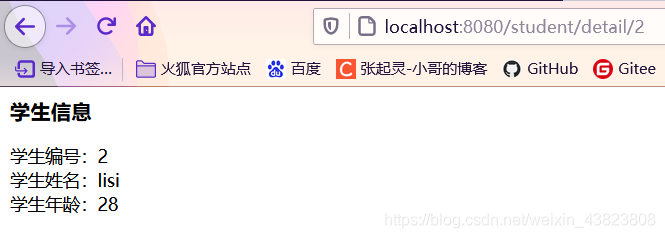
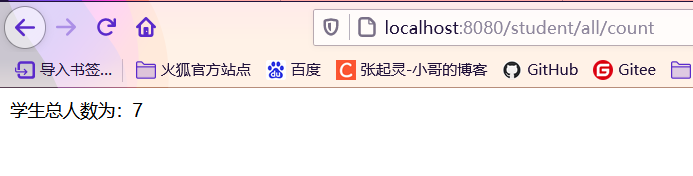
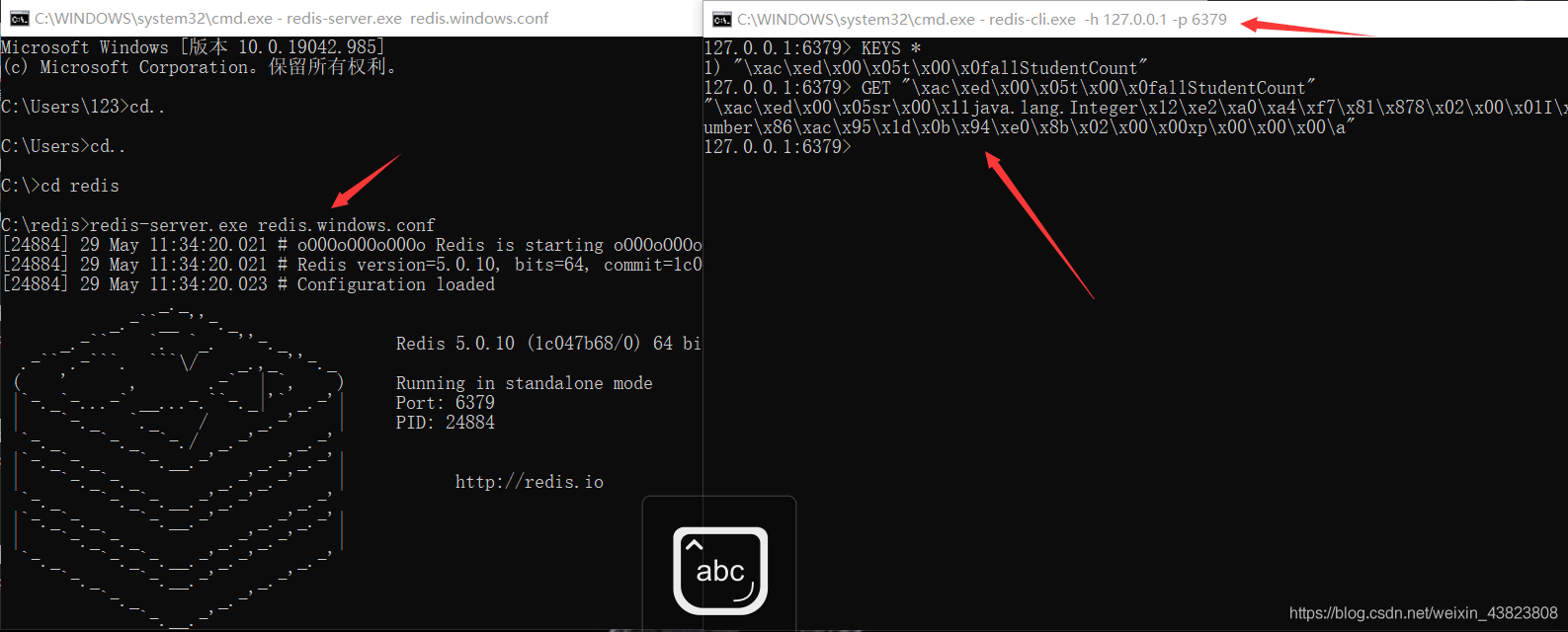
測試結果中,可以看到,第一個請求結果拿到了學生信息,第二個請求結果也查詢出了學生數量,而且我們開啟redis服務之后,可以看到發起第二個請求之后,redis緩存中已經有了這個 allStudentCount 數據,經過30秒之后,這個數據會被清除。
以上就是SpringBoot集成SSM、Dubbo、Redis、JSP的案例小結及思路講解的詳細內容,更多關于SpringBoot集成SSM、Dubbo、Redis、JSP的資料請關注好吧啦網其它相關文章!
相關文章:
 網公網安備
網公網安備