在vue中實(shí)現(xiàn)清除echarts上次保留的數(shù)據(jù)(親測(cè)有效)
因?yàn)槲沂菍charts封裝好后,父組件只要傳遞值就可以進(jìn)行渲染。
但是點(diǎn)擊多次數(shù)據(jù)請(qǐng)求的時(shí)候echarts會(huì)多次渲染。如果試過(guò)
clear() 與setOption(this.options, true)沒(méi)用之后。可以試一下下面的方法。
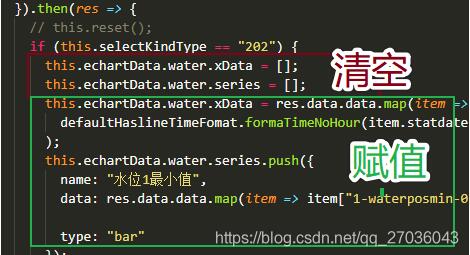
首先是在父組件中對(duì)數(shù)據(jù)進(jìn)行請(qǐng)求,在賦值之前,先清空。
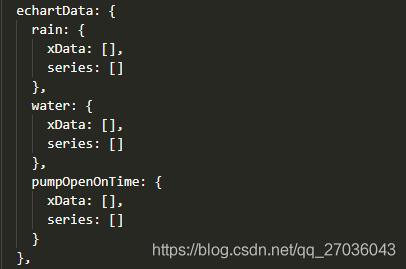
data里定義的三組echarts數(shù)據(jù)
在axios發(fā)送請(qǐng)求后
先清空再賦值。
補(bǔ)充知識(shí):vue.js使用vue-echarts給柱形圖綁定點(diǎn)擊事件
我就廢話不多說(shuō)了,大家還是直接看代碼吧~
<template> <div class='echarts'> <IEcharts :option='bar' :loading='loading' @ready='onReady' @click='onClick'></IEcharts> <button @click='doRandom'>Random</button> </div></template> <script type='text/babel'> import IEcharts from ’vue-echarts-v3/src/full.js’; export default { name: ’view’, components: { IEcharts }, props: { }, data: () => ({ loading: true, bar: { title: { text: ’ECharts Hello World’ }, tooltip: {}, xAxis: { data: [’Shirt’, ’Sweater’, ’Chiffon Shirt’, ’Pants’, ’High Heels’, ’Socks’] }, yAxis: {}, series: [{ name: ’Sales’, type: ’bar’, data: [5, 20, 36, 10, 10, 20] }] } }), methods: { doRandom() { const that = this; let data = []; for (let i = 0, min = 5, max = 99; i < 6; i++) { data.push(Math.floor(Math.random() * (max + 1 - min) + min)); } that.loading = !that.loading; that.bar.series[0].data = data; }, onReady(instance) { console.log(instance); }, onClick(event, instance, echarts) { console.log(arguments); } } };</script> <style scoped> .echarts { width: 400px; height: 400px; }</style>
以上這篇在vue中實(shí)現(xiàn)清除echarts上次保留的數(shù)據(jù)(親測(cè)有效)就是小編分享給大家的全部?jī)?nèi)容了,希望能給大家一個(gè)參考,也希望大家多多支持好吧啦網(wǎng)。
相關(guān)文章:
1. IntelliJ IDEA導(dǎo)入項(xiàng)目的方法2. Java通俗易懂系列設(shè)計(jì)模式之建造者模式3. ASP常用源代碼的總結(jié)(下)4. 基于Java實(shí)現(xiàn)記事本功能5. .NET的基元類型包括什么及Unmanaged和Blittable類型詳解6. python利用opencv如何實(shí)現(xiàn)答題卡自動(dòng)判卷7. Java 實(shí)現(xiàn)定時(shí)任務(wù)的三種方法8. 詳解Python IO口多路復(fù)用9. Python ini文件常用操作方法解析10. Java實(shí)現(xiàn)簡(jiǎn)單LRU緩存機(jī)制的方法

 網(wǎng)公網(wǎng)安備