vue 里面的 $forceUpdate() 強(qiáng)制實(shí)例重新渲染操作
迫使 Vue 實(shí)例重新渲染。注意它僅僅影響實(shí)例本身和插入插槽內(nèi)容的子組件,而不是所有子組件。
比如v-for里面數(shù)據(jù)層次太多, 修改過(guò)數(shù)據(jù)變了,頁(yè)面沒(méi)有重新渲染,需手動(dòng)強(qiáng)制刷新。
for(...){ ...}this.$forceUpdate();
補(bǔ)充知識(shí):VUE項(xiàng)目中使用this.$forceUpdate();解決頁(yè)面v-for中修改item屬性值后頁(yè)面v-if不改變的問(wèn)題
頁(yè)面展示:
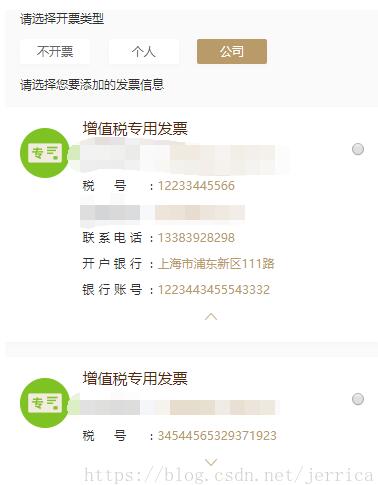
實(shí)現(xiàn)效果:點(diǎn)擊實(shí)現(xiàn)列表內(nèi)容的展開(kāi)、折疊。
代碼:
<div v-for='(item,index) in invoiceData' :key='index'> <div class='images'><img src='http://www.b3g6.com/static/images/invoice_pu.png' v-if='item.invoiceType == ’0’'><img src='http://www.b3g6.com/static/images/invoice_zhuan.png' v-else-if='item.invoiceType == ’1’'></div> <div class='text'> <h3 v-if='item.invoiceType == ’0’'>增值稅普通發(fā)票</h3> <h3 v-else-if='item.invoiceType == ’1’'>增值稅專(zhuān)用發(fā)票</h3> <p><span>企業(yè)名稱(chēng):</span>{{item.enterpriseName}}</p> <p><span>稅號(hào):</span>{{item.dutyParagraph}}</p> <transition name='fade'> <div v-if='item.mark == true'> <p><span>注冊(cè)地址:</span>{{item.address}}</p> <p><span>聯(lián)系電話:</span>{{item.contactNumber}}</p> <p><span>開(kāi)戶銀行:</span>{{item.accountOpeningBank}}</p> <p><span>銀行賬號(hào):</span>{{item.bankAccount }}</p> </div> </transition> <div v-if='item.invoiceType == ’1’'> <p class='hideMark'> <img src='http://www.b3g6.com/static/images/arrow_bottom.png' v-if='item.mark == false' @click='clickZhuanMark(index,$event)'> <img src='http://www.b3g6.com/static/images/arrow_top.png' v-else @click='clickZhuanMark(index,$event)'> </p> </div> <div class='list-radio'><input type='radio' value='' name='selectContact' @change='getInvoiceId(item.invoiceId)' /></div> </div></div>
v-for渲染出列表,在執(zhí)行列表折疊展開(kāi)時(shí)'clickZhuanMark' JS如下:
clickZhuanMark(val,event){ this.invoiceData[val].mark = !this.invoiceData[val].mark; },
可是實(shí)際并沒(méi)有如設(shè)想的那樣實(shí)現(xiàn)效果,之后修改代碼:

添加this.$forceUpdate();進(jìn)行強(qiáng)制渲染,效果實(shí)現(xiàn)。搜索資料得出結(jié)果:因?yàn)閿?shù)據(jù)層次太多,render函數(shù)沒(méi)有自動(dòng)更新,需手動(dòng)強(qiáng)制刷新。
以上這篇vue 里面的 $forceUpdate() 強(qiáng)制實(shí)例重新渲染操作就是小編分享給大家的全部?jī)?nèi)容了,希望能給大家一個(gè)參考,也希望大家多多支持好吧啦網(wǎng)。
相關(guān)文章:
1. idea打開(kāi)多個(gè)窗口的操作方法2. idea修改背景顏色樣式的方法3. IntelliJ IDEA調(diào)整字體大小的方法4. IntelliJ IDEA創(chuàng)建web項(xiàng)目的方法5. idea設(shè)置代碼格式化的方法步驟6. Django使用HTTP協(xié)議向服務(wù)器傳參方式小結(jié)7. VMware中如何安裝Ubuntu8. IntelliJ IDEA刪除類(lèi)的方法步驟9. 使用IDEA編寫(xiě)jsp時(shí)EL表達(dá)式不起作用的問(wèn)題及解決方法10. 解析原生JS getComputedStyle
 網(wǎng)公網(wǎng)安備