vue實(shí)現(xiàn)圖書管理系統(tǒng)
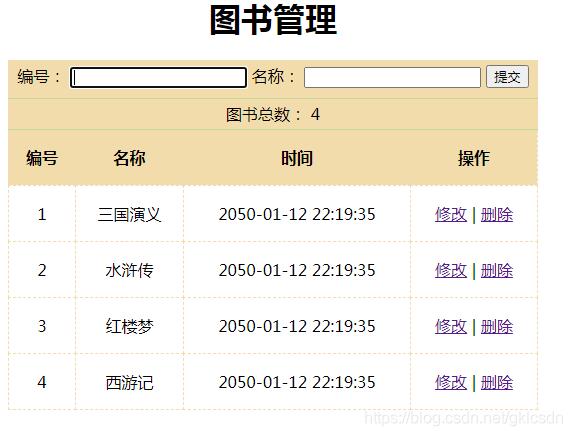
本文實(shí)例為大家分享了vue實(shí)現(xiàn)圖書管理系統(tǒng)的具體代碼,供大家參考,具體內(nèi)容如下
組件代碼
<template> <div id='app'> <div class='grid'> <div> <h1>圖書管理</h1> <div class='book'> <div> <label for='id' v-focus> 編號(hào): </label> <input type='text' v-model='id' :disabled='flag'> <label for='name'> 名稱: </label> <input type='text' v-model='name'> <button @click='add(addOrUpdate)' :disabled='subFlag'>提交</button> </div> </div> </div> <div class='total'> <span>圖書總數(shù):</span> <span>{{ totalNum }}</span> </div> <table> <thead> <tr> <th>編號(hào)</th> <th>名稱</th> <th>時(shí)間</th> <th>操作</th> </tr> </thead> <tbody> <tr v-for='book in books'> <td> {{ book.id }} </td> <td> {{ book.name }} </td> <td> {{ book.date | date-format }} </td> <td> <a href='http://www.b3g6.com/bcjs/10460.html' @click.prevent=' rel='external nofollow' updateBook(book.id)'>修改</a> <span>|</span> <a href='http://www.b3g6.com/bcjs/10460.html' @click.prevent = ’deleteBook(book.id)’>刪除</a> </td> </tr> </tbody> </table> </div> </div></template><script> export default { data(){ return{ books:[ { id: 1, name: ’三國演義’, date: 2525609975000 }, { id: 2, name: ’水滸傳’, date: 2525609975000 }, { id: 3, name: ’紅樓夢(mèng)’, date: 2525609975000 }, { id: 4, name: ’西游記’, date: 2525609975000 } ], id:’’, name:’’, flag:false, // id輸入框是否可修改標(biāo)識(shí) addOrUpdate: 0, // 0代表添加 1代表修改 subFlag:false, // 提交按鈕是否禁用(圖書存在時(shí)禁用) } }, methods:{ // 添加圖書的方法 add() { if(this.addOrUpdate===0){ // 添加圖書 this.books.push({ id: this.id, name: this.name, date: new Date() }); }else{ const book = this.books.filter((book)=>{ return book.id === this.id; }); book[0].name = this.name } // 添加之后清空input框 this.id = ’’; this.name = ’’; this.flag = false }, // 更新圖書的方法 updateBook(id){this.addOrUpdate = 1; // 需要修改的當(dāng)前圖書信息 const book = this.books.filter((book)=>{ return book.id === id; }); // 讓input框顯示相應(yīng)內(nèi)容 this.id = book[0].id; this.name = book[0].name; this.flag = true; }, deleteBook(id){ // 獲取當(dāng)前圖書的索引 const index = this.books.findIndex((book)=>{ return book.id === id }); this.books.splice(index, 1) } }, computed:{ totalNum(){return this.books.length } }, // 自定義局部指令 directives:{ focus:{ inserted(el){ // 自動(dòng)聚焦 el.focus() } } }, // 監(jiān)視圖書是否存在 watch:{ name:{ deep:true, handler(val){ const book = this.books.find((book)=>{ return book.name === val }); if(book){ this.subFlag = true }else{ this.subFlag = false } } } } }</script><style type='text/css'> .grid { margin: auto; width: 530px; text-align: center; } .grid table { border-top: 1px solid #C2D89A; width: 100%; border-collapse: collapse; } .grid th,td { padding: 10px; border: 1px dashed #F3DCAB; height: 35px; line-height: 35px; } .grid th { background-color: #F3DCAB; } .grid .book { padding-bottom: 10px; padding-top: 5px; background-color: #F3DCAB; } .grid .total { height: 30px; line-height: 30px; background-color: #F3DCAB; border-top: 1px solid #C2D89A; }</style>
過濾器文件index.js

import Vue from ’vue’import format from ’date-fns/format’// 自定義過濾器Vue.filter(’date-format’, function (value, formatStr=’yyyy-MM-dd HH:mm:ss’) { return format(value, formatStr)});
main.js引入
import ’./filters’
以上就是本文的全部內(nèi)容,希望對(duì)大家的學(xué)習(xí)有所幫助,也希望大家多多支持好吧啦網(wǎng)。
相關(guān)文章:
1. vue 防止頁面加載時(shí)看到花括號(hào)的解決操作2. PHP大文件分割分片上傳實(shí)現(xiàn)代碼3. python在CMD界面讀取excel所有數(shù)據(jù)的示例4. idea打開多個(gè)窗口的操作方法5. vue+elementUI下拉框回顯問題及解決方式6. 淺談JavaScript宏任務(wù)和微任務(wù)執(zhí)行順序7. Python幾種常見算法匯總8. PyCharm vs VSCode,作為python開發(fā)者,你更傾向哪種IDE呢?9. 利用Python實(shí)現(xiàn)Excel的文件間的數(shù)據(jù)匹配功能10. Python無頭爬蟲下載文件的實(shí)現(xiàn)
 網(wǎng)公網(wǎng)安備