Android實(shí)現(xiàn)本地Service方法控制音樂播放
問題現(xiàn)象描述:在Activity中控制播放時(shí),按返回鍵退出應(yīng)用后,音樂可在后臺(tái)繼續(xù)播放。重新進(jìn)入app,音樂無法停止,重新點(diǎn)擊開始播放音樂,出現(xiàn)重復(fù)的音樂同時(shí)播放的現(xiàn)象(多個(gè)同時(shí)播放)。如何解決?
解決方法:使用本地Service的方式來控制音樂的播放,app返回退出了,重新進(jìn)入App也可以正常終止。
1、主Activity控制音樂 的開始、暫停、停止、退出空能,(具體實(shí)現(xiàn)在下面MusicService.java中實(shí)現(xiàn))
/** * Activity播放廣播,返回鍵返回后,重新進(jìn)入無法停止 * * 通過start啟動(dòng)服務(wù)的方式 控制音樂播放 */public class MainActivity extends AppCompatActivity implements View.OnClickListener{ private Button btn_main_play; private Button btn_main_stop; private Button btn_main_pause; private Button btn_main_exit; @Override protected void onCreate(Bundle savedInstanceState) { super.onCreate(savedInstanceState); setContentView(R.layout.activity_main); btn_main_play = findViewById(R.id.btn_main_play); btn_main_stop = findViewById(R.id.btn_main_stop); btn_main_pause = findViewById(R.id.btn_main_pause); btn_main_exit = findViewById(R.id.btn_main_exit); btn_main_play.setOnClickListener(this); btn_main_stop.setOnClickListener(this); btn_main_pause.setOnClickListener(this); btn_main_exit.setOnClickListener(this); } /** * 按鈕點(diǎn)擊監(jiān)聽事件 將點(diǎn)擊的類型傳給服務(wù)進(jìn)行判斷 * @param v */ @Override public void onClick(View v) { Intent intent = new Intent(this,MusicService.class); switch ( v.getId()){ case R.id.btn_main_play://播放 intent.putExtra('action','play'); startService(intent); break; case R.id.btn_main_stop://停止 intent.putExtra('action','stop'); startService(intent); break; case R.id.btn_main_pause://暫停 intent.putExtra('action','pause'); startService(intent); break; case R.id.btn_main_exit://退出并關(guān)閉音樂 //停止服務(wù) stopService(intent); finish(); break; default: } }}
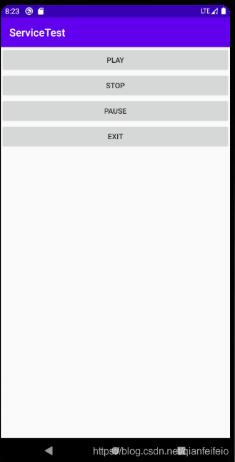
2、activity_main.xml布局代碼省略,效果圖如下:
3、創(chuàng)建音樂播放器處理流程的服務(wù) MusicService.java:
/** * 通過服務(wù)控制音樂的播放 */public class MusicService extends Service { public MusicService() { } //創(chuàng)建播放器對(duì)象 private MediaPlayer player; @Override public IBinder onBind(Intent intent) { throw new UnsupportedOperationException('Not yet implemented'); } @Override public int onStartCommand(Intent intent, int flags, int startId) { //獲取MainActivity中 按鈕的點(diǎn)擊類型:根據(jù)不同類型處理不同事件 String action = intent.getStringExtra('action'); if ('play'.equals(action)) { //播放 playMusic(); } else if ('stop'.equals(action)) { //停止 stopMusic(); } else if ('pause'.equals(action)) { //暫停 pauseMusic(); } return super.onStartCommand(intent, flags, startId); } /** * 播放音樂 */ public void playMusic() { if (player == null ) { player= MediaPlayer.create(this,R.raw.kkth_myr); } player.start(); } /** * 暫停播放 */ public void pauseMusic() { if (player != null && player.isPlaying()) { player.pause(); } } /** * 停止播放 */ public void stopMusic() { if (player != null) { player.stop(); player.reset();//重置 player.release();//釋放 player = null; } } @Override public void onDestroy() { super.onDestroy(); //在服務(wù)死亡之前停止音樂 stopMusic(); }}
創(chuàng)建服務(wù)看一下配置文件AndroidManifest.xml中是否添加了對(duì)應(yīng)的<Service>標(biāo)簽。
以上就是本文的全部?jī)?nèi)容,希望對(duì)大家的學(xué)習(xí)有所幫助,也希望大家多多支持好吧啦網(wǎng)。
相關(guān)文章:
1. 使用Python webdriver圖書館搶座自動(dòng)預(yù)約的正確方法2. Python3 json模塊之編碼解碼方法講解3. Python字符串到字節(jié)的轉(zhuǎn)換。雙反斜杠問題4. 在線php代碼縮進(jìn)、代碼美化工具:PHP Formatter5. ASP基礎(chǔ)知識(shí)VBScript基本元素講解6. PHP如何開啟Opcache功能提升程序處理效率7. Linux刪除系統(tǒng)自帶版本Python過程詳解8. Python 合并拼接字符串的方法9. 淺談?dòng)蓀osition屬性引申的css進(jìn)階討論10. ASP.NET MVC使用jQuery ui的progressbar實(shí)現(xiàn)進(jìn)度條
 網(wǎng)公網(wǎng)安備