iOS實(shí)現(xiàn)輪盤動(dòng)態(tài)效果
本文實(shí)例為大家分享了iOS實(shí)現(xiàn)輪盤動(dòng)態(tài)效果的具體代碼,供大家參考,具體內(nèi)容如下
一個(gè)常用的繪圖,主要用來(lái)打分之類的動(dòng)畫,效果如下。
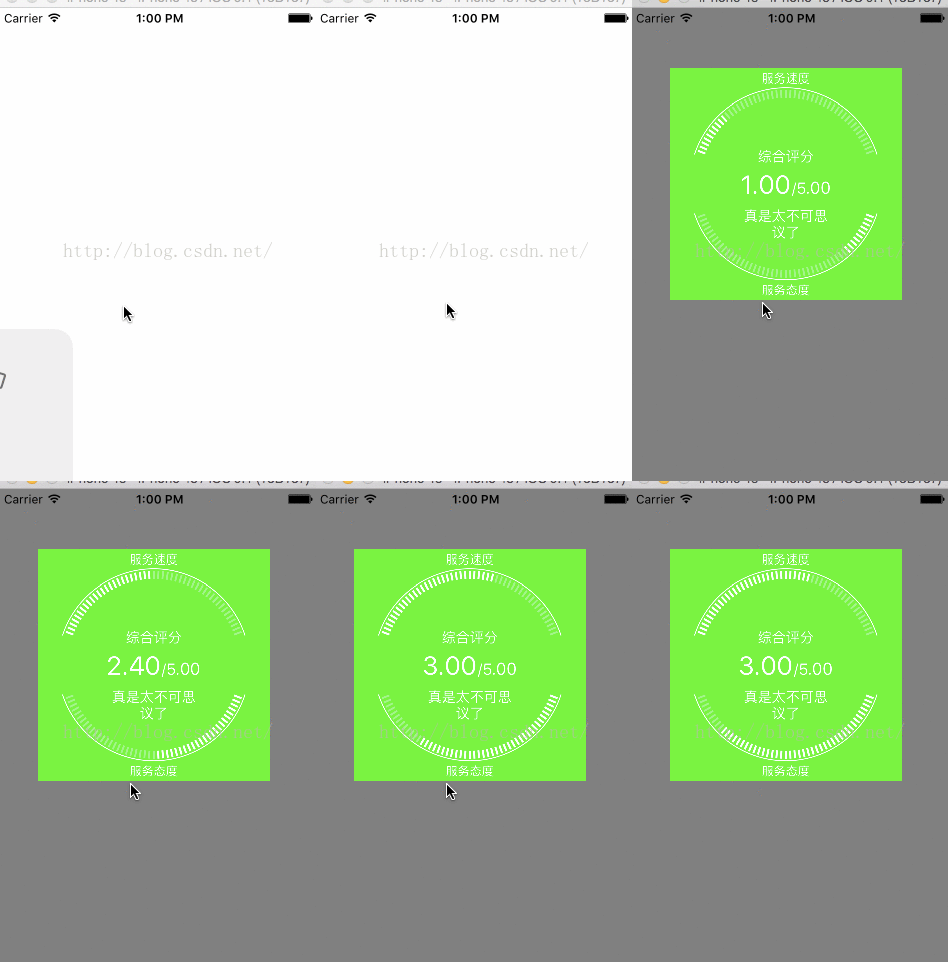
主要是iOS的繪圖和動(dòng)畫,本來(lái)想用系統(tǒng)自帶動(dòng)畫實(shí)現(xiàn)呢,發(fā)現(xiàn)實(shí)現(xiàn)不了,用了其他辦法延時(shí)并重繪視圖沒有成功,用了gcd延時(shí),nsthread休眠,performselector delay 都不行。最后用了一個(gè)定時(shí)器實(shí)現(xiàn)類似效果,總感覺不太明智,以后應(yīng)該考慮下對(duì)CALayer和
隱式動(dòng)畫的角度考慮下
#import <UIKit/UIKit.h> /** * 自定義變量里面以s結(jié)尾的表示具體的數(shù)值,否則表示的是表示顯示具體內(nèi)容的標(biāo)簽,以lbe的表示對(duì)內(nèi)容的說(shuō)明 比如comments 表示的具體評(píng)價(jià)內(nèi)容,comment 表示評(píng)價(jià)的具體內(nèi)容,lbecomment 是一個(gè)顯示 '評(píng)價(jià):'的標(biāo)簽 */ @interface ScorePlateView : UIView /*速度滿意度*/@property (nonatomic,assign) CGFloat speedValues; /*態(tài)度滿意度*/@property (nonatomic,assign) CGFloat altitudeValues; /*把半圓分割的份數(shù)*/@property (nonatomic,assign) int precision;/** * 整體評(píng)價(jià) */@property (nonatomic,strong) NSString * comments;/** * 滿分是多少分 */@property (nonatomic,assign) CGFloat fullValues;/** * 綜合評(píng)分 */@property (nonatomic,assign) CGFloat compreValues;/** * 開始角度 */ @property (nonatomic,assign) CGFloat startAngle;/** * 終止角度 */@property (nonatomic,assign) CGFloat endAngle; //-(void)startAnimation;@end
#import 'ScorePlateView.h' @interface ScorePlateView(){ CGFloat d_speed;//執(zhí)行動(dòng)畫時(shí)候每個(gè)的增量 CGFloat d_altitude; CGFloat d_comp;} @property (nonatomic,strong) UILabel*lbeCompreValue;//綜合分?jǐn)?shù)的標(biāo)簽 @property (nonatomic,strong) UILabel *compreValue;//綜合分?jǐn)?shù)的具體數(shù)值 @property (nonatomic,strong) UILabel * comment;//評(píng)價(jià) @property (nonatomic,assign) CGFloat cur_speedV;//當(dāng)前的值 @property (nonatomic,assign) CGFloat cur_altitudeV;//當(dāng)前的態(tài)度; @property (nonatomic,assign) CGFloat cur_compV;//當(dāng)前的綜合分?jǐn)?shù)@property (nonatomic,assign) NSTimer * timer; @end @implementation ScorePlateView - (instancetype)initWithFrame:(CGRect)frame{ if (self = [super initWithFrame:frame]) {self.precision= 50;//這里設(shè)置默認(rèn)值; self.fullValues =5; self.altitudeValues=3.0; self.speedValues=4.0; self.backgroundColor = [UIColor clearColor]; self.startAngle=0.1*M_PI; self.endAngle = 0.9*M_PI; self.comments =@'真是太不可思議了'; self.backgroundColor = [UIColor greenColor]; _cur_compV=0; _cur_speedV=0; _cur_altitudeV=0; } return self;}- (void)drawRect:(CGRect)rect { //1. 畫圓 CGFloat circleMargin = 0; //上下兩個(gè)半圓的間距 CGFloat topBottomMargin =20;//這個(gè)間距用來(lái)顯示服務(wù)態(tài)度和服務(wù)速度那樣標(biāo)簽內(nèi)容 CGFloat radius = (self.frame.size.height-circleMargin-2*topBottomMargin)/2;//半徑 //上邊圓的圓心 CGPoint centerTop = CGPointMake(self.frame.size.width/2,self.frame.size.height/2-circleMargin/2); [self drawHalfCircle:centerTop andWithRadius:radius isTop:YES]; //下面圓的圓心 CGPoint centerBottom = CGPointMake(self.frame.size.width/2, self.frame.size.height/2+circleMargin/2); [self drawHalfCircle:centerBottom andWithRadius:radius isTop:NO]; //2. 創(chuàng)建需要的標(biāo)簽,并在合適的位置繪制內(nèi)容 UILabel * lbeAltitude = [[UILabel alloc]initWithFrame:CGRectMake(0, 0, self.frame.size.width, topBottomMargin)]; lbeAltitude.text = @'服務(wù)速度'; lbeAltitude.textColor = [UIColor whiteColor]; lbeAltitude.textAlignment = NSTextAlignmentCenter; lbeAltitude.font = [UIFont systemFontOfSize:12]; [lbeAltitude drawTextInRect:lbeAltitude.frame]; //服務(wù)態(tài)度評(píng)分 UILabel * lbeSpeed = [[UILabel alloc]initWithFrame:CGRectMake(0, self.frame.size.height-topBottomMargin, self.frame.size.width, topBottomMargin)]; lbeSpeed.text = @'服務(wù)態(tài)度'; lbeSpeed.textColor = [UIColor whiteColor]; lbeSpeed.textAlignment = NSTextAlignmentCenter; lbeSpeed.font = [UIFont systemFontOfSize:12]; [lbeSpeed drawTextInRect:lbeSpeed.frame]; //繪制綜合評(píng)分 NSString *attitudeScore = [NSString stringWithFormat:@'%.2f/%.2f',_cur_altitudeV,self.fullValues]; NSMutableAttributedString* attributeString = [[NSMutableAttributedString alloc]initWithString:attitudeScore]; [attributeString addAttribute:NSFontAttributeName value:[UIFont systemFontOfSize:26] range:NSMakeRange(0, 4)]; [attributeString addAttribute:NSFontAttributeName value:[UIFont systemFontOfSize:16] range:NSMakeRange(4, 3)]; self.compreValue = [[UILabel alloc]initWithFrame:CGRectMake(0, radius-topBottomMargin,self.frame.size.width, 2*topBottomMargin)]; self.compreValue.attributedText = attributeString; self.compreValue.textAlignment = NSTextAlignmentCenter; self.compreValue.textColor = [UIColor whiteColor]; self.compreValue.frame = CGRectMake(0, centerTop.y-topBottomMargin+circleMargin/2, self.frame.size.width, topBottomMargin*2); [self.compreValue drawTextInRect:self.compreValue.frame]; self.lbeCompreValue = [[UILabel alloc]initWithFrame:CGRectMake(0, centerTop.y-radius*0.5, self.frame.size.width, topBottomMargin*2)]; self.lbeCompreValue.text =@'綜合評(píng)分'; self.lbeCompreValue.textAlignment = NSTextAlignmentCenter; self.lbeCompreValue.textColor = [UIColor whiteColor]; self.lbeCompreValue.font = [UIFont systemFontOfSize:14]; [self.lbeCompreValue drawTextInRect:self.lbeCompreValue.frame]; //評(píng)價(jià)內(nèi)容 self.comment = [[UILabel alloc]initWithFrame:CGRectMake(topBottomMargin+circleMargin+radius/2, CGRectGetMaxY(self.compreValue.frame), radius, topBottomMargin*2)]; self.comment.text =self.comments; self.comment.numberOfLines=0; self.comment.textAlignment = NSTextAlignmentCenter; self.comment.textColor = [UIColor whiteColor]; self.comment.font = [UIFont systemFontOfSize:14]; [self.comment drawTextInRect:self.comment.frame]; }/** * 畫半圓 繪制刻度的時(shí)候可以先繪制從圓心的線,最后用一個(gè)內(nèi)圓裁剪的方式,但是如果要求背景隨時(shí)變化就局限了,特別是父視圖背景是漸變的,要么重新定義該類,要么把這個(gè)類視圖定義為透明,從而透過(guò)父視圖背景顏色 透明的背景無(wú)法掩蓋從圓心出發(fā)的線, * * @param center 圓心坐標(biāo) * @param radius 半徑 * @param top 是不是畫上面的圓 */-(void)drawHalfCircle:(CGPoint) center andWithRadius:(CGFloat)radius isTop:(BOOL) top{ //畫上面圓的邊框 CGContextRef ctx = UIGraphicsGetCurrentContext(); CGContextSetStrokeColorWithColor(ctx, [UIColor whiteColor].CGColor); if (top) { CGContextAddArc(ctx, center.x, center.y, radius, -self.startAngle, -self.endAngle, 1); } else { CGContextAddArc(ctx, center.x, center.y, radius,self.startAngle,self.endAngle, 0); } //設(shè)置線的寬度 CGContextSetLineWidth(ctx, 1); CGContextSetStrokeColorWithColor(ctx, [UIColor whiteColor].CGColor); CGContextStrokePath(ctx); //繪制上下圓的分割線 CGContextSetLineWidth(ctx, 2);//設(shè)置線寬 CGFloat borderValue; if (top) { borderValue=_cur_altitudeV/self.fullValues;//設(shè)置邊界值 } else { borderValue =_cur_speedV/self.fullValues; } //實(shí)現(xiàn)動(dòng)畫效果,只能先畫刻度,再畫具體值 for (int i=1; i<self.precision; i++)//畫刻度 {CGContextSetRGBStrokeColor(ctx, 1.0, 1.0, 1.0, 0.5);//設(shè)置白色 透明 CGFloat endX,endY,startX,startY;//刻度的長(zhǎng)度是這里 7 -2 =5; if (top) { startX = center.x -(radius-10)*cos((double)i/self.precision*(self.endAngle-self.startAngle)+self.startAngle); startY = center.y - (radius-10)*sin((double)i/self.precision*(self.endAngle-self.startAngle)+self.startAngle); endX = center.x - (radius-2)*cos((double)i/self.precision*(self.endAngle-self.startAngle)+self.startAngle);//圓上的點(diǎn)的x坐標(biāo) endY = center.y - (radius-2)*sin((double)i/self.precision*(self.endAngle-self.startAngle)+self.startAngle);//圓上的點(diǎn)的y坐標(biāo) } else { startX = center.x +(radius-10)*cos((double)i/self.precision*(self.endAngle-self.startAngle)+self.startAngle); startY = center.y + (radius-10)*sin((double)i/self.precision*(self.endAngle-self.startAngle)+self.startAngle); endX = center.x + (radius-2)*cos((double)i/self.precision*(self.endAngle-self.startAngle)+self.startAngle);//圓上的點(diǎn)的x坐標(biāo) endY = center.y + (radius-2)*sin((double)i/self.precision*(self.endAngle-self.startAngle)+self.startAngle);//圓上的點(diǎn)的y坐標(biāo) } CGContextMoveToPoint(ctx, startX, startY); CGContextAddLineToPoint(ctx, endX, endY); CGContextStrokePath(ctx); } for (int i=1; i<self.precision; i++) {CGFloat curAngle =(double)i/self.precision*(self.endAngle-self.startAngle)+self.startAngle; if ((double)i/(double)self.precision<borderValue) { CGContextSetRGBStrokeColor(ctx, 1.0, 1.0, 1.0, 1);//設(shè)置白色 不透明 CGFloat endX,endY,startX,startY;//刻度的長(zhǎng)度是這里 7 -2 =5; if (top) {startX = center.x -(radius-10)*cos(curAngle);startY = center.y - (radius-10)*sin(curAngle);endX = center.x - (radius-2)*cos(curAngle);//圓上的點(diǎn)的x坐標(biāo)endY = center.y - (radius-2)*sin(curAngle);//圓上的點(diǎn)的y坐標(biāo) } else {startX = center.x +(radius-10)*cos(curAngle);startY = center.y + (radius-10)*sin(curAngle);endX = center.x + (radius-2)*cos(curAngle);//圓上的點(diǎn)的x坐標(biāo)endY = center.y + (radius-2)*sin(curAngle);//圓上的點(diǎn)的y坐標(biāo) } CGContextMoveToPoint(ctx, startX, startY); CGContextAddLineToPoint(ctx, endX, endY); CGContextStrokePath(ctx); } }}- (void)didMoveToSuperview{ self.timer = [NSTimer scheduledTimerWithTimeInterval:0.1 target:self selector:@selector(update) userInfo:nil repeats:YES]; d_comp = self.compreValues/20; d_speed= self.speedValues/20; d_altitude=self.speedValues/20;}-(void)update{ _cur_altitudeV+=d_altitude; _cur_speedV+=d_speed; _cur_compV+=d_comp; if (_cur_altitudeV>self.altitudeValues) { _cur_altitudeV =self.altitudeValues; } if (_cur_speedV > self.speedValues) { _cur_speedV=self.speedValues; } if (_cur_compV>self.compreValues) { _cur_compV=self.compreValues; } if ( _cur_compV==self.compreValues&&_cur_speedV==self.speedValues&&_cur_altitudeV ==self.altitudeValues) {[self.timer invalidate]; self.timer = nil; } //self.backgroundColor = [UIColor colorWithRed:arc4random()%255/255.0 green:arc4random()%255/255.0 blue:arc4random()%255/255.0 alpha:1]; [self setNeedsDisplay]; } @end
以上就是本文的全部?jī)?nèi)容,希望對(duì)大家的學(xué)習(xí)有所幫助,也希望大家多多支持好吧啦網(wǎng)。
相關(guān)文章:
1. 刪除docker里建立容器的操作方法2. docker容器調(diào)用yum報(bào)錯(cuò)的解決辦法3. Django中如何使用Channels功能4. IntelliJ IDEA導(dǎo)出項(xiàng)目的方法5. IntelliJ IDEA設(shè)置條件斷點(diǎn)的方法步驟6. Docker究竟是什么 為什么這么流行 它的優(yōu)點(diǎn)和缺陷有哪些?7. idea自定義快捷鍵的方法步驟8. jsp中sitemesh修改tagRule技術(shù)分享9. 使用 kind 和 Docker 啟動(dòng)本地的 Kubernetes環(huán)境10. idea設(shè)置代碼格式化的方法步驟

 網(wǎng)公網(wǎng)安備