Python+unittest+requests+excel實現接口自動化測試框架
環境:python3 + unittest + requests
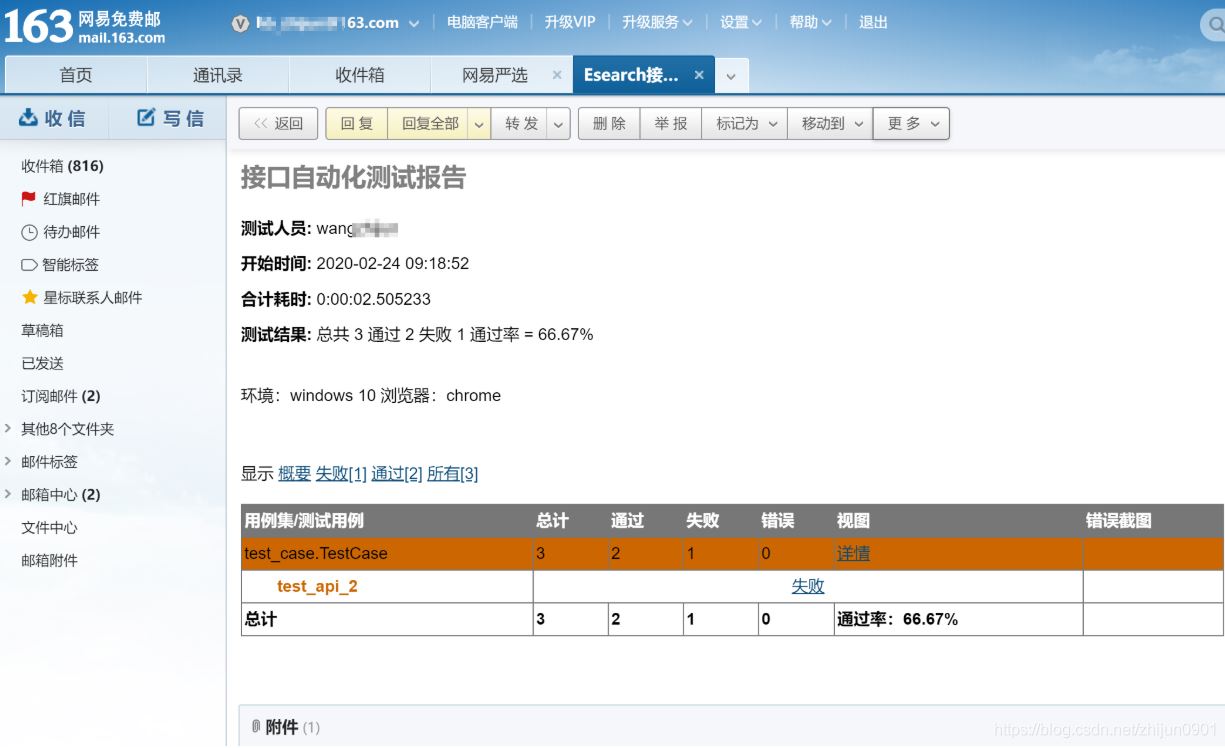
Excel管理測試用例, HTMLTestRunner生成測試報告 測試完成后郵件發送測試報告 jsonpath方式做預期結果數據處理,后期多樣化處理 后期擴展,CI持續集成發送郵件效果:
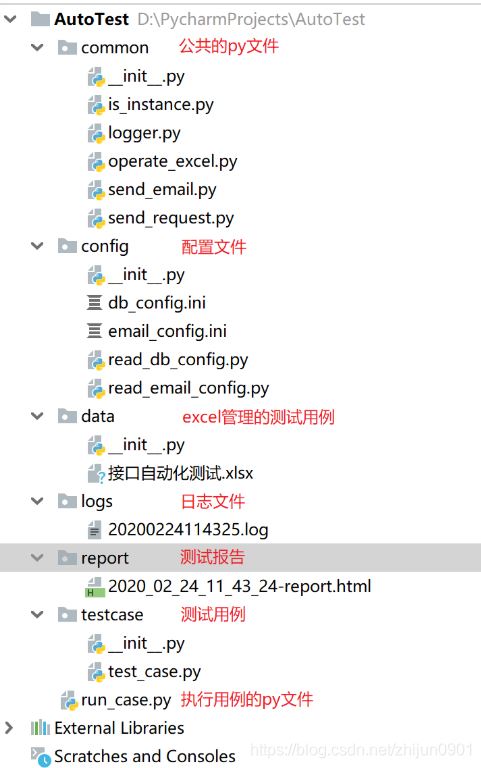
項目整體結構:
common模塊代碼
class IsInstance: def get_instance(self, value, check): flag = None if isinstance(value, str): if check == value:flag = True else:flag = False elif isinstance(value, float): if value - float(check) == 0:flag = True else:flag = False elif isinstance(value, int): if value - int(check) == 0:flag = True else:flag = False return flag
# logger.py import loggingimport timeimport os class MyLogging: def __init__(self): timestr = time.strftime(’%Y%m%d%H%M%S’, time.localtime(time.time())) lib_path = os.path.abspath(os.path.join(os.path.dirname(__file__), ’../logs’)) filename = lib_path + ’/’ + timestr + ’.log’ # 日志文件的地址 self.logger = logging.getLogger() # 定義對應的程序模塊名name,默認為root self.logger.setLevel(logging.INFO) # 必須設置,這里如果不顯示設置,默認過濾掉warning之前的所有級別的信息 sh = logging.StreamHandler() # 日志輸出到屏幕控制臺 sh.setLevel(logging.INFO) # 設置日志等級 fh = logging.FileHandler(filename=filename) # 向文件filename輸出日志信息 fh.setLevel(logging.INFO) # 設置日志等級 # 設置格式對象 formatter = logging.Formatter( '%(asctime)s %(filename)s[line:%(lineno)d]%(levelname)s - %(message)s') # 定義日志輸出格式 # 設置handler的格式對象 sh.setFormatter(formatter) fh.setFormatter(formatter) # 將handler增加到logger中 self.logger.addHandler(sh) self.logger.addHandler(fh) if __name__ == '__main__': log = MyLogging().logger log.debug('debug') log.info('info') log.warning('warning') log.error('error') log.critical('critical')
# operate_excel.pyimport xlrdfrom xlrd import xldate_as_tupleimport openpyxlimport datetime class ExcelData(): def __init__(self, file_path, sheet_name): self.file_path = file_path self.sheet_name = sheet_name self.workbook = xlrd.open_workbook(self.file_path) # 獲取工作表的內容 self.table = self.workbook.sheet_by_name(self.sheet_name) # 獲取第一行內容 self.keys = self.table.row_values(0) # 獲取行數 self.rowNum = self.table.nrows # 獲取列數 self.colNum = self.table.ncols def readExcel(self): datas = [] for i in range(1, self.rowNum): sheet_data = [] for j in range(self.colNum):# 獲取單元格類型c_type = self.table.cell(i, j).ctype# 獲取單元格數據c_cell = self.table.cell_value(i, j)if c_type == 2 and c_cell % 1 == 0: c_cell = int(c_cell)elif c_type == 3: date = datetime.datetime(*xldate_as_tuple(c_cell, 0)) c_cell = date.strftime(’%Y/%d/%m %H:%M:%S’)elif c_type == 4: c_cell = True if c_cell == 1 else False# sheet_data[self.keys[j]] = c_cell # 字典sheet_data.append(c_cell) datas.append(sheet_data) return datas def write(self, rowNum, colNum, result): workbook = openpyxl.load_workbook(self.file_path) table = workbook.get_sheet_by_name(self.sheet_name) table = workbook.active # rows = table.max_row # cols = table.max_column # values = [’E’,’X’,’C’,’E’,’L’] # for value in values: # table.cell(rows + 1, 1).value = value # rows = rows + 1 # 指定單元格中寫入數據 table.cell(rowNum, colNum, result) workbook.save(self.file_path) if __name__ == ’__main__’: file_path = 'D:python_data接口自動化測試.xlsx' sheet_name = '測試用例' data = ExcelData(file_path, sheet_name) datas = data.readExcel() print(datas) print(type(datas)) for i in datas: print(i) # data.write(2,12,'哈哈')
# send_email.pyfrom email.mime.multipart import MIMEMultipartfrom email.header import Headerfrom email.mime.text import MIMETextfrom config import read_email_configimport smtplib def send_email(subject, mail_body, file_names=list()): # 獲取郵件相關信息 smtp_server = read_email_config.smtp_server port = read_email_config.port user_name = read_email_config.user_name password = read_email_config.password sender = read_email_config.sender receiver = read_email_config.receiver # 定義郵件內容 msg = MIMEMultipart() body = MIMEText(mail_body, _subtype='html', _charset='utf-8') msg['Subject'] = Header(subject, 'utf-8') msg['From'] = user_name msg['To'] = receiver msg.attach(body) # 附件:附件名稱用英文 for file_name in file_names: att = MIMEText(open(file_name, 'rb').read(), 'base64', 'utf-8') att['Content-Type'] = 'application/octet-stream' att['Content-Disposition'] = 'attachment;filename=’%s’' % (file_name) msg.attach(att) # 登錄并發送郵件 try: smtp = smtplib.SMTP() smtp.connect(smtp_server) smtp.login(user_name, password) smtp.sendmail(sender, receiver.split(’,’), msg.as_string()) except Exception as e: print(e) print('郵件發送失敗!') else: print('郵件發送成功!') finally: smtp.quit() if __name__ == ’__main__’: subject = '測試標題' mail_body = '測試本文' receiver = '780156051@qq.com,hb_zhijun@163.com' # 接收人郵件地址 用逗號分隔 file_names = [r’D:PycharmProjectsAutoTestresult2020-02-23 13_38_41report.html’] send_email(subject, mail_body, receiver, file_names)
# send_request.py import requestsimport json class RunMethod: # post請求 def do_post(self, url, data, headers=None): res = None if headers != None: res = requests.post(url=url, json=data, headers=headers) else: res = requests.post(url=url, json=data) return res.json() # get請求 def do_get(self, url, data=None, headers=None): res = None if headers != None: res = requests.get(url=url, data=data, headers=headers) else: res = requests.get(url=url, data=data) return res.json() def run_method(self, method, url, data=None, headers=None): res = None if method == 'POST' or method == 'post': res = self.do_post(url, data, headers) else: res = self.do_get(url, data, headers) return res
config模塊
# coding:utf-8# 郵件配置信息 [mysqlconf]host = 127.0.0.1port = 3306user = rootpassword = rootdb = test
# coding:utf-8# 郵箱配置信息# email_config.ini [email]smtp_server = smtp.qq.comport = 465sender = 780***51@qq.compassword = hrpk******bafuser_name = 780***51@qq.comreceiver = 780***51@qq.com,h***n@163.com
# coding:utf-8from pymysql import connect, cursorsfrom pymysql.err import OperationalErrorimport osimport configparser # read_db_config.py # 讀取DB配數據# os.path.realpath(__file__):返回當前文件的絕對路徑# os.path.dirname(): 返回()所在目錄cur_path = os.path.dirname(os.path.realpath(__file__))configPath = os.path.join(cur_path, 'db_config.ini') # 路徑拼接:/config/db_config.iniconf = configparser.ConfigParser()conf.read(configPath, encoding='UTF-8') host = conf.get('mysqlconf', 'host')port = conf.get('mysqlconf', 'port ')user = conf.get('mysqlconf', 'user')password = conf.get('mysqlconf', 'password')port = conf.get('mysqlconf', 'port')
# coding:utf-8import osimport configparser# 讀取郵件數據# os.path.realpath(__file__):返回當前文件的絕對路徑# os.path.dirname(): 返回()所在目錄 # read_email_config.py cur_path = os.path.dirname(os.path.realpath(__file__)) # 當前文件的所在目錄configPath = os.path.join(cur_path, 'email_config.ini') # 路徑拼接:/config/email_config.iniconf = configparser.ConfigParser()conf.read(configPath, encoding=’UTF-8’) # 讀取/config/email_config.ini 的內容 # get(section,option) 得到section中option的值,返回為string類型smtp_server = conf.get('email', 'smtp_server')sender = conf.get('email', 'sender')user_name = conf.get('email','user_name')password = conf.get('email', 'password')receiver = conf.get('email', 'receiver')port = conf.get('email', 'port')
testcase模塊
# test_case.py from common.operate_excel import *import unittestfrom parameterized import parameterizedfrom common.send_request import RunMethodimport jsonfrom common.logger import MyLoggingimport jsonpathfrom common.is_instance import IsInstancefrom HTMLTestRunner import HTMLTestRunnerimport osimport time lib_path = os.path.abspath(os.path.join(os.path.dirname(__file__), '../data'))file_path = lib_path + '/' + '接口自動化測試.xlsx' # excel的地址sheet_name = '測試用例'log = MyLogging().logger def getExcelData(): list = ExcelData(file_path, sheet_name).readExcel() return list class TestCase(unittest.TestCase): @parameterized.expand(getExcelData()) def test_api(self, rowNumber, caseRowNumber, testCaseName, priority, apiName, url, method, parmsType, data, checkPoint, isRun, result): if isRun == 'Y' or isRun == 'y': log.info('【開始執行測試用例:{}】'.format(testCaseName)) headers = {'Content-Type': 'application/json'} data = json.loads(data) # 字典對象轉換為json字符串 c = checkPoint.split(',') log.info('用例設置檢查點:%s' % c) print('用例設置檢查點:%s' % c) log.info('請求url:%s' % url) log.info('請求參數:%s' % data) r = RunMethod() res = r.run_method(method, url, data, headers) log.info('返回結果:%s' % res) flag = None for i in range(0, len(c)):checkPoint_dict = {}checkPoint_dict[c[i].split(’=’)[0]] = c[i].split(’=’)[1]# jsonpath方式獲取檢查點對應的返回數據list = jsonpath.jsonpath(res, c[i].split(’=’)[0])value = list[0]check = checkPoint_dict[c[i].split(’=’)[0]]log.info('檢查點數據{}:{},返回數據:{}'.format(i + 1, check, value))print('檢查點數據{}:{},返回數據:{}'.format(i + 1, check, value))# 判斷檢查點數據是否與返回的數據一致flag = IsInstance().get_instance(value, check) if flag:log.info('【測試結果:通過】')ExcelData(file_path, sheet_name).write(rowNumber + 1, 12, 'Pass') else:log.info('【測試結果:失敗】')ExcelData(file_path, sheet_name).write(rowNumber + 1, 12, 'Fail') # 斷言 self.assertTrue(flag, msg='檢查點數據與實際返回數據不一致') else: unittest.skip('不執行') if __name__ == ’__main__’: # unittest.main() # Alt+Shift+f10 執行生成報告 # 報告樣式1 suite = unittest.TestSuite() suite.addTests(unittest.TestLoader().loadTestsFromTestCase(TestCase)) now = time.strftime(’%Y-%m-%d %H_%M_%S’) report_path = r'D:PycharmProjectsAutoTestresultreport.html' with open(report_path, 'wb') as f: runner = HTMLTestRunner(stream=f,, description='測試用例執行情況', verbosity=2) runner.run(suite)
用例執行文件
import osimport timeimport unittestfrom HTMLTestRunner import HTMLTestRunnerfrom common.send_email import send_email # run_case.py # 獲取當前py文件絕對路徑cur_path = os.path.dirname(os.path.realpath(__file__)) # 1: 加載測試用例def all_test(): case_path = os.path.join(cur_path, 'testcase') suite = unittest.TestLoader().discover(start_dir=case_path, pattern='test_*.py', top_level_dir=None) return suite # 2: 執行測試用例def run(): now = time.strftime('%Y_%m_%d_%H_%M_%S') # 測試報告路徑 file_name = os.path.join(cur_path, 'report') + '/' + now + '-report.html' f = open(file_name, 'wb') runner = HTMLTestRunner(stream=f,, description='環境:windows 10 瀏覽器:chrome', tester='wangzhijun') runner.run(all_test()) f.close() # 3: 獲取最新的測試報告def get_report(report_path): list = os.listdir(report_path) list.sort(key=lambda x: os.path.getmtime(os.path.join(report_path, x))) print('測試報告:', list[-1]) report_file = os.path.join(report_path, list[-1]) return report_file # 4: 發送郵件def send_mail(subject, report_file, file_names): # 讀取測試報告內容,作為郵件的正文內容 with open(report_file, 'rb') as f: mail_body = f.read() send_email(subject, mail_body, file_names) if __name__ == '__main__': run() report_path = os.path.join(cur_path, 'report') # 測試報告路徑 report_file = get_report(report_path) # 測試報告文件 subject = 'Esearch接口測試報告' # 郵件主題 file_names = [report_file] # 郵件附件 # 發送郵件 send_mail(subject, report_file, file_names)
data:

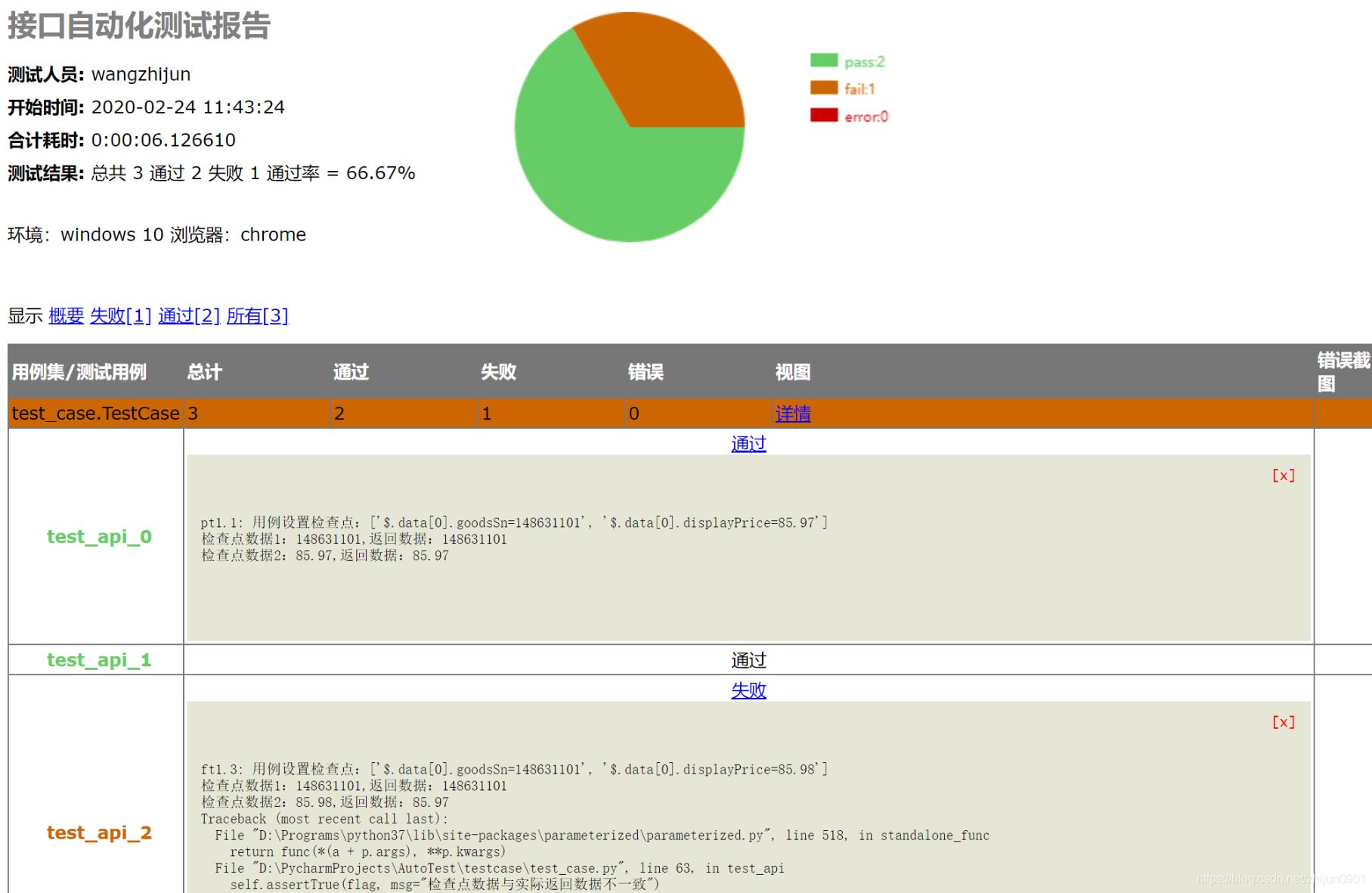
report:
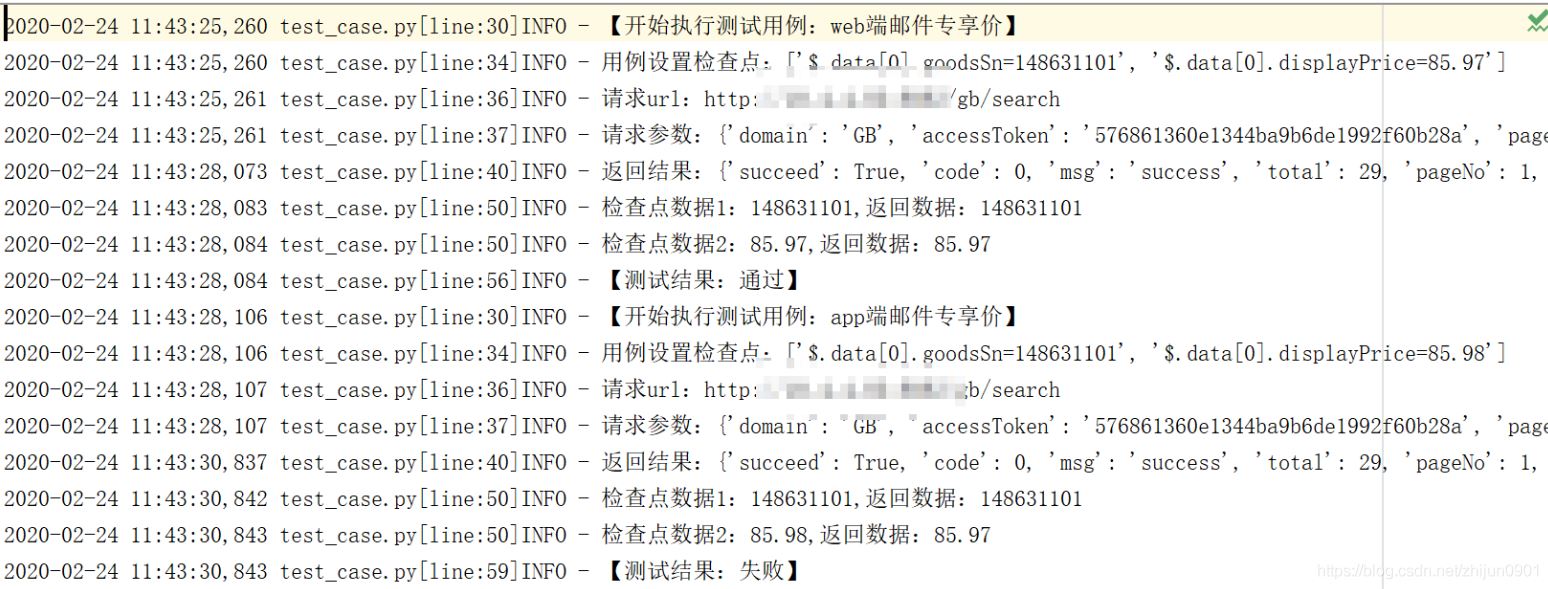
logs:
到此這篇關于Python+unittest+requests+excel實現接口自動化測試框架的文章就介紹到這了,更多相關Python 接口自動化測試內容請搜索好吧啦網以前的文章或繼續瀏覽下面的相關文章希望大家以后多多支持好吧啦網!
相關文章:
 網公網安備
網公網安備